I’m looking at the MSE source documentation for help making a custom loss function, and it seems that MSE will return a single loss value no matter what, not a loss value per pair of y_true and y_pred. Could anyone help me understand this?
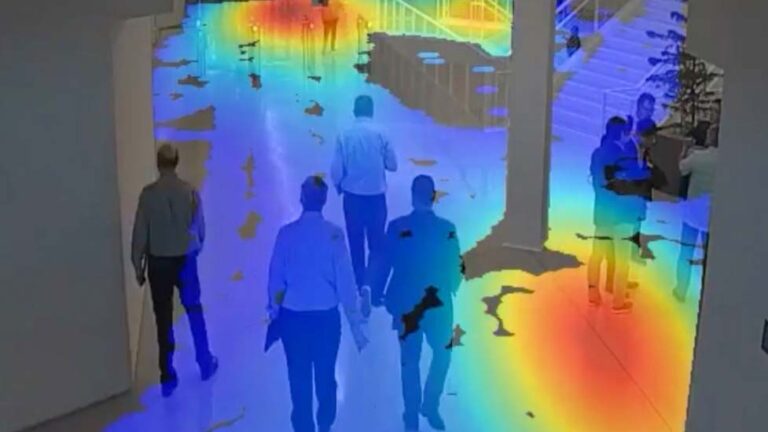
Learn the skills to transform raw video data from cameras into deep learning-based insights in real time
Video analytics rely on computerized processing and automatic analysis of video content to detect and determine temporal and spatial events. The field is anticipated to experience double-digit growth for the next decade, as videos are quickly becoming a primary media form for transferring information.
As the amount of video data generated grows at unprecedented rates, so does the ability and desire to analyze this information. Intelligent video analytics (IVA), which uses computer vision to extract valuable information from unstructured video data, is at the cutting edge of this emerging field.
The computer vision revolution
Computer vision, which uses deep learning models to help machines understand visual data, has improved drastically over the past few years thanks to HPC and neural networks. It transforms pixels to usable data through a range of tasks such as image classification, object detection, and segmentation.
Some of its use cases include behavior analysis, enhanced safety measures, operations management, optical inspection, and content filtering. It has also aided new industries such as autonomous vehicles, smart retail, smart cities, and smart healthcare. Recognizing the potential IVA holds, organizations are eager to develop applications that harness this technology.
Developing video AI applications
NVIDIA, through the DeepStream SDK and the TAO Toolkit, makes creating highly-performant video AI solutions easy and intuitive. The DeepStream SDK is a streaming analytics toolkit for constructing video processing pipelines. It provides the flexibility to select from various input formats, AI-based inference types, and outputs. Users also determine what to do with the results such as cold storage, composite for display, or further analysis downstream.
On the other hand, the TAO Toolkit uses transfer learning to efficiently train vision models. The software was designed with an emphasis on acceleration and optimization for video AI applications known to be computationally intensive. It can be deployed on low-power IoT devices for real-time analytics.
This course provides an easy progression of foundational understanding, important concepts, terminologies, as well as a lab portion. The hands-on walk-through of the technical components provides an opportunity to build complete video AI applications.
It’s complemented by thorough explanations in each step of the development cycle to help you confidently make implementation decisions for your own project. The course also highlights important performance considerations to optimize the video AI application and meet deployment requirements.
Upon completion, you can earn a certificate of competency and begin to develop custom applications. Intelligent video analytics is an exciting area of AI with great opportunities.
The latest Nsight Graphics 2022.1 release supports Direct3D (11, 12, DXR), Vulkan 1.3, ray tracing extension, OpenGL, OpenVR, and the Oculus SDK.
Today, NVIDIA announced the latest Nsight Graphics 32022.1, which supports Direct3D (11, 12, DXR), Vulkan 1.3 ray tracing extension, OpenGL, OpenVR, and the Oculus SDK.
NVIDIA Nsight Graphics is a standalone developer tool that enables you to debug, profile, and export frames built with high-fidelity, 3D-graphic applications.
Event Details view can now link to a new Object Browser view. The Object Browser view shows objects alongside their properties, usages, and related objects.
Linux Gaming improvements.
Vertex Selection for memory analysis.
Nsight Aftermath (crash debugging) improvements.
Vulkan 1.3 support
Nsight Graphics now has day one support for Vulkan 1.3. This version includes many new extensions to support developer productivity. If you’d like to learn more about this new version of Vulkan, check out the blog post here.
Object Browser view
The release adds the ability for you to link from the Event Details view to a new Object Browser view. The Object Browser view shows objects alongside their properties, usages, and related objects. From the Object Browser, you may also navigate to other purposed views, like resource viewers. This helps you save time by letting you quickly move from different but related viewers.
Figure 1. D3D12 events showing hyperlinks to Object Browser.
Linux gaming improvements
For Nsight Graphics users who are developing on Linux, you now have support for Ubuntu 21.04 and for Linux games, thanks to major improvements with the Linux Steam Runtime. This should make it easier to develop games that run on Linux by ensuring that the latest OS versions work correctly with Nsight Graphics.
Vertex selection
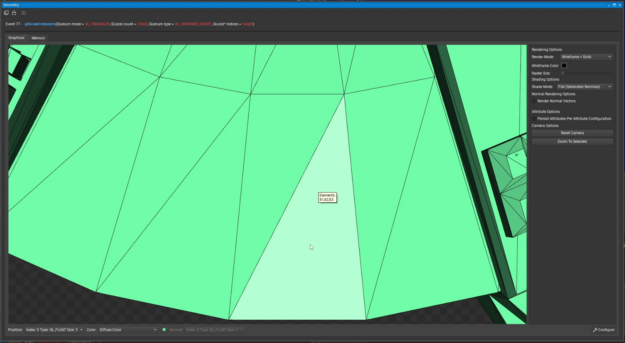
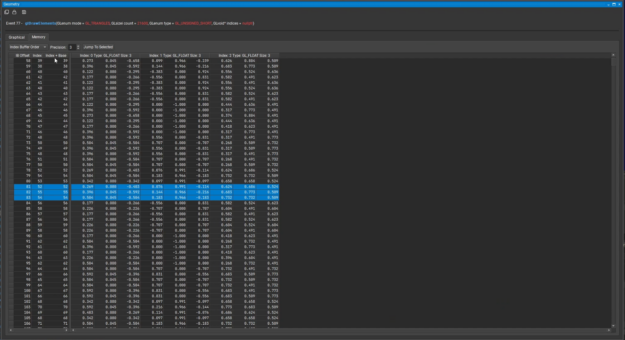
With this version of Nsight Graphics, you can now select a triangle in the Graphical tab of the Geometry view and see the corresponding vertex data from the Memory tab in the Geometry view. This makes it much easier to find geometry issues as you don’t need to know the specific vertex indices before using the viewer.
Figure 2. A selected triangle (left) and the data for vertices 81, 82 and 83 (right.)
Nsight Aftermath improvements
Nsight Aftermath now shows additional information when applications crash in driver-generated shaders, like those used for ray tracing. This will assist you in narrowing down the root cause of GPU instability and allow you to provide information to NVIDIA to help fix the problem.
Benjamin Sokomba Dazhi, aka Benny Dee, has learned the ins and outs of the entertainment industry from many angles — first as a rapper, then as a music video director and now as a full-time animator.
Many different platforms, same great performance. That’s why Vulkan is a very big deal. With the release Tuesday of Vulkan 1.3, NVIDIA continues its unparalleled record of day one driver support for this cross-platform GPU application programming interface for 3D graphics and computing. Vulkan has been created by experts from across the industry working together Read article >
The Keras Hyperband algorithm seems to work well: it simulates the various models, and when it reaches the Early Stopping condition on a model, the training of that model stops and the training of a new model starts.
What I noticed is that with this EarlyStopping callback implementation, when EarlyStopping stops the training of a model, before starting the training of the next model, the following two consecutive Python errors occur (anyway, the simulation doesn’t exit or generate exceptions, but it goes on, by simulating the successive model):
W tensorflow/core/framework/op_kernel.cc:1755] Invalid argument: ValueError: callback pyfunc_2 is not found Traceback (most recent call last): File "/home/username/anaconda3/envs/myenv/lib/python3.8/site-packages/tensorflow/python/ops/script_ops.py", line 233, in __call__ raise ValueError("callback %s is not found" % token) ValueError: callback pyfunc_2 is not found W tensorflow/core/kernels/data/generator_dataset_op.cc:103] Error occurred when finalizing GeneratorDataset iterator: Invalid argument: ValueError: callback pyfunc_2 is not found Traceback (most recent call last): File "/home/username/anaconda3/envs/myenv/lib/python3.8/site-packages/tensorflow/python/ops/script_ops.py", line 233, in __call__ raise ValueError("callback %s is not found" % token) ValueError: callback pyfunc_2 is not found [[{{node PyFunc}}]]
While if I don’t use the “min_delta” argument, these two errors don’t appear.
I also noted, looking for examples on the Internet, that, the “min_delta” argument of the EarlyStopping callback is never set – so it is always left at its default value – when tuning.
Do you know why?
PS:
I have another question:I noticed that if I set the Hyperband “max_epochs”, for example, equal to 100, the training of the model is performed by steps:
firstly, from epoch 1 to epoch 3; secondly, from 4 to 7; then, from 8 to 13; then, from 14 to 25; then, from 26 to 50; and finally, from 51 to 100.
If I set “patience=15”, I noticed that the EarlyStopping callback stops the training right after epoch 66 (thus, the first epoch at which EarlyStopping is able to operate, because 51+15=66); could it be a coincidence, or maybe should it be the normal behavior when tuning with Keras Hyperband, or what?
The latest release of Vulkan 1.3 simplifies render passes and makes synchronization easier.
A total of 23 of the most often requested Vulkan extensions developed by NVIDIA and other Khronos members are now incorporated into the brand new Vulkan 1.3 core specification. NVIDIA is ready with zero-day drivers for developers to immediately try out this significant new version of the industry’s only modern, cross-platform GPU API on their own systems.
Some of the most significant new core functionality in Vulkan 1.3 includes:
Dynamic state to reduce the number of pipeline objects needed to avoid hitching.
Streamlined management of shader pipeline compilations.
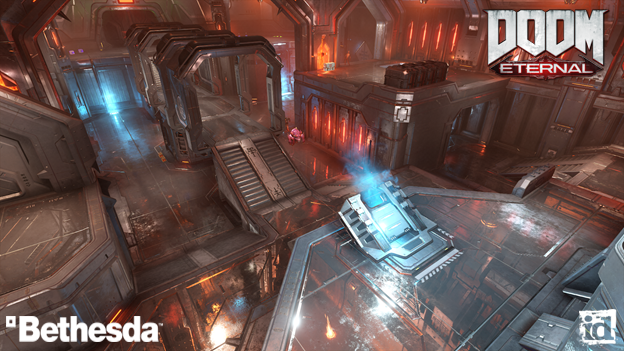
Figure 1. Doom Eternal running at 200 FPS with every single game setting on a GeForce 2080ti.
Nsight tools support
To help developers upgrade to Vulkan 1.3 with ease, developer tools have been upgraded to support the new functionality. This gives Vulkan developers the ability to jump into the new standard quickly and have the right tools to investigate and optimize, saving you time and frustration.
Nsight Graphics is a powerful debugger and profiler that helps you identify API issues quickly using the events view and API inspector. You can inspect Vulkan ray tracing acceleration structures, as well as look at and edit shaders in real time. The advanced shader profiler helps identify where the GPU is not executing shader instructions with full parallelism, so you can make modifications to your shaders for improved performance.
With the GPU Trace next-generation profiler you can view frames on a timeline with low-level GPU performance metrics. These metrics can help you fine-tune your Vulkan application and take full advantage of all GPU resources.
Nsight Systems is an application performance analysis tool designed to track GPU workloads to their CPU origins, uncovering bottlenecks. A system-wide view helps you analyze GPU workloads, GPU performance metrics, graphics APIs, compute APIs, frame stutter, and correlate them with each other.
“Vulkan is the cornerstone of Adobe’s multi-platform, multi-vendor rendering strategy for its Adobe Substance 3D products. Thanks to the ray tracing extensions that NVIDIA pioneered and contributed to Khronos, Vulkan gives native access to ray tracing hardware, offering exceptional ray tracing performance on supported devices. In addition, Nsight Graphics and Nsight Systems are invaluable tools when it comes to understanding and improving the performance of Vulkan ray tracing applications.” – Francois Beaune, Lead Software Engineer, Photorealistic Rendering at Adobe 3D & Immersive
Nsight Systems is a great place to start as you can verify if you are CPU or GPU limited. Its integration with Nsight Graphics makes for a seamless experience switching between the two as you performance tune the application.
These tools give you the power to harness the NVIDIA GPUs to their maximum potential and deliver high frame rates in games and other intensive Vulkan applications.
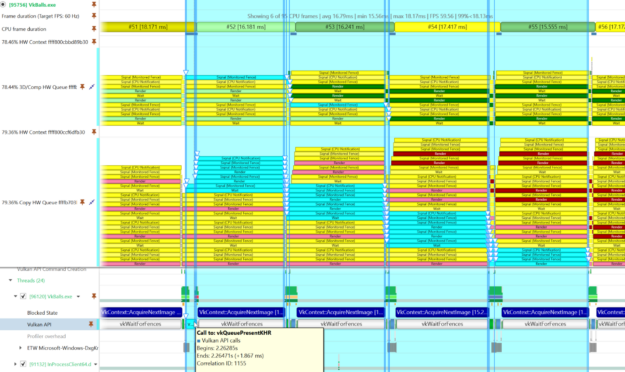
Figure 2. Correlating Vulkan API calls to WDDM queue packets using NVIDIA Nsight Systems.
Vulkan support for NVIDIA RTX SDKs and DLSS
Vulkan developers can maximize the performance of real-time ray tracing in their applications with support from NVIDIA RTX SDKs. With NVIDIA RTX Direct Illumination developers can add millions of dynamic lights to game environments without worrying about performance or resource constraints. NVIDIA RTX Global Illumination provides scalable solutions to compute multibounce indirect lighting. NVIDIA Real-Time Denoiser is a spatio-agnostic, temporal, API agnostic, denoising library that’s designed to work with low ray-per-pixel images, and NVIDIA RTX Memory Utility reduces memory consumption of acceleration structures.
“Vulkan has empowered us to deliver bleeding-edge performance on our recent DOOM games running idTech. DOOM and DOOM Eternal showcase how Vulkan may be leveraged to achieve state-of-the-art visuals and gameplay at extremely high frame rates across a wide variety of platforms. The flexibility of the Vulkan API allows us to collaborate closely with our hardware partners to meet the creative vision of our games. This past year, we brought NVIDIA DLSS and Ray Tracing to DOOM Eternal, made possible by extensions developed by NVIDIA.” – Billy Khan, Director of Engine Technology at id Software
Every Vulkan developer can access DLSS upscaling technology on Windows and Linux. NVIDIA also added DLSS support for Vulkan API games on Proton and has DLSS support for both x86 and ARM-based platforms. With NVIDIA DLSS support for Vulkan, Linux gamers can use the dedicated Tensor Cores in their GeForce RTX GPUs to accelerate frame rates in DOOM Eternal, No Man’s Sky, and Wolfenstein: Youngblood.
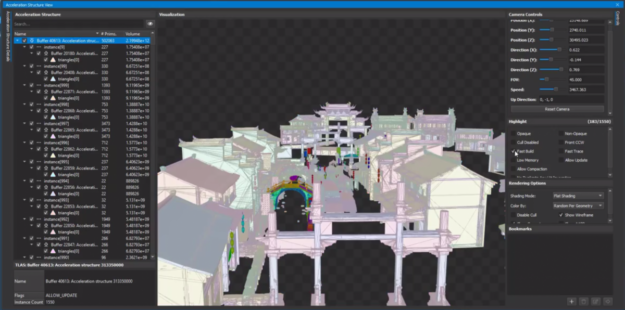
Figure 3. Vulkan ray tracing debugging is made easy with NVIDIA Nsight Graphics.
Supporting new Vulkan functionality
NVIDIA ships Vulkan across a breadth of products and is deeply engaged in driving Vulkan’s evolution. In addition to supporting the Khronos Group as President, NVIDIA has chair positions in the Vulkan ray tracing, machine learning, and portability subgroups.
NVIDIA is often the first to spearhead the development of new Vulkan functionality. This includes the “VKRay” vendor extension, the only current implementation of Vulkan Mesh Shaders. Along with the first implementation of the new Vulkan Video extensions and the NVIDIA Cooperative Matrix Vulkan extension, which exposes Tensor Cores for inferencing acceleration.
where ann_model is the compiled model of the Artificial Neural Network under test, while both training_gen() and valid_gen() are Python generators.
As it can be seen, Early Stopping and Tensorbord are the callbacks passed to tuner.search().
The Keras Hyperband algorithm works well: it simulates the various models, and when it reaches the Early Stopping condition on a model, the training of that model stops and the training of a new model starts; the point is that I noticed that between these two events (stop and start), the following two consecutive Python errors occur (anyway, the simulation doesn’t exit or generate an Exception, but it goes on, by simulating the successive model):
W tensorflow/core/framework/op_kernel.cc:1755] Invalid argument: ValueError: callback pyfunc_2 is not found Traceback (most recent call last): File "/home/username/anaconda3/envs/myenv/lib/python3.8/site-packages/tensorflow/python/ops/script_ops.py", line 233, in __call__ raise ValueError("callback %s is not found" % token) ValueError: callback pyfunc_2 is not found W tensorflow/core/kernels/data/generator_dataset_op.cc:103] Error occurred when finalizing GeneratorDataset iterator: Invalid argument: ValueError: callback pyfunc_2 is not found Traceback (most recent call last): File "/home/username/anaconda3/envs/myenv/lib/python3.8/site-packages/tensorflow/python/ops/script_ops.py", line 233, in __call__ raise ValueError("callback %s is not found" % token) ValueError: callback pyfunc_2 is not found [[{{node PyFunc}}]]
The first error seems to refer to a “callback”, while the second one refers to a “callback” and a “generator”.
Which could be the cause of these errors? What could be this callback “not found”?
When I load a trained model that I have previously saved, the model topology is being loaded, but none of the weights are loaded (so I have to train the model from scratch). I am very confused by this, and can find noone else who has had the same problem (here, stackoverflow, …).
I would really apreciate some help, if anyone has any idea what is going on.
I am saving my model as follows:
model.save('file://' + path);
To load the model, I am using:
model = tf.loadLayersModel('file://' + path + '/model.json');
I am running my training on a 1070 Ti with about 8Gb of VRAM and 6,5 are available. Now i am getting this error, when i use a batch size greater than 2
2022-01-24 23:28:40.444781: E tensorflow/stream_executor/cuda/cuda_driver.cc:802] failed to alloc 4294967296 bytes on host: CUDA_ERROR_OUT_OF_MEMORY: out of memory
For me this looks like it is trying to allocate only 4294967296 byte and i have 8589900000 byte available. So im only trying to allocate about 50%. nvidia-smi shows im using 7488MiB/8192MiB of VRAM during training(batchsize = 1). And 14,6 /16GB of RAM.
Obviously training with a batch size of 1 is useless, 8 is just doable it seems, but i dont understand why? Most people say a batch size of 64 should be possible with my hardware, please correct me.

 Learn the skills to transform raw video data from cameras into deep learning-based insights in real time
 The latest Nsight Graphics 2022.1 release supports Direct3D (11, 12, DXR), Vulkan 1.3, ray tracing extension, OpenGL, OpenVR, and the Oculus SDK.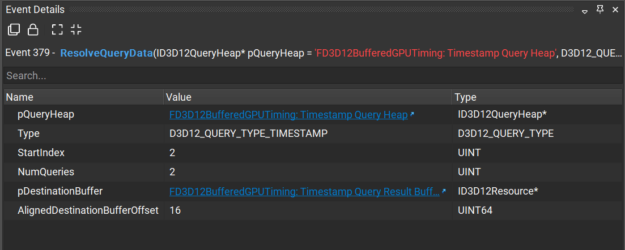
 The latest release of Vulkan 1.3 simplifies render passes and makes synchronization easier.