Hey all, I’m trying to take a train model and move it to a local deployment software (OpenFrameworks with ofxTensorFlow2 library) but the lib only takes .pb format models. Is there a way to convert the model from .pkl to .pb? It is a TF model, so I feel like maybe it isn’t so hard, but I have no idea how.
Cumulus Linux 4.4 introduces a new CLI, NVUE, that is more than just a CLI. NVUE provides a complete object model for Linux, unlocking incredible operational potential.
Cumulus Linux 4.4 is the first release with the NVIDIA User Experience (NVUE), a brand new CLI for Cumulus Linux. Being excited about a new networking CLI sounds a bit like being excited about your new 56k modem. What makes NVUE special isn’t just that it’s a new CLI but it’s the principles it was built on that make it unique. At its core, NVUE has created a full object model of Cumulus Linux enabling advanced programmability, extensibility, and usability.
What is an object model?
Object models aren’t exactly the kind of thing network engineers think about daily. I didn’t know what an object model was before I got involved in helping the team design NVUE.
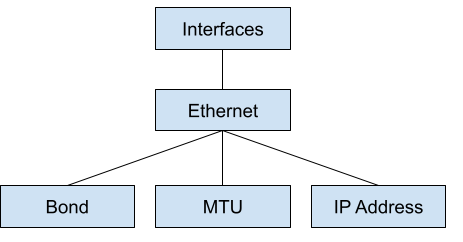
An object model defines the components of a system and their relationships to each other. For example, an interface is an object. It has components like an IP address or MTU setting. It’s not just the fact that an object model exists that is important, but the thought that is put into how those relationships between objects and components fit together.
An interface and IP address are an easy example, but what about something more complicated? Think about a “bond” interface, also called a port-channel. Is the bond a top-level interface like an Ethernet port with the components of other Ethernet interfaces as children or is being a member in a bond an element of the interface?
Figure 1. Ethernet interfaces and bonds are at the same level with relationships between them.
Figure 2. A bond is a property of an interface, like the MTU or IP address.
These relationships get complicated fast. Failing to think through them creates a poor user experience where you may have to define the same setting multiple times to achieve an end goal or an inconsistent configuration. An imaginary network CLI could have you define any route inside a VRF under a VRF object but any route in the global routing table at the top level, like the following example:
ip vrf red
   ip route 10.1.1.0/24 via 169.254.1.1
 !
 ip route 192.168.1.0/24 via 172.16.1.1
This is a trivial example, but now the way that a route is defined is not uniform, depending on where you are in the system.
What do you get with an object model?
With an understanding of what an object model is, the next question is, “Why should you care?” By having an object model, it makes building ways to interact with the system extremely easy. Systems talk to an API that represents the object model. The first interface is, of course, the CLI, but anything can now be an interface to the system: REST, gRPC, or even RFC1149 Avian Carriers.
Figure 3. CLI and REST interfaces are available in Cumulus Linux 4.4.
By having all the interfaces use the same object model, it guarantees consistent results regardless of how you interface with the system. The CLI and REST API use the same methods to configure a BGP peer. There is never a chance of seeing different behaviors based on which interface you use. Because the object model is the same no matter how you interact with it, this means that going from playing with the CLI to building full automation is an evolution, not a completely new process.
REST and CLI are expected for any network device today. Where can we think beyond this? An object model can be directly imported into a programming language like Python or Java. This enables you to use true programming concepts to build configurations for one device or an entire fabric of devices. You can enforce inputs, values, and relationships like never before. The following code example shows what an NVUE Python interface might look like:
from nvue import Switch

 spine01 = Switch()
 x = 1
 while x


In this example, I load the nvue library and create a new Switch object called spine01. I have the object tell me how many interfaces exist on the system with len(spine01.interfaces). For each interface, I put it in the up state and assign an IP address with the subnet value matching the interface number. For example, port 3 would have an IP address of 10.1.3.1/24.


This doesn’t exist yet, but it is absolutely in the realm of possibility because an object model exists. Unlike all other networking vendor systems, where the model is determined by the CLI, this CLI is based on the model. The object model is a standalone element that can be imported into programming languages, APIs, or any other system.


Try it out


One of the most valuable pieces of Cumulus Linux is the ability to try all our features and functions virtually. You can use NVIDIA Air to start using NVUE today and see what you think of the future of network CLIs and programmability.
NVIDIA Omniverse Create 2021.3 is now available in open beta, delivering a new set of features for Omniverse artists, designers, developers, and engineers to enhance graphics and content creation workflows. We sat down with Frank DeLise, Senior Director of Product Management for Omniverse, to get a tour of some of the exciting new features. Get … Continued
NVIDIA Omniverse Create 2021.3 is now available in open beta, delivering a new set of features for Omniverse artists, designers, developers, and engineers to enhance graphics and content creation workflows.
We sat down with Frank DeLise, Senior Director of Product Management for Omniverse, to get a tour of some of the exciting new features. Get an overview through the clips or view the entirety of the livestream here.
NVIDIA Omniverse Create is an app that allows users to assemble, light, simulate, and render large-scale scenes. It is built using NVIDIA Omniverse Kit, and the scene description and in-memory model is based on Pixar’s USD.
Omniverse Create can be used on its own or as a companion application alongside popular content creation tools in a connected, collaborative workflow. Omniverse Connectors, or plug-ins to applications, can provide real-time, synchronized feedback. Being an extra viewport with physically accurate path tracing and physics simulation, greatly increases any creative and design workflow.
Zero Gravity Mode, powered by PhysX 5
Frank shows us Zero Gravity, a physics-based manipulation tool built to make scene composition intuitive for creators. With physics interactions based on NVIDIA PhysX 5, users can now nudge, slide, bump, and push objects into position with no interpenetration. Zero Gravity easily makes objects solid, making precise positioning, scattering and grouping of objects a breeze.
Features to Simplify Workflows Next on our tour is a trio of features:
Browser Extension: A new set of windows were added for easy browsing of assets, textures, materials, samples, and more.
Paint Scattering: Users can select assets and randomly scatter using a paint brush. The ability to flood fill areas with percentage ratios makes it easy to create lifelike environments with realistic variety.
Quick Search: Users can now search for anything with Create, including connected libraries, functions, and tools, by simply typing the name. Quick Search also uses skills to provide contextual suggestions, like suggesting an HDRI map after you place a dome light. It’s a highly extensible system and can be enhanced through AI integration.
Sun Study Simulations
Omniverse users can further explore lighting options with the Sun Study extension, which offers a quick way to review a model with accurate sunlight. When the Sun Study Timeline is invoked, it will appear on the bottom of the viewport and allow the user to “scrub” or “play” through a given day/night cycle. It even includes dynamic skies with animated clouds for added realism.
Animation and Sequencer
Animation gets a massive push forward with the addition of a sequencer and key framer.
The new sequencer enables users to assemble animations through clips, easily cut from one camera to another, apply motion data to characters, and add a soundtrack or sound effects.
The key framer extension provides a user-friendly way of adding keyframes and animations to prims in your scenes.
UsdShade Graphic Editor for Material Definition Language (MDL)
New with Create 2021.3 is the UsdShade graph editor for Material Definition Language (MDL) materials. Provided with the Material Graph is a comprehensive list of MDL BSDFs and functions. Materials and functions are represented as drag and droppable nodes in the Material Graph Node List. Now, you can easily create custom materials by connecting shading nodes together and storing them in USD.
OpenVDB Support, Accelerated by NanoVDB
Support for OpenVDB volumes has also been added, making use of NanoVDB for acceleration. This feature helps artists visualize volumetric data created with applications like SideFX Houdini or Autodesk Bifrost.
What is Omniverse Create versus Omniverse View?
Lastly, Frank finishes our tour with an explanation of Omniverse View compared to Omniverse Create.
To learn more, look at the new features in Omniverse View 2021.3.
More Resources
Watch the full recording for coverage of additional features including installation using the launcher, USDZ and point cloud support, version control, Iray rendering, payloads, and more!
You can get more details about the latest Create and View apps by reading the release notes in our online documentation:
Calling all warriors. It’s a glorious week full of new games. This GFN Thursday comes with the exciting release of the new battle royale NARAKA: BLADEPOINT, as well as the Hello Neighbor franchise as part of the 11 great games joining the GeForce NOW library this week. Plus, the newest Assassin’s Creed Valhalla DLC has Read article >
During the configuration before compilation it asks for what cuda capability your graphics card has if you enable cuda so wouldn’t that mean that if I compile it myself and select the correct capability then it will be a better fit for my graphics card than the generic tensorflow-gpu package?
Hey guys, I have just getting started with tensorflow regression, now I want to do some practice. Can you guys suggest any simple dataset for me to practice on? Are there ‘beginner’ dataset on kaggle?
Facebook is open-sourcing the Open Compute Project Time Appliance Project (OCP TAP), which provides very precise time keeping and time synchronization across data centers in a cost-effective manner.
NVIDIA ConnectX NIC enables precise timekeeping for social network’s mission-critical distributed applications
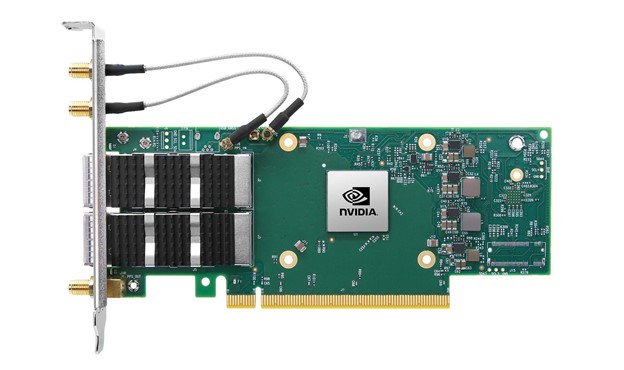
Facebook is open-sourcing the Open Compute Project Time Appliance Project (OCP TAP), which provides very precise time keeping and time synchronization across data centers in a cost-effective manner. The solution includes a Time Card that can turn almost any commercial off-the-shelf (COTS) server into an accurate time appliance, enabled by the NVIDIA ConnectX-6 Dx network card (NICs), with precision timing protocol, to share the precise time keeping with other servers across the data center.
The combination of Facebook’s Time Card and NVIDIA’s NIC gives data center operators a modern, affordable, time synchronization solution that is open-sourced, secure, reliable, and scalable.
Why Accurate Time Matters in the Data Center
As applications scale-out and IT operations span the globe, keeping data synchronized across different servers within a data center, or different data centers across continents, it becomes more important and more difficult. If a database is distributed, it must track the exact order of events to maintain consistency and show causality. If two people try to buy the same stock, fairness (and compliance) requires knowing with certainty which order arrived first. Likewise when thousands of people post content and millions of users like/laugh/love those posts every hour, Facebook needs to know the actual order in which each post, thumbs up, reply or emoji happened.
One way to keep data synchronized is to have each data center send its updates to the others after each transaction, but this rapidly becomes untenable because the latency between data centers is too high to support millions of events per hour.
A better way is to have each server and data center synchronized to the exact time, within less than a microsecond of each other. This enables each site to keep track of time, and when they share events with other data centers, the ordering of each event is already correct.
The more accurate the time sync, the faster the performance of the applications. A recent test showed that making the timekeeping 80x more precise (making any time discrepancies 80x smaller) made a distributed database run 3x faster — an incredible performance boost on the same server hardware, just from keeping more accurate and more reliable time.
The Role of the NIC and Network in Time Synchronization
The OCP TAP project (and Facebook’s blog post on Open Sourcing the Time Appliance) defines exactly how the Time Card receives and processes time signals from a GPS satellite network, keeps accurate time even when the satellite signal is temporarily unavailable, and shares this accurate time with the time server. But the networking — and the network card used — is also of critical importance.
Figure 1. The OCP Time Card maintains accurate time and shares it with a NIC that supports PPS in/out, such as the NVIDIA ConnectX-6 Dx (source: Facebook engineering blog).
The NIC in the time appliance must have a time pulse per second (PPS) port to connect to the Time Card. This ensures exact time synchronization between the Time Card and NIC in each Time Server, accurate to within a few nanoseconds. ConnectX-6 Dx is one of the first modern 25/50/100/200 Gb/s NICs to support this. It also filters and checks the incoming PPS signal and maintains time internally using hardware in its ASIC to ensure accuracy and consistency.
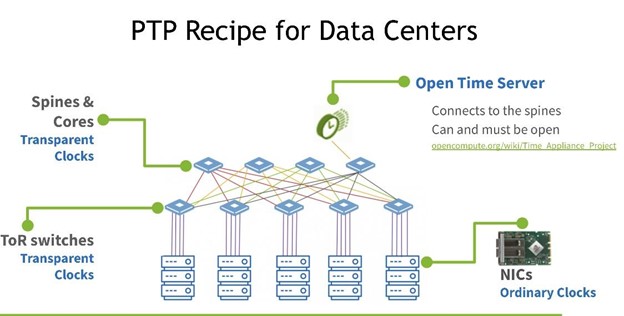
Time Appliances with sub-microsecond accurate timing can share that timing with hundreds of regular servers using the network time protocol (NTP) or tens of thousands of servers using the precision time protocol (PTP). Since the network adds latency to the time signal, NTP and PTP timestamp packets to measure the travel time in both directions, factor in jitter and latency, and calculate the correct time on each server (PTP is far more accurate so it is starting to displace NTP).
Figure 2. The NVIDIA ConnectX-6 Dx with PPS in/out ports to enable direct time synchronization with the Time Card. It also performs precision hardware time stamping of packets in hardware.
An alternative is to timestamp with software solutions, but timestamping with software at today’s speed is too unpredictable and inaccurate or even impossible, varying by up to milliseconds due to congestion or CPU distractions. Instead, the ConnectX-6 Dx NIC and BlueField-2 DPU apply hardware timestamps to inbound packets as soon as they arrive and outbound packets right before they hit the network, at speeds up to 100Gb/s. ConnectX-6 Dx can timestamp every packet with less than 4 nanoseconds (4ns) of variance in time stamping precision, even under heavy network loads. Most other time-capable NICs stamp only some packets and show a much greater variance in precision, becoming less precise with their timestamps when network traffic is heavy.
NVIDIA networking delivers the most precise latency measurements available from a commercial NIC, leading to the most accurate time across all the servers, with application time variance typically lower than one microsecond (
Figure 3. Deploying NTP or PTP with OCP Time Servers and NVIDIA NICs or DPUs propagates extremely accurate time to all servers across the data center.
Accurate Time Synchronization, for Everyone
The OCP Time Appliance Project makes time keeping precise, accurate, and accessible to any organization. The Open Time Servers and open management tools from Facebook, NVIDIA, and OCP provide an easy to adopt recipe everyone can use just like a hyperscaler.
NVIDIA provides precision time-capable NICs and data processing units (DPUs) that deliver ultra-precise timestamping and network synchronization features needed for precision timing appliances. If the BlueField DPU is used, it can run the PTP stack on its Arm cores, isolating the time stack from other server software and continuously verifying the accuracy of time within that server and continuously calculating the maximum time error bound across the data center.
Cloud services and databases are already adding new time-based commands and APIs to take advantage of better time servers and time synchronization. Together, this solution enables a new era of more accurate time keeping that can improve the performance of distributed applications and enable new types of solutions in both cloud and enterprise.
Specifics about OCP TAP, including specifications, schematics, mechanics, bill of materials, and source code can be found at www.ocptap.com.
How to optimize DX12 resource uploads from the CPU to the GPU over the PCIe bus is an old problem with many possible solutions, each with their pros and cons. In this post, I show how moving cherry-picked DX12 UPLOAD heaps to CPU-Visible VRAM (CVV) using NVAPI can be a simple solution to speed up … Continued
How to optimize DX12 resource uploads from the CPU to the GPU over the PCIe bus is an old problem with many possible solutions, each with their pros and cons. In this post, I show how moving cherry-picked DX12 UPLOAD heaps to CPU-Visible VRAM (CVV) using NVAPI can be a simple solution to speed up PCIe limited workloads.
CPU-Visible VRAM: A new tool in the toolbox
Take the example of a vertex buffer (VB) upload, for which the data cannot be reused across frames. The simplest way to upload a VB to the GPU is to read the CPU memory directly from the GPU:
First, the application creates a DX12 UPLOAD heap, or an equivalent CUSTOM heap. DX12 UPLOAD heaps are allocated in system memory, also known as CPU memory, with WRITE_COMBINE (WC) pages optimized for CPU writes. The CPU writes the VB data to this system memory heap first.
Second, the application binds the VB within the UPLOAD heap to a GPU draw command, by using an IASetVertexBuffers command.
When the draw executes in the GPU, vertex shaders are launched. Next, the vertex attribute fetch (VAF) unit reads the VB data through the GPU’s L2 cache, which itself loads the VB data from the DX12 UPLOAD heap stored in system memory:
Figure 1. Fetching a VB directly from a DX12 UPLOAD heap.
L2 accesses from system memory have high latency, so it is preferable to hide that latency by copying the data from system memory to VRAM before the draw command is executed.
The preupload from CPU to GPU can be done by using a copy command, either asynchronously by using a COPY queue, or synchronously on the main DIRECT queue.
Figure 2. Preloading a VB to VRAM using a copy command
Copy engines can execute copy commands in a COPY queue concurrently with other GPU work, and multiple COPY queues can be used concurrently. One problem with using async COPY queues though is that you must take care of synchronizing the queues with DX12 Fences, which may be complicated to implement and may have significant overhead.
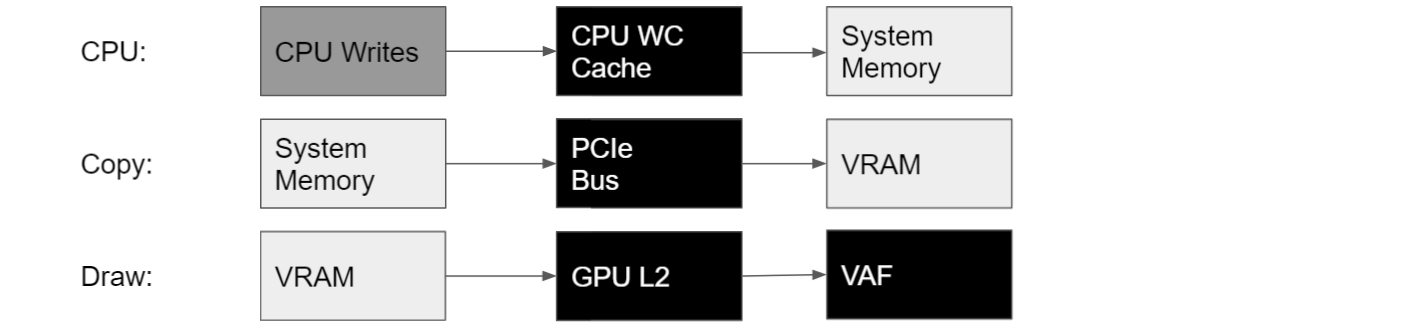
In the The Next Level of Optimization Advice with Nsight Graphics: GPU Trace session at GTC 2021, we announced that an alternative solution for DX12 applications on NVIDIA GPUs is to effectively use a CPU thread as a copy engine. This can be achieved by creating the DX12 UPLOAD heap in CVV by using NVAPI. CPU writes to this special UPLOAD heap are then forwarded directly to VRAM, over the PCIe bus (Figure 3).
Figure 3. Preloading a VB to VRAM using CPU writes in a CPU thread
For DX12, the following NVAPI functions are available for querying the amount of CVV available in the system, and for allocating heaps of this new flavor (CPU-writable VRAM, with fast CPU writes and slow CPU reads):
NvAPI_D3D12_QueryCpuVisibleVidmem
NvAPI_D3D12_CreateCommittedResource
NvAPI_D3D12_CreateHeap2
These new functions require recent drivers: 466.11 or later.
NvAPI_D3D12_QueryCpuVisibleVidmem should report the following amount of CVV memory:
200-256 MB for NVIDIA RTX 20xx and 30xx GPUs with Windows 11 (for instance, with the Windows 11 Insider Preview).
Detecting and quantifying GPU performance-gain opportunities from CPU-Visible VRAM using Nsight Graphics
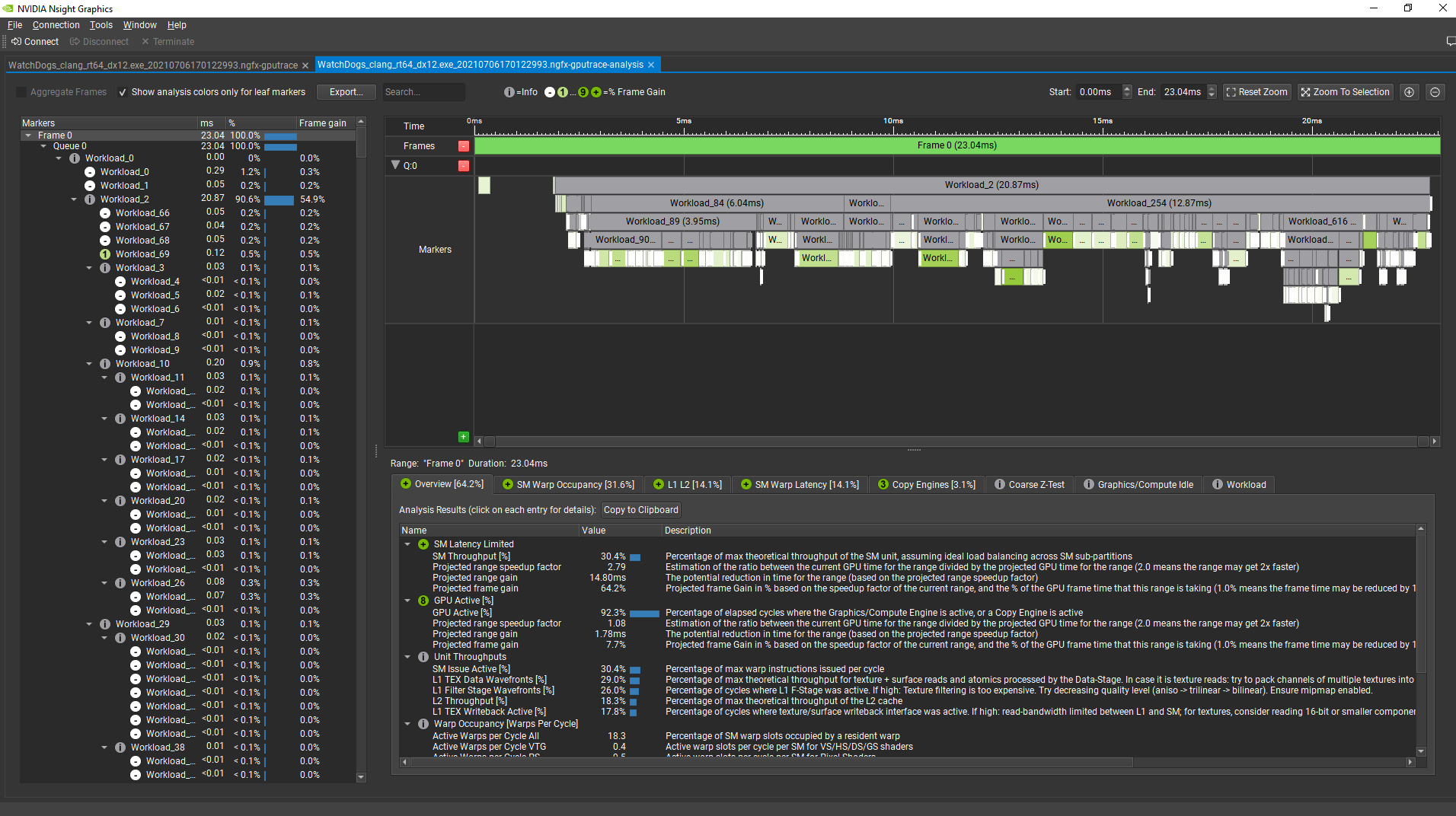
The GPU Trace tool within NVIDIA Nsight Graphics 2021.3 makes it easy to detect GPU performance-gain opportunities. When Advanced Mode is enabled, the Analysis panel within GPU Trace color codes perf markers within the frame based on the projected frame-reduction percentage by fixing a specific issue in this GPU workload.
Here’s how it looks like for a frame from a prerelease build of Watch Dogs: Legion (DX12), on NVIDIA RTX 3080, after choosing Analyze:
Figure 4. The GPU Trace Analysis tool with color-coded GPU workloads (the greener, the higher the projected gain on the frame).
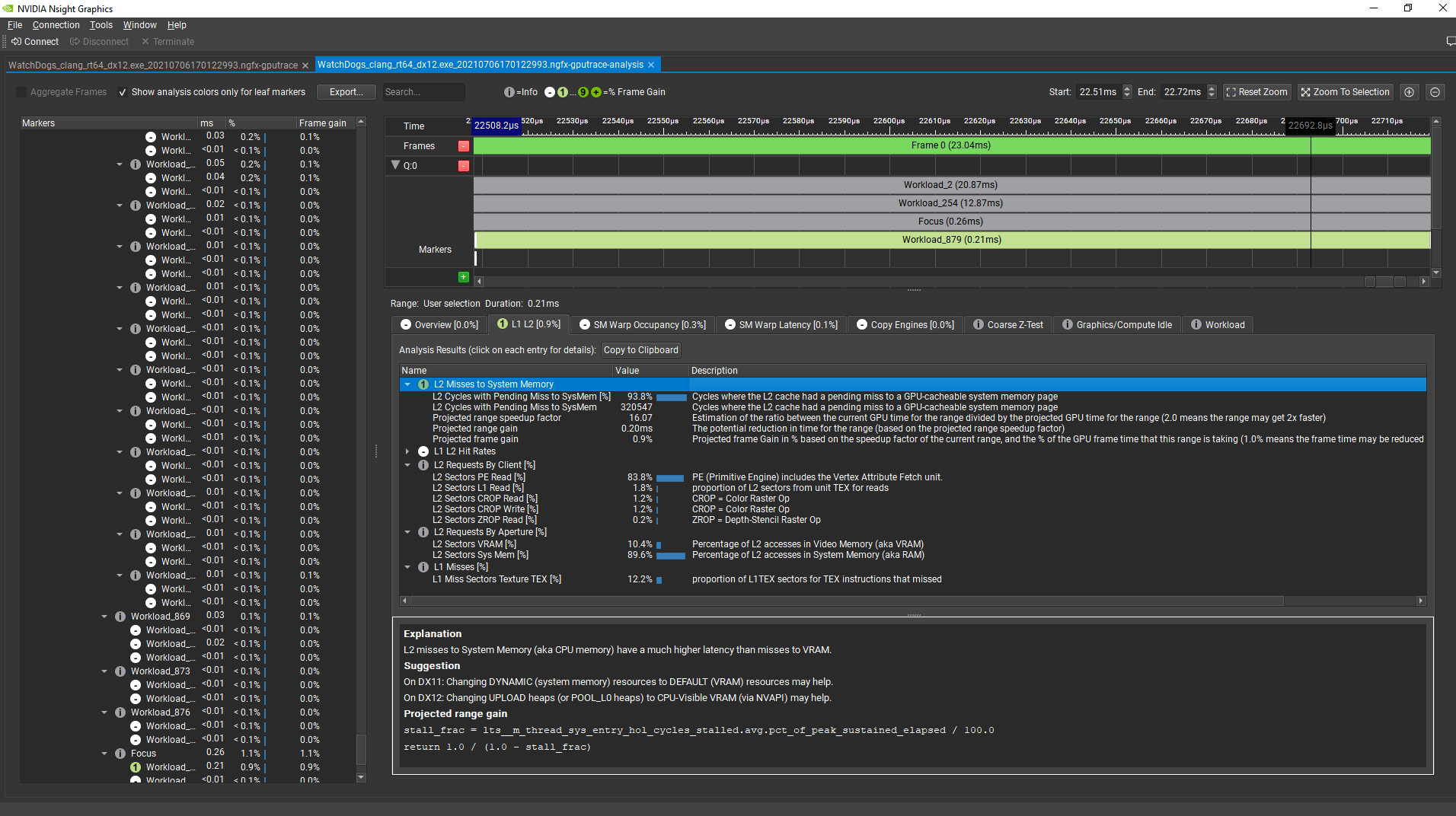
Now, selecting a user interface draw command at the end of the frame, the analysis tool shows that there is a 0.9% projected reduction in the GPU frame time from fixing the L2 Misses To System Memory performance issue. The tool also shows that most of the system memory traffic transiting through the L2 cache is requested by the Primitive Engine, which includes the vertex attribute fetch unit:
Figure 5. GPU Trace Analysis tool, focusing on a single workload.
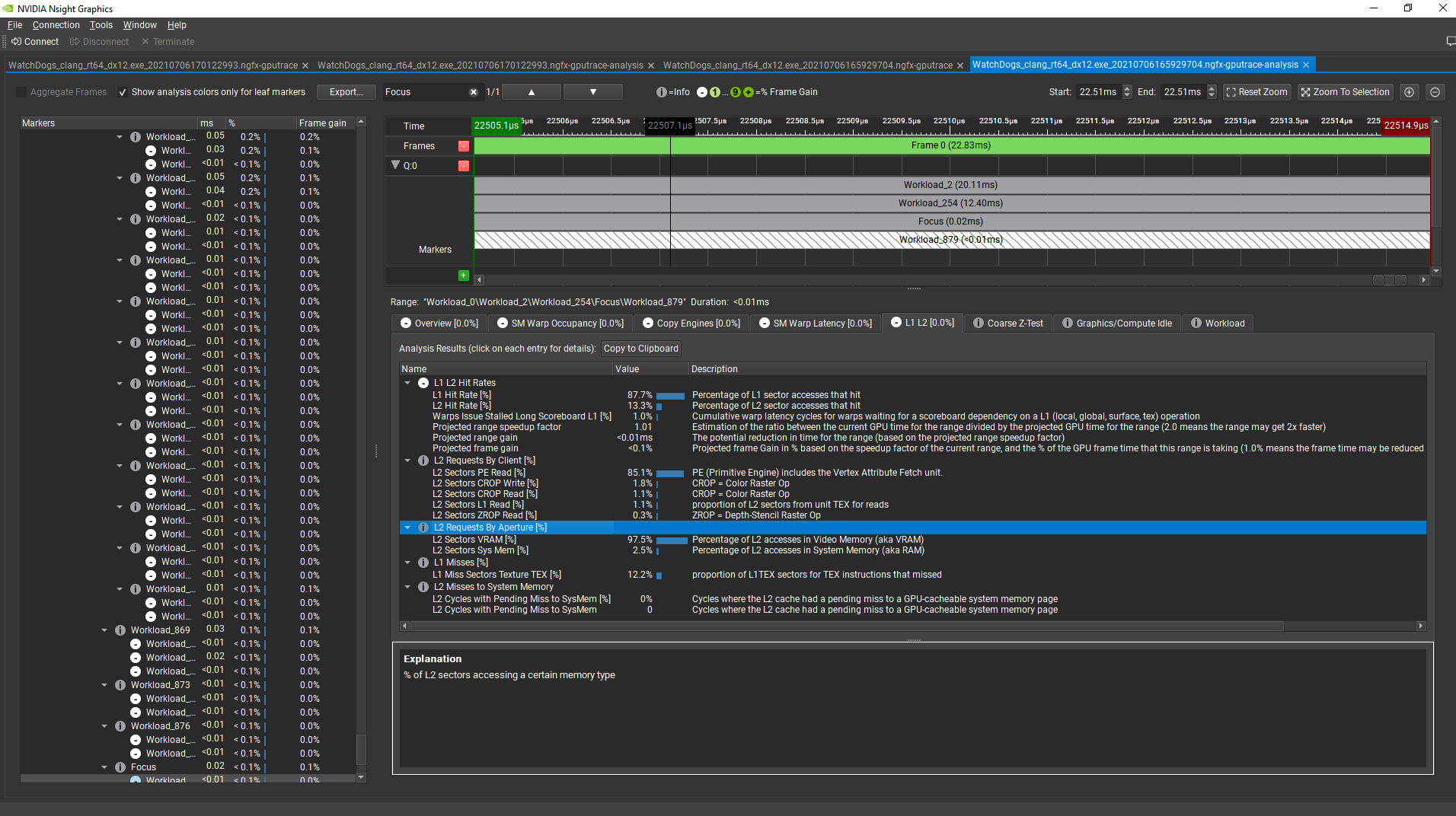
By allocating the VB of this draw command in CVV instead of system memory using a regular DX12 UPLOAD heap, the GPU time for this regime went from 0.2 ms to under 0.01 ms. The GPU frame time was also reduced by 0.9%. The VB data is now fetched directly from VRAM in this workload:
Figure 6. GPU Trace Analysis tool, after having optimized the workload.
Avoiding CPU reads from CPU-Visible VRAM using Nsight Systems
Regular DX12 UPLOAD heaps are not supposed to be read by the CPU but only written to. Like the regular heaps, CPU memory pages for CVV heaps have write combining enabled. That provides fast CPU write performance, but slow uncached CPU read performance. Moreover, because CPU reads from CVV make a round-trip through PCIe, GPU L2, and VRAM, the latencies of reads from CVV is much greater than the latency of reads from regular DX12 upload heaps.
To detect whether an application CPU performance is negatively impacted by CPU reads from CVV and to get information on what CPU calls are causing that, I recommend using Nsight Systems 2021.3.
Example 1: CVV CPU Reads through ReadFromSubresource
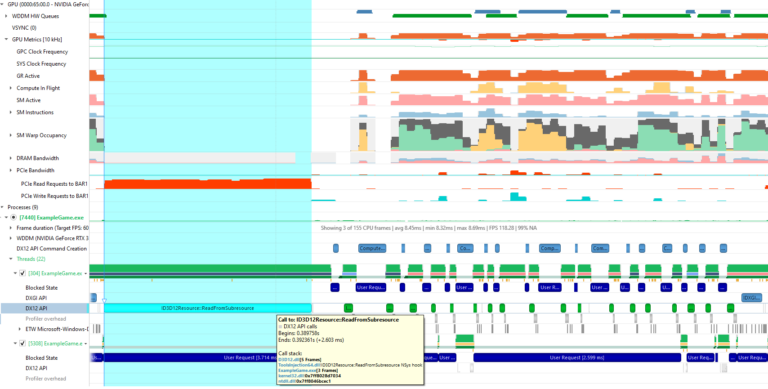
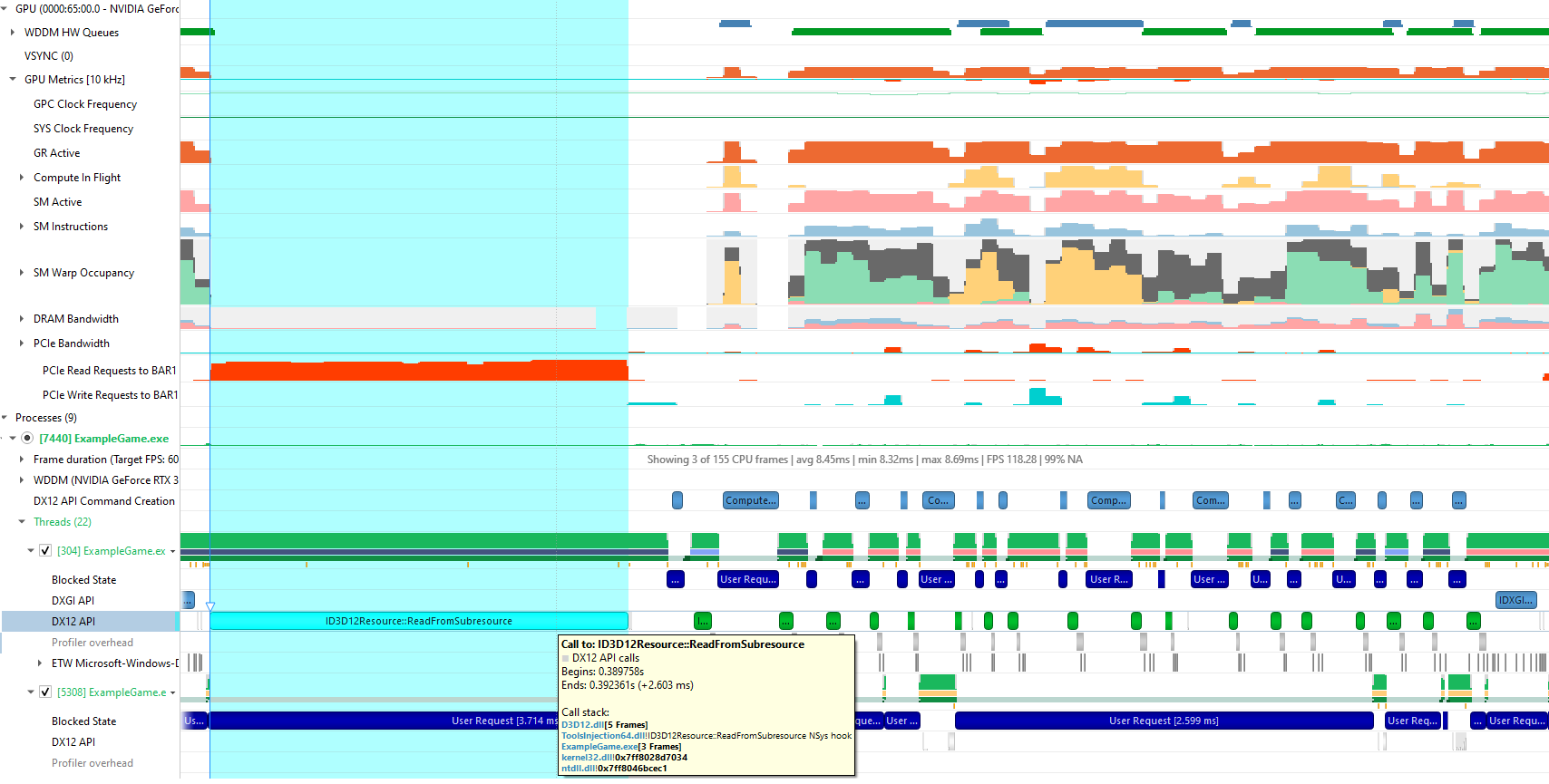
Here’s an example of a disastrous CPU read from a DX12 ReadFromSubresource, in a Nsight Systems trace. For capturing this trace, I enabled the new Collect GPU metrics option in the Nsight Systems project configuration when taking the trace, along with the default settings, which include Sample target process.
Here is what Nsight Systems shows after zooming in on one representative frame:
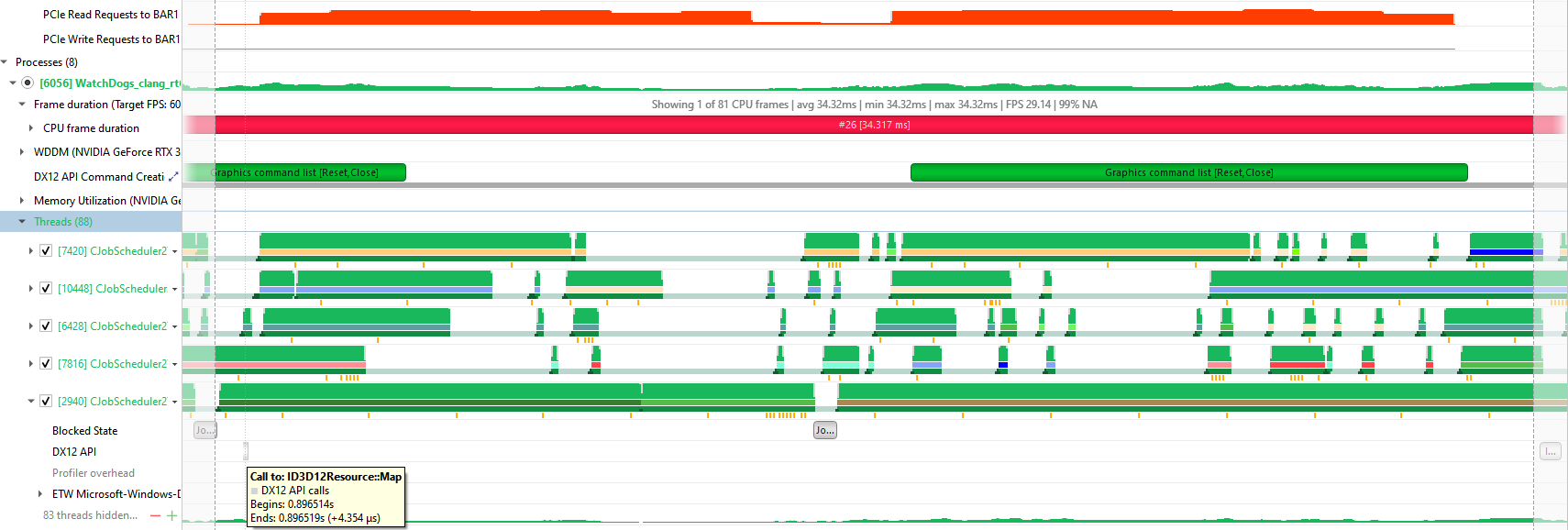
Figure 7. Nsight Systems showing a 2.6 ms ReadFromSubresource call in a CPU thread correlated with high PCIe Read Request Counts from BAR1.
In this case (a single-GPU machine), the PCIe Read Requests to BAR1 GPU metric in Nsight Systems measures the number of CPU read requests sent to PCIe for a resource allocated in CVV (BAR1 aperture). Nsight Systems shows a clear correlation between a long DX12 ReadFromSubresource call on a CPU thread and a high number of PCIe read requests from CVV. So you can conclude that this call is most likely doing a CPU readback from CVV, and fix that in the application.
Example 2: CVV CPU reads from a mapped pointer
CPU reads from CVV are not limited to DX12 commands. They can happen in any CPU thread when using any CPU memory pointer returned by a DX12 resource Map call. That is why using Nsight Systems is recommended for debugging them, because Nsight Systems can periodically sample call stacks per CPU thread, in addition to selected GPU hardware metrics.
Here is an example of Nsight Systems showing CPU reads from CVV correlated with no DX12 API calls, but with the start of a CPU thread activity:
Figure 8. Nsight Systems showing correlation between a CPU thread doing a Map call and PCIe read requests to BAR1 increasing right after.
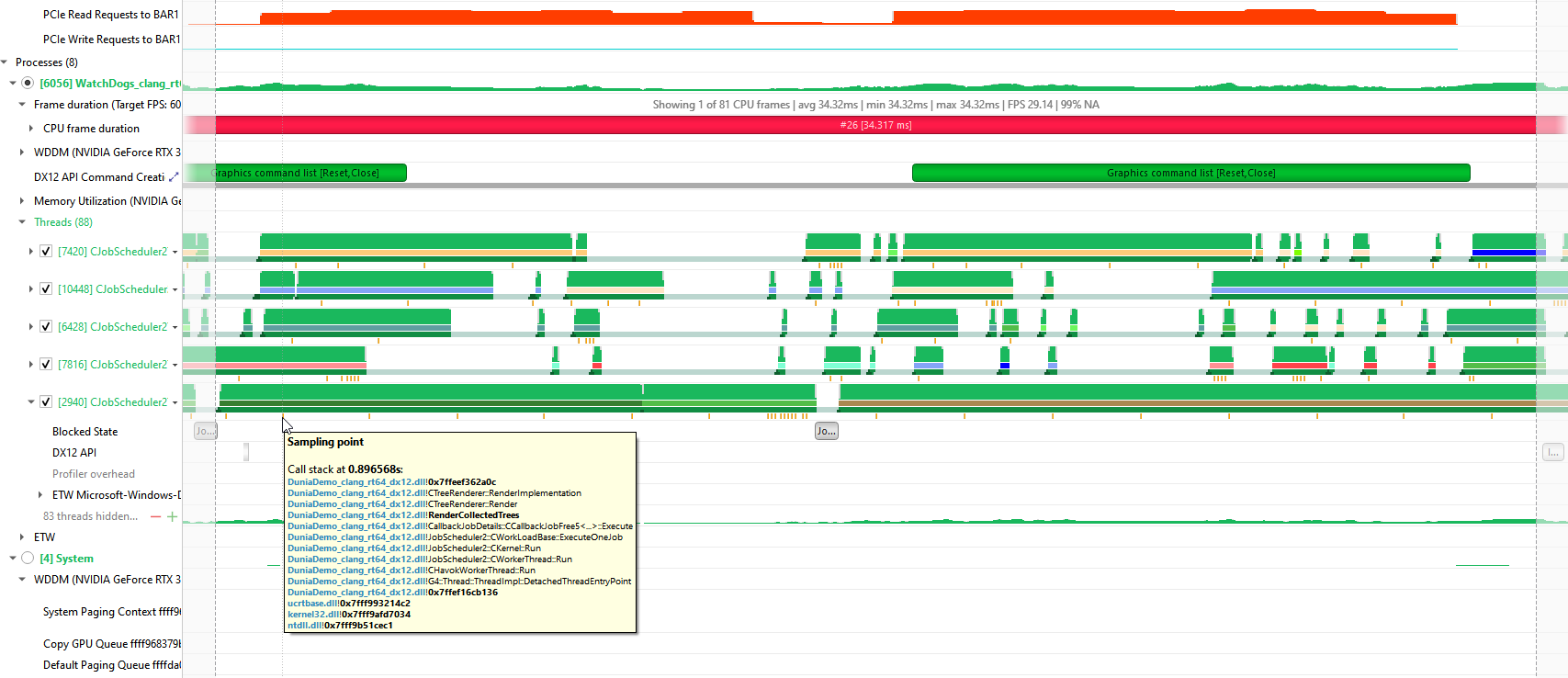
By hovering over the orange sample points right under the CPU thread, you see that this thread is executing a C++ method named RenderCollectedTrees, which can be helpful to locate the code that is doing read/write operations to the CVV heap:
Figure 9. Nsight Systems showing a call stack sample point for the CPU thread that is correlated to the high PCIe read requests to BAR1.
One way to improve the performance in this case would be to perform the read/write accesses to a separate chunk of CPU memory, not in a DX12 UPLOAD heap. When all read/write updates are finished, do a memcpy call from the CPU read/write memory to the UPLOAD heap.
Conclusion
All PC games running on Windows 11 PCs can use 256 MB of CVV on NVIDIA RTX 20xx and 30xx GPUs. NVAPI can be used to query the total amount of available CVV memory in the system and to allocate DX12 memory in this space. This makes it possible to replace DX12 UPLOAD heaps with CVV heaps by simply changing the code that allocates the heap, if the CPU never reads from the original DX12 UPLOAD heap.
To detect GPU performance-gain opportunities from moving a DX12 UPLOAD heap to CVV, I recommend using the GPU Trace Analysis tool, which is part of Nsight Graphics. To detect and debug CPU performance loss from reading from CVV, I recommend using Nsight Systems with its GPU metrics enabled.
Acknowledgments
I would like to acknowledge the following NVIDIA colleagues, who have contributed to this post: Avinash Baliga, Dana Elifaz, Daniel Horowitz, Patrick Neill, Chris Schultz, and Venkatesh Tammana.
The NGC team is hosting a webinar with live Q&A to dive into how to build AI models using PyTorch Lightening, an AI framework built on top of PyTorch, from the NGC catalog.
The NGC team is hosting a webinar with live Q&A to dive into how to build AI models using PyTorch Lightning, an AI framework built on top of PyTorch, from the NGC catalog.
Organizations across industries are using AI to help build better products, streamline operations, and increase customer satisfaction.
Today, speech recognition services are deployed in financial organizations to transcribe earnings calls, in hospitals to assist doctors writing patient notes, and in video broadcasting for live captioning.
Under the hood, researchers and data scientists are building hundreds of AI models to experiment and identify the most impactful models to deploy for their use cases.
PyTorch Lightning, an AI framework built on top of PyTorch, simplifies coding, so researchers can focus on building models and reduce time spent on the engineering process. It also speeds up the development of hundreds of models by easily scaling on GPUs within and across nodes.
By joining this webinar, you will learn:
About the benefit of using PyTorch Lightning and how it simplifies building complex models
How NGC helps accelerate AI development by simplifying software deployment
How researchers can quickly build models using PyTorch Lightning from NGC on AWS
Immersive 3D design and character creation are going sky high this week at SIGGRAPH, in a demo showcasing NVIDIA CloudXR running on Google Cloud. The clip shows an artist with an untethered VR headset creating a fully rigged character with Masterpiece Studio Pro, which is running remotely in Google Cloud and interactively streamed to the Read article >

 Cumulus Linux 4.4 introduces a new CLI, NVUE, that is more than just a CLI. NVUE provides a complete object model for Linux, unlocking incredible operational potential.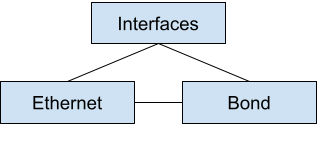

 NVIDIA Omniverse Create 2021.3 is now available in open beta, delivering a new set of features for Omniverse artists, designers, developers, and engineers to enhance graphics and content creation workflows. We sat down with Frank DeLise, Senior Director of Product Management for Omniverse, to get a tour of some of the exciting new features. Get …
  Facebook is open-sourcing the Open Compute Project Time Appliance Project (OCP TAP), which provides very precise time keeping and time synchronization across data centers in a cost-effective manner.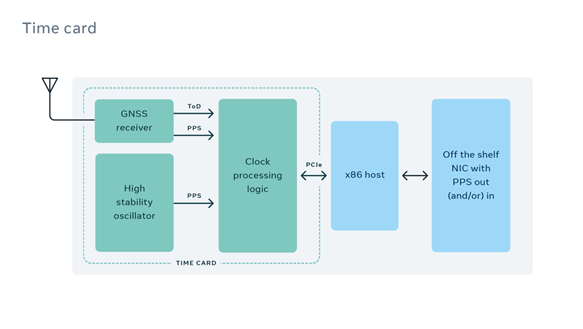
 How to optimize DX12 resource uploads from the CPU to the GPU over the PCIe bus is an old problem with many possible solutions, each with their pros and cons. In this post, I show how moving cherry-picked DX12 UPLOAD heaps to CPU-Visible VRAM (CVV) using NVAPI can be a simple solution to speed up …

 The NGC team is hosting a webinar with live Q&A to dive into how to build AI models using PyTorch Lightening, an AI framework built on top of PyTorch, from the NGC catalog.