
SaaS Platform Helps Leading Device Makers, Factories, Warehouses and Retailers Deploy AI Products and ServicesSANTA CLARA, Calif., June 22, 2021 (GLOBE NEWSWIRE) — NVIDIA today announced …
Category: Misc
Built with Enterprise IT Partners and Deployed First at Equinix, NVIDIA AI LaunchPad Includes End-to-End NVIDIA Hardware and Software Stack to Accelerate AI from Hybrid Cloud to EdgeSANTA …
Categories
Can someone help me fix this error?
Traceback (most recent call last):
File “c:UsersLandenOneDriveDesktopSign Language DetectorRealTimeObjectDetectionTensorflowscriptsgenerate_tfrecord.py”, line 62, in <module> label_map_dict = label_map_util.get_label_map_dict(label_map) File
“C:UsersLandenAppDataLocalProgramsPythonPython39libsite-packagesobject_detectionutilslabel_map_util.py”, line 164, in get_label_map_dict label_map = load_labelmap(label_map_path) File
“C:UsersLandenAppDataLocalProgramsPythonPython39libsite-packagesobject_detectionutilslabel_map_util.py”, line 133, in load_labelmap label_map_string = fid.read() File “C:UsersLandenAppDataLocalProgramsPythonPython39libsite-packagestensorflowpythonlibiofile_io.py”, line 117, in read self._preread_check() File
“C:UsersLandenAppDataLocalProgramsPythonPython39libsite-packagestensorflowpythonlibiofile_io.py”, line 79, in _preread_check self._read_buf = _pywrap_file_io.BufferedInputStream( TypeError: __init__(): incompatible constructor arguments.
The following argument types are supported:
-
tensorflow.python.lib.io._pywrap_file_io.BufferedInputStream(filename: str, buffer_size: int, token: tensorflow.python.lib.io._pywrap_file_io.TransactionToken = None)
Invoked with: item { name: “Hello” id: 1 } item { name: “ILoveYou” id: 2 } item { name: “No” id: 3 } item { name: “Thanks” id: 4 } item { name: “Yes” id: 5 } , 524288
submitted by /u/Spud783
[visit reddit] [comments]
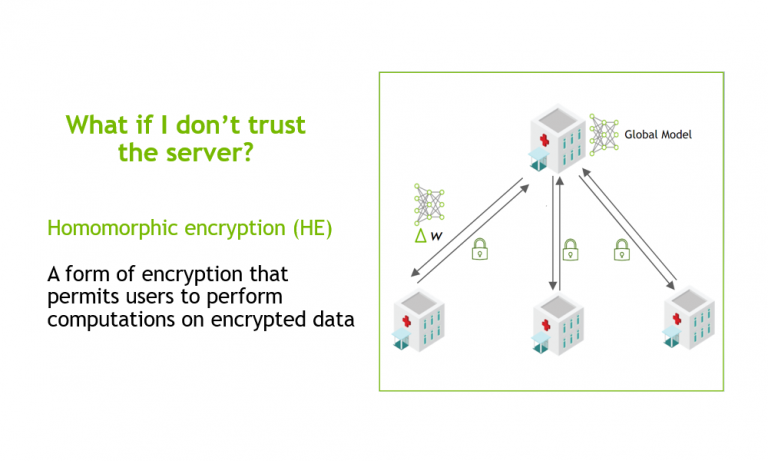 In NVIDIA Clara Train 4.0, we added homomorphic encryption (HE) tools for federated learning (FL). HE enables you to compute data while the data is still encrypted. In Clara Train 3.1, all clients used certified SSL channels to communicate their local model updates with the server. The SSL certificates are needed to establish trusted communication … Continued
In NVIDIA Clara Train 4.0, we added homomorphic encryption (HE) tools for federated learning (FL). HE enables you to compute data while the data is still encrypted.
In Clara Train 3.1, all clients used certified SSL channels to communicate their local model updates with the server. The SSL certificates are needed to establish trusted communication channels and are provided through a third party that runs the provisioning tool and securely distributes them to the hospitals. This secures the communication to the server, but the server can still see the raw model (unencrypted) updates to do aggregation.
With Clara Train 4.0, the communication channels are still established using SSL certificates and the provisioning tool. However, each client optionally also receives additional keys to homomorphically encrypt their model updates before sending them to the server. The server doesn’t own a key and only sees the encrypted model updates.
With HE, the server can aggregate these encrypted weights and then send the updated model back to the client. The clients can decrypt the model weights because they have the keys and can then continue with the next round of training (Figure 1).
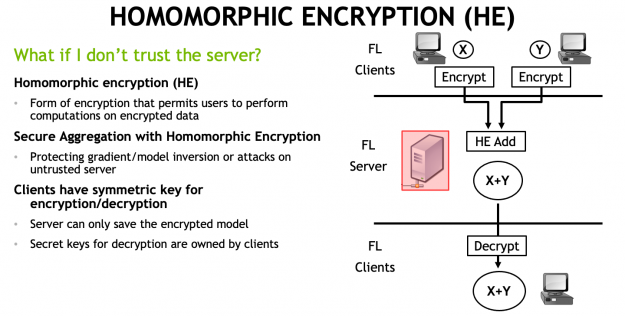
HE ensures that each client’s changes to the global model stays hidden by preventing the server from reverse-engineering the submitted weights and discovering any training data. This added security comes at a computational cost on the server. However, it can play an important role in healthcare in making sure that patient data stays secure at each hospital while still benefiting from using federated learning with other institutions.
HE implementation in Clara Train 4.0
We implemented secure aggregation during FL with HE using the TenSEAL library by OpenMined, a convenient Python wrapper around Microsoft SEAL. Both libraries are available as open-source and provide an implementation of Homomorphic encryption for arithmetic of approximate numbers, also known as the CKKS scheme, which was proposed as a solution for encrypted machine learning.
Our default uses the following HE setting, specified in Clara Train’s provisioning tool for FL:
# homomorphic encryption
he:
  lib: tenseal
  config:
    poly_modulus_degree: 8192
    coeff_mod_bit_sizes: [60, 40, 40]
    scale_bits: 40
    scheme: CKKS
These settings are recommended and should work for most tasks but could be further optimized depending on your specific model architecture and machine learning problem. For more information about different settings, see this tutorial on the CKKS scheme and benchmarking.
HE benchmarking in FL
To compare the impact of HE to the overall training time and performance, we ran the following experiments. We chose SegResNet (a U-Net like architecture used to win the BraTS 2018 challenge) trained on the CT spleen segmentation task from the Medical Segmentation Decathlon.
Each federated learning run was trained for 100 rounds with each client training for 10 local epochs on their local data on an NVIDIA V100 (server and clients are running on localhost). In each run, half of the clients each used half of the training data (16/16) and half of the validation data (5/4), respectively. We recorded the total training time and best average validation dice score of the global model. We show the relative increase added by HE in Table 1.
There is a moderate increase in total training time of about 20% when encrypting the full model. This increase in training time is due to the added encryption and decryption steps and aggregation in homomorphically encrypted space. Our implementation enables you to reduce that extra time by only encrypting a subset of the model parameters, for example, all convolutional layers (“conv”). You could also encrypt just three of the key layers, such as the input, middle, and output layers.
The added training time is also due to increased message sizes needed to send the encrypted model gradient updates, requiring longer upload times. For SegResNet, we observe an increase from 19 MB to 283 MB using the HE setting mentioned earlier (~15x increase).
| Setting | Message size (MB) | Nr. clients | Training time | Best global Dice | Best epoch | Re. Increase in training time |
| Raw | 19 | 2 | 4:57:26 | 0.951 | 931 | – |
| Raw | 19 | 4 | 5:11:20 | 0.956 | 931 | – |
| Raw | 19 | 8 | 5:18:00 | 0.943 | 901 | – |
| HE full | 283 | 2 | 5:57:05 | 0.949 | 931 | 20.1% |
| HE full | 283 | 4 | 6:00:05 | 0.946 | 811 | 15.7% |
| HE full | 283 | 8 | 6:21:56 | 0.963 | 971 | 20.1% |
| HE conv layers | 272 | 2 | 5:54:39 | 0.952 | 891 | 19.2% |
| HE conv layers | 272 | 4 | 6:06:13 | 0.954 | 951 | 17.6% |
| HE conv layers | 272 | 8 | 6:28:16 | 0.948 | 891 | 22.1% |
| HE three layers | 43 | 2 | 5:12:10 | 0.957 | 811 | 5.0% |
| HE three layers | 43 | 4 | 5:15:01 | 0.939 | 841 | 1.2% |
| HE three layers | 43 | 8 | 5:19:02 | 0.949 | 971 | 0.3% |
Next, we compare the performance of FL using up to 30 clients with the server running on AWS. For reference, we used an m5a.2xlarge with eight vCPUs, 32-GB memory, and up to 2,880 Gbps network bandwidth. We show the average encryption, decryption, and upload time, comparing raw compared to encrypted model gradients being uploaded in Figure 2 and Table 2. You can see the longer upload times due to the larger message sizes needed by HE.
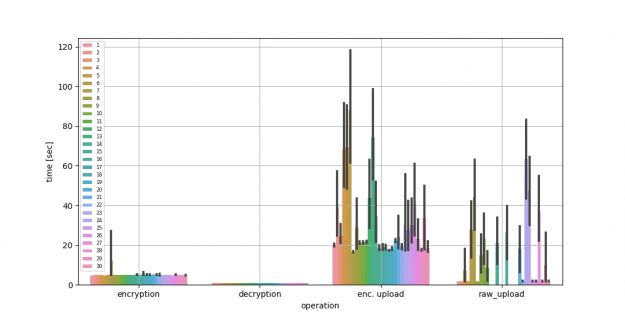
| Time in seconds | Mean | Std. Dev. | |||||
| Encryption time | 5.01 | 1.18 | |||||
| Decryption time | 0.95 | 0.04 | |||||
| Enc. upload time | 38 | 71.170 | |||||
| Raw upload time | 21.57 | 74.23 |
Try it out
If you’re interested in learning more about how to set up FL with homomorphic encryption using Clara Train, we have a great Jupyter notebook on GitHub that walks you through the setup.
HE can reduce model inversion or data leakage risks if there is a malicious or compromised server. However, your final models might still contain or memorize privacy-relevant information. That’s where differential privacy methods can be a useful addition to HE. Clara Train SDK implements the sparse vector technique (SVT) and partial model sharing that can help preserve privacy. For more information, see Privacy-preserving Federated Brain Tumour Segmentation. Keep in mind that there is a tradeoff between model performance and privacy protection.
Categories
AMD Graphics
I am trying to run a CNN model on a computer with an AMD Raedon 5500. I ran the previous models on computers with Nvidia cards and they worked but for some reason tensorflow cannot see the GPU. It says the list of physical devices is empty. I know that the GPU is in PCI slot 3 and not 1, would that be an issue?
submitted by /u/NameError-undefined
[visit reddit] [comments]
I have a sequence of 20 numbers, 1 – 20 and all numbers must be put in to sequence once. I have a formula which generates a score for each sequence input. What would be the best Machine Learning approach to find the sequence with the lowest score. It is very noisy and has many minimums.
Thanks for your help.
James
submitted by /u/JackFeet
[visit reddit] [comments]
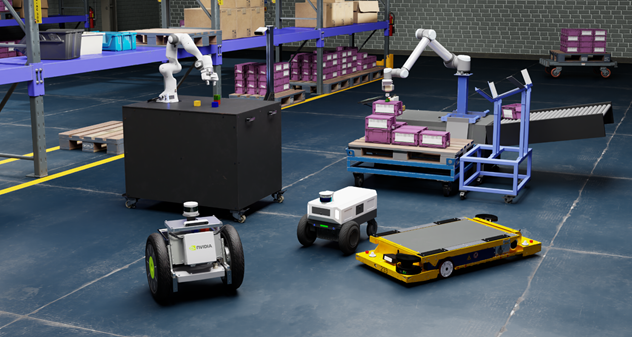 The new Isaac simulation engine not only creates better photorealistic environments, but also streamlines synthetic data generation and domain randomization to build ground-truth datasets to train robots in applications from logistics and warehouses to factories of the future.
The new Isaac simulation engine not only creates better photorealistic environments, but also streamlines synthetic data generation and domain randomization to build ground-truth datasets to train robots in applications from logistics and warehouses to factories of the future.
NVIDIA Omniverse is the underlying foundation for NVIDIA’s simulators, including the Isaac platform — which now includes several new features. Discover the next level in simulation capabilities for robots with NVIDIA Isaac Sim open beta, available now.
Built on the Omniverse platform, Isaac Sim is a robotics simulation application and synthetic data generation tool. It allows roboticists to train and test their robots more efficiently by providing a realistic simulation of the robot interacting with compelling environments that can expand coverage beyond what is possible in the real world.
This release of Isaac Sim also adds improved multi-camera support and sensor capabilities, and a PTC OnShape CAD importer to make it easier to bring in 3D assets. These new features will expand the breadth of robots and environments that can be successfully modeled and deployed in every aspect: from design and development of the physical robot, then training the robot, to deploying in a “digital twin” in which the robot is simulated and tested in an accurate and photorealistic virtual environment.
Summary of Key New Features
- Multi-Camera Support
- Fisheye Camera with Synthetic Data
- ROS2 Support
- PTC OnShape Importer
- Improved Sensor Support
- Ultrasonic Sensor
- Force Sensor
- Custom Lidar Patterns
- Downloadable from NVIDIA Omniverse Launcher
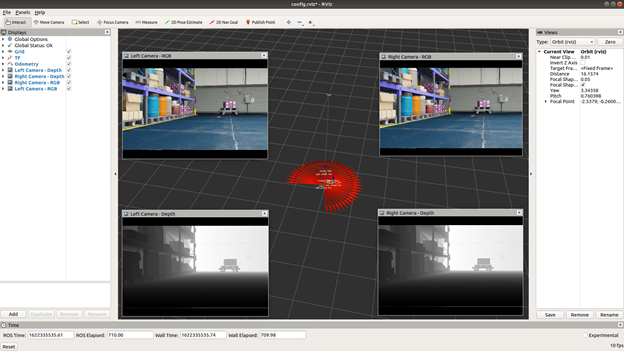
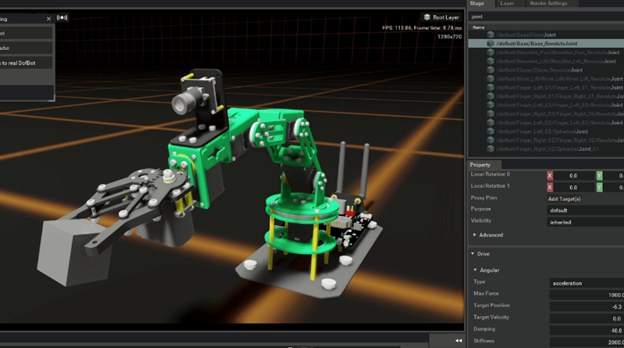
Isaac Sim Enables More Robotics Simulation
Developers have long seen the benefits of having a powerful simulation environment for testing and training robots. But all too often, the simulators have had shortcomings which limited their adoption. Isaac Sim addresses these drawbacks with the benefits described below.
Realistic Simulation
In order to deliver realistic robotics simulations, Isaac Sim leverages the Omniverse platform’s powerful technologies including advanced GPU-enabled physics simulation with PhysX 5, photorealism with real-time ray and path tracing, and Material Definition Language (MDL) support for physically-based rendering.
Modular, Breadth of Applications
Isaac Sim is built to address many of the most common robotics use cases including manipulation, autonomous navigation, and synthetic data generation for training data. Its modular design allows users to easily customize and extend the toolset to accommodate many applications and and environments.
Seamless Connectivity and Interoperability
Isaac Sim benefits from Omniverse Nucleus and Omniverse Connectors, enabling collaborative building, sharing, and importing of environments and robot models in Universal Scene Description (USD). Easily connect the robot’s brain to a virtual world through Isaac SDK and ROS/ROS2 interface, fully-featured Python scripting, plugins for importing robot and environment models.
Synthetic Data Generation in Isaac Sim Bootstraps Machine Learning
Synthetic Data Generation is an important tool that is increasingly used to train the perception models found in today’s robots. Getting real-world, properly labeled data is a time consuming and costly endeavor. But in the case of robotics, some of the required training data could be too difficult or dangerous to collect in the real world. This is especially true of robots that must operate in close proximity to humans.
Isaac Sim has built-in support for a variety of sensor types that are important in training perception models. These sensors include RGB, depth, bounding boxes, and segmentation.
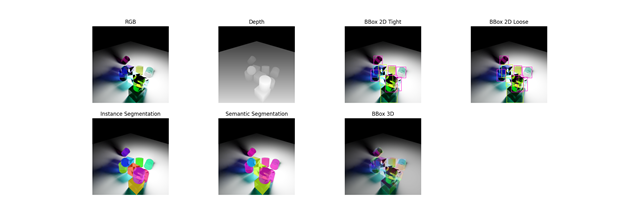
In the open beta, we have the ability to output synthetic data in the KITTI format. This data can then be used directly with the NVIDIA Transfer Learning Toolkit to enhance model performance with use case-specific data.
Domain Randomization
Domain Randomization varies the parameters that define a simulated scene, such as the lighting, color and texture of materials in the scene. One of the main objectives of domain randomization is to enhance the training of machine learning (ML) models by exposing the neural network to a wide variety of domain parameters in simulation. This will help the model to generalize well when it encounters real world scenarios. In effect, this technique helps teach models what to ignore.
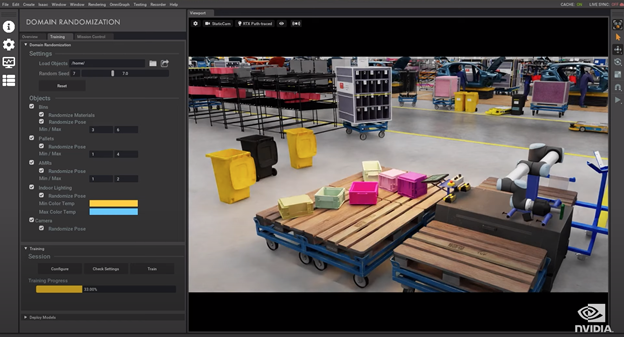
Isaac Sim supports the randomization of many different attributes that help define a given scene. With these capabilities, the ML engineers can ensure that the synthetic dataset contains sufficient diversity to drive robust model performance.
Randomizable Parameters
| Color | Movement |
| Scale | Light |
| Texture | Material |
| Mesh | Visibility |
| Rotation |
In Isaac Sim open beta, we have enhanced the domain randomization capabilities by allowing the user to define a region for randomization. Developers can now draw a box around the region in the scene that is to be randomized and the rest of the scene will remain static.
More Information on Isaac Sim
Check out the latest Isaac Sim GTC 2021 session, Sim-to-Real.
Also, learn more about importing your own robot with the following tutorial.
Learn more about using Isasac Sim to train your Jetbot by exploring these developer blogs:.
- Training Your JetBot in NVIDIA Isaac Sim
- Training Your NVIDIA JetBot to Avoid Collisions Using NVIDIA Isaac Sim
Getting Started
Join the thousands of developers who have worked with Isaac Sim across the robotics community via our early access program. Get started with the next step in robotics simulation by downloading Isaac Sim.
Categories
Same code and data but diff rates
I’m trying to train an encoder-decoder model. The code is provided from my Udemy’s instructor. His training rate is high (0.9xxx), same thing for my classmates. When I copy exactly the code and run it on Google Colab (I literally just changed directory paths), my rate is extremely low (around 0.1-0.2 and just stuck there). It ends up the model almost doesn’t learn anything. I even use the same data. Is this even possible?
submitted by /u/khoaleeeeee
[visit reddit] [comments]
Categories
Tensorflow not recognising/seeing my GPU
I have installed CUDA 10.1 and cuDNN 7.6.5. I checked the path in environment variables and it was the same as what was in a tutorial. I then created a new environment in anaconda and installed cudatoolkit 10.1 and cudnn 7.6.5. After, I installed tensorflow version 2.3.0. Then I tried tf.test.is_built_with_cuda(), which returned False. Also, print(device_lib.list_local_devices()) only showed my CPU. I tried restarting my laptop which didn’t seem to do anything and I have been trying different solutions for hours. I feel like I’m going crazy now and can’t think what could be wrong. Any help here would be massively appreciated.
My GPU is a GTX 1060 if that is any help.
submitted by /u/feynstein17
[visit reddit] [comments]
Categories
Beginner is completely lost with forecasting
Sorry if this is too trivial for this sub, but I’m a noob so here I go: I try to train an Odometry-model for my 4-wheeled robot using Tensorflow. I have my dataset with the sensordata (wheelencoders, acceleration) and X, Y, speed_x, speed_y as my labels.
So far so good, but because my algorithm needs the predictions of the timestep before as inputs to make the next prediction, I need: a RNN? Or something else for Time series prediction? I’m lost, please help me figure out the method I need to look into for this. Cheers
submitted by /u/Magic_newbie
[visit reddit] [comments]