Categories
Misc

Accelerating Conversational AI Research with New Cutting-Edge Neural Networks and Features from NeMo 1.0

NVIDIA NeMo is a conversational AI toolkit built for researchers working on automatic speech recognition (ASR), natural language processing (NLP), and text-to-speech synthesis (TTS). The primary objective of NeMo is to help researchers from industry and academia to reuse prior work (code and pretrained models and make it easier to create new conversational AI models. … Continued

NVIDIA NeMo is a conversational AI toolkit built for researchers working on automatic speech recognition (ASR), natural language processing (NLP), and text-to-speech synthesis (TTS). The primary objective of NeMo is to help researchers from industry and academia to reuse prior work (code and pretrained models and make it easier to create new conversational AI models. NeMo is an open-source project, and we welcome contributions from the research community.

The 1.0 update brings significant architectural, code quality, and documentation improvements as well as a plethora of new state-of-the-art neural networks and pretrained checkpoints in several languages. The best way to start with NeMo is by installing it in your regular PyTorch environment:

pip install nemo_toolkit[all]

NeMo collections

NeMo is a PyTorch ecosystem project that relies heavily on two other projects from the ecosystem: PyTorch Lightning for training and Hydra for configuration management. You can also use NeMo models and modules within any PyTorch code.

NeMo comes with three main collections: ASR, NLP, and TTS. They are collections of models and modules that are ready to be reused in your conversational AI experiments. Most importantly, for most of the models, we provide weights pretrained on various datasets using tens of thousands of GPU hours.

Speech recognition

The NeMo ASR collection is the most extensive collection with a lot to offer for researchers of all levels, from beginners to advanced. If you are new to deep learning for speech recognition, we recommend that you get started with an interactive notebook for both ASR and NeMo overview. If you are an experienced researcher looking to create your own model, you’ll find various ready-to-use building blocks:

  • Data layers
  • Encoders
  • Augmentation modules
  • Text normalization and denormalization
  • More advanced decoders, such as RNN-T

The NeMo ASR collection provides you with various types of ASR networks: Jasper, QuartzNet, CitriNet, and Conformer. With the NeMo 1.0 update, the CitriNet and Conformer models are the next flagship ASR models providing better accuracy on word-error-rate (WER) than Jasper and QuartzNet while maintaining similar or better efficiency.

CitriNet

CitriNet is an improvement upon QuartzNet that uses several ideas originally introduced in ContextNet. It uses subword encoding through word piece tokenization and Squeeze-and-Excitation mechanism to obtain highly accurate audio transcripts while using a nonautoregressive, CTC-based decoding scheme for efficient inference.
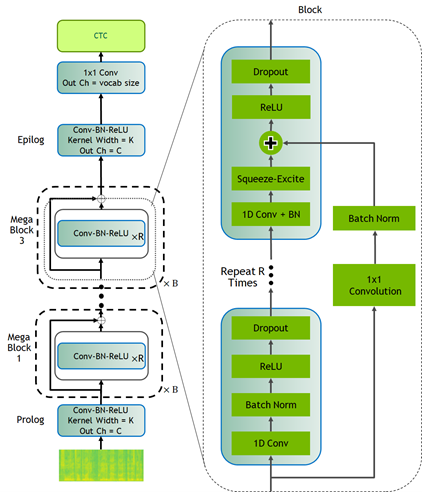
Block diagram of Citrinet architecture with CTC decoding
Figure 1. CitriNet architecture.

Conformer-CTC

Conformer-CTC is a CTC-based variant of the Conformer model that uses CTC loss and decoding instead of RNN-T loss, making it a nonautoregressive model. This model combines self-attention and convolution modules to achieve the best of both worlds. The self-attention modules can learn the global interaction while the convolutions efficiently capture the local correlations.

This model gives you an option to experiment with attention-based models. Due to the global context obtained by self-attention and squeeze-and-excitation mechanism, Conformer and CitriNet models have superior WER in offline scenarios.
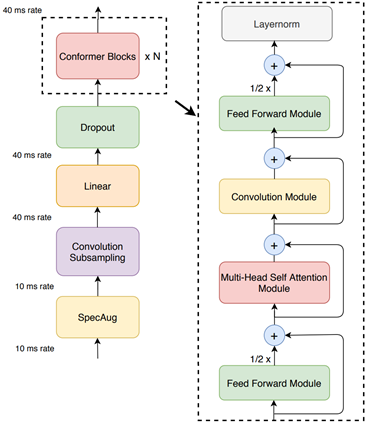
Block diagram of Conformer-CTC that combines self-attention and convolution modules.
Figure 2. Conformer-CTC architecture.

You can use Citrinet and Conformer models with CTC as well as RNN-T decoders.

We spent tens of thousands of GPU hours training ASR models in various languages. In NeMo, we offer these checkpoints back to the community for free. As of this release, NeMo has ASR models in English, Spanish, Chinese, Catalonian, Italian, Russian, French, and Polish. Moreover, we partner with Mozilla to make more pretrained models available with the help of Mozilla Common Voice project.

Finally, NeMo’s ASR collection contains reusable building blocks and pretrained models for various other important speech-based tasks such as: voice activity detection, speaker recognition, diarization, and voice command detection.

Natural language processing

Natural language processing (NLP) is essential for providing a great conversational AI experience. The NeMo NLP collection provides a set of pretrained models for typical NLP tasks such as question answering, punctuation and capitalization, named entity recognition, and neural machine translation. 

Hugging Face transformers have fueled many recent advances in NLP by providing a huge set of pretrained models and an easy-to-use experience for developers and researchers. NeMo is compatible with transformers in that most of the pretrained Hugging Face NLP models can be imported into NeMo. You may provide pretrained BERT-like checkpoints from transformers for the encoders of common tasks. The language models of the common tasks are initialized in default with the pretrained model from Hugging Face transformers. 

NeMo is also integrated with models trained by NVIDIA Megatron, allowing you to incorporate Megatron-based encoders into your question answering and neural machine translation models. NeMo can be used to fine-tune model-parallel models based on Megatron.

Neural machine translation

In today’s globalized world, it has become important to communicate with people speaking different languages. A conversational AI system capable of converting source text from one language to another will be a powerful communication tool. NeMo 1.0 now supports neural machine translation (NMT) tasks with transformer-based models allowing you to quickly build an end-to-end language translation pipelines. This release includes pretrained NMT models for the following language pairs in both directions:

  • English Spanish
  • English Russian
  • English Mandarin
  • English German
  • English French

Because tokenization is an extremely important part of NLP and NeMo supports most widely used tokenizers, such as HF tokenizers, SentencePiece, and YouTokenToMe.

Speech synthesis

If humans can talk to computers, the computers should be able to talk back as well. Speech synthesis takes text as an input and generates humanized audio output. This is typically accomplished with two models: a spectrogram generator that generates spectrograms from text and a vocoder that generates audio from spectrogram. The NeMo TTS collection provides you with the following models:

  • Pretrained spectrogram generator models: Tacotron2, GlowTTS, Fastspeech, Fastpitch, and Talknet
  • Pretrained vocoder models: HiFiGan, MelGan, SqueezeWave, Uniglow, and WaveGlow
  • End-to-end models: FastPitchHiFiGAN and Fastspeech2 Hifigan

End-to-end conversational AI example

Here’s a simple example demonstrating how to use NeMo for prototyping a universal translator app. This app takes a Russian audio file and generates an English translation audio. You can play with it using the AudioTranslationSample.ipynb notebook.

# Start by importing NeMo and all three collections
 import nemo
 import nemo.collections.asr as nemo_asr
 import nemo.collections.nlp as nemo_nlp
 import nemo.collections.tts as nemo_tts
 # Next, automatically download pretrained models from the NGC cloud
 quartznet = nemo_asr.models.EncDecCTCModel.from_pretrained(model_name="stt_ru_quartznet15x5")
 # Neural Machine Translation model
 nmt_model = nemo_nlp.models.MTEncDecModel.from_pretrained(model_name='nmt_ru_en_transformer6x6')
 # Spectrogram generator that takes text as an input and produces spectrogram
 spectrogram_generator = nemo_tts.models.Tacotron2Model.from_pretrained(model_name="tts_en_tacotron2")
 # Vocoder model that takes spectrogram and produces actual audio
 vocoder = nemo_tts.models.WaveGlowModel.from_pretrained(model_name="tts_waveglow_88m")
 # First step is to transcribe, or recognize, what was said in the audio
 russian_text = quartznet.transcribe([Audio_sample])
 # Then, translate it to English text
 english_text = nmt_model.translate(russian_text)
 # Finally, convert it into English audio
 # A helper function that combines Tacotron2 and WaveGlow to go directly from
 # text to audio
 def text_to_audio(text):
   parsed = spectrogram_generator.parse(text)
   spectrogram = spectrogram_generator.generate_spectrogram(tokens=parsed)
   audio = vocoder.convert_spectrogram_to_audio(spec=spectrogram)
   return audio.to('cpu').numpy()
 audio = text_to_audio(english_text[0]) 

The best part of this example is that you can fine-tune all the models used here on your datasets. In-domain fine-tuning is a great way to improve the performance of your models on specific applications. The NeMo GitHub repo provides plenty of fine-tuning examples.

NeMo models have a common look and feel, regardless of domain. They are configured, trained, and used in a similar fashion.

Scaling with NeMo

An ability to run experiments and quickly test new ideas is key to successful research. With NeMo, you can speed up training by using the latest NVIDIA Tensor Cores and model parallel training features across many nodes and hundreds of GPUs. Much of this functionality is provided with the help of the PyTorch Lightning trainer, which has an intuitive and easy-to-use API.

For speech recognition, language modeling, and machine translation, we provide high-performance web dataset-based data loaders. These data loaders can handle scaling to tens of thousands of hours of speech data to deliver high performance in massively distributed settings with thousands of GPUs.

Text processing and dataset creation with NeMo

Proper preparation of training data and pre and post-processing are hugely important and often overlooked steps in all machine learning pipelines. NeMo 1.0 includes new features for dataset creation and speech data explorer.

NeMo 1.0 includes important text processing features such as text normalization and inverse text normalization. Text normalization converts text from written form into its verbalized form. It is used as a preprocessing step before training TTS models. It could also be used for preprocessing ASR training transcripts. Inverse text normalization (ITN) is a reverse operation and is often a part of the ASR post-processing pipeline. It is the task of converting the raw spoken output of the ASR model into its written form to improve text readability.

For example, the normalized version of “It weighs 10 kg.” would be “It weighs 10 kilograms”.

Conclusion

NeMo 1.0 release substantially improves overall quality and documentation. It adds support for new tasks such as neural machine translation and many new models pretrained in different languages. As a mature tool for ASR and TTS, it also adds new features for text normalization and denormalization, dataset creation based on CTC-segmentation and speech data explorer. These updates benefit researchers in academia and industry by making it easier for you to develop and train new conversational AI models.

Many NeMo models can be exported to NVIDIA Jarvis for production deployment and high-performance inference. NVIDIA Jarvis is an application framework for building multimodal conversational AI services that delivers real-time performance on GPUs.

We welcome external contributions! On the NVIDIA NeMo GitHub page, you can try out the examples, participate in community discussions, and take your models from research to production using NeMo and NVIDIA Jarvis.
Categories
Misc

NVIDIA Clara AGX SDK 3.0 Goes Public and Includes New Application Container

The Clara AGX SDK runs on the NVIDIA Jetson and Clara AGX platform and provides developers with capabilities to build end-to-end streaming workflows for medical imaging.

NVIDIA Clara AGX SDK 3.0 is available today! The Clara AGX SDK runs on the NVIDIA Jetson and Clara AGX platform and provides developers with capabilities to build end-to-end streaming workflows for medical imaging. The focus of this release is to provide added support for NGC containers, including TensorFlow and PyTorch frameworks, a new ultrasound application, and updated Transfer Learning Toolkit scripts.  
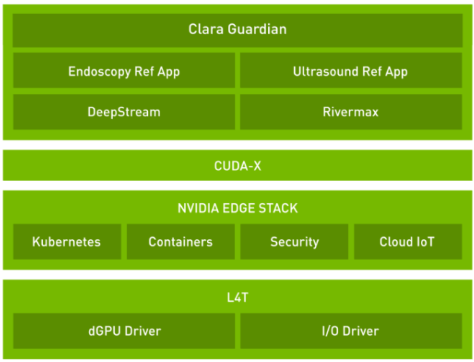
NVIDIA Clara AGX SDK

There is now support for the leading deep learning framework containers, including TensorFlow 1, TensorFlow 2, and PyTorch, as well as the Triton Inference Server. These containers can help you quickly get started using the Clara AGX Development Kit, NVIDIA’s GPU super-charged development platform for AI medical devices and edge-based inferencing. We’ve also released three new application containers along with the SDK, available on NGC. These application containers include: 

  • Metagenomics application 
  • US4US Ultrasound application and sample code 
  • Dermatology Melanoma detection  

Clara AGX SDK has also been updated to the latest Transfer Learning Toolkit (TLT) 3.0 release. Developers can now use TLT 3.0 out-of-the-box and includes compatibility with DeepStream SDK for real-time, low latency, high-resolution image AI deployments.  

Download Clara AGX SDK 3.0 through the Clara AGX Developer Site. An NVIDIA Developer Program account is needed to access the SDK. You can also find all of our containers through NGC. 

Categories
Misc

XOR Problem with MLP

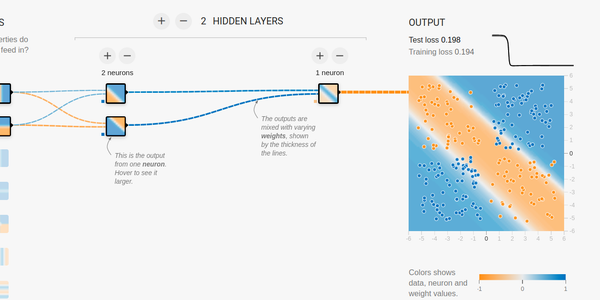
Hi guys, I’m trying to reproduce this mlp in tf (constraining it to have only one hidden layer with 2 units). However, like in playground tf, many times do not converge to global maxima. I think is due to weight initialization, tried xavier and he initializations but no success. The following piece of code is the model in tf keras.

model = tf.keras.models.Sequential([ Dense(units=2, activation='sigmoid', input_shape=(2,)), Dense(units=1, activation='sigmoid') 

])

Any help, would be appreciated. Thanks.

https://preview.redd.it/otv9rmbrtr251.png?width=1375&format=png&auto=webp&s=6757653b702f45a728dd032a89368fedbd6968e2

submitted by /u/Idea_Cultural
[visit reddit] [comments]

Categories
Misc

How can tensorflow utilize multiple cores by default if python is limited to one core by default?

All the threads I’ve read online regarding utilizing multiple cores in python requires multiprocessing. By default python can only bye running on one core (and one on thread, because of the GIL).

On the other hand, I often read that tensorflow by default uses multiple cores. How can this work if python itself is limited to one core?

submitted by /u/hattrickostrich
[visit reddit] [comments]

Categories
Misc

Fast Track AI Model Adaptation with TAO

NVIDIA Train, Adapt, and Optimize (TAO) is an AI model adaptation platform that simplifies and accelerates the creation of enterprise AI applications.

Building a state-of-the-art deep learning model is a complex and time-consuming process. To achieve this, large datasets collected for the model must be of high quality. Once the data is collected, it must be prepared and then trained, and optimized over several iterations. This is not always an option for many enterprises looking to bring their AI applications to market faster while reducing operational costs.

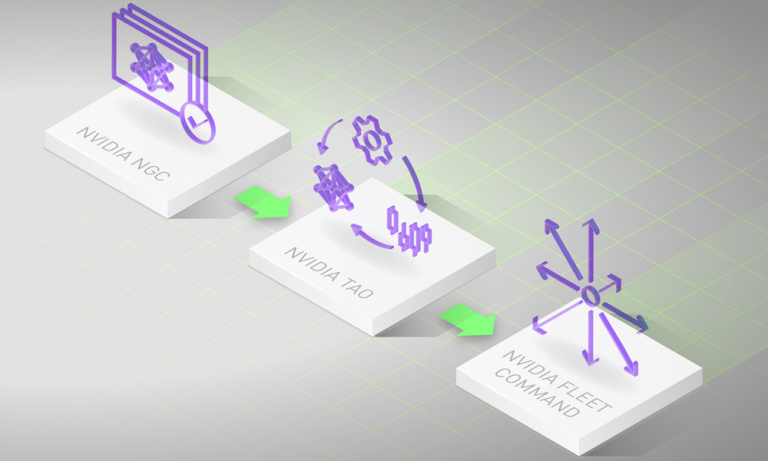
NVIDIA TAO is being developed to address these challenges. NVIDIA Train, Adapt, and Optimize (TAO) is an AI model adaptation platform that simplifies and accelerates the creation of enterprise AI applications. By fine-tuning state-of-the-art pre-trained models created by NVIDIA experts with custom data through a UI-based, guided workflow, you can produce highly accurate computer vision, speech, and language understanding models in hours rather than months, eliminating the need for large training runs and deep AI expertise.
As a managed and guided workflow, TAO lowers the barrier to building AI by unifying key existing NVIDIA technologies, such as pre-trained models from the NGC catalog, Transfer Learning Toolkit (TLT), Federated Learning with NVIDIA Clara, and TensorRT.

Registration for the Early Access Program is now open. Later this year we will begin accepting applicants into the program which will provide you with an exclusive opportunity to collaborate with the NVIDIA product team to help shape TAO.

Key Highlights of the Early Access Program:

  • Access to state-of-the-art accurate pre-trained models that can be customized for your use case
  • Access to compute infrastructure
  • Hands-on support to help you navigate through the entire process

Apply to the TAO Early Access Program here.

Categories
Misc

Using Physics-Informed Deep Learning for Transport in Porous Media

Simulations are pervasive in every domain of science and engineering, but they are often constrained by large computational times, limited compute resources, tedious manual setup efforts, and the need for technical expertise. NVIDIA SimNet is a simulation toolkit that addresses these challenges with a combination of AI and physics.  A success story of SimNet’s application … Continued

Simulations are pervasive in every domain of science and engineering, but they are often constrained by large computational times, limited compute resources, tedious manual setup efforts, and the need for technical expertise. NVIDIA SimNet is a simulation toolkit that addresses these challenges with a combination of AI and physics. 

A success story of SimNet’s application today is in modeling the flow and transport in porous media. This effort was led by Cedric Frances, a PhD student at Stanford University.

Use case study

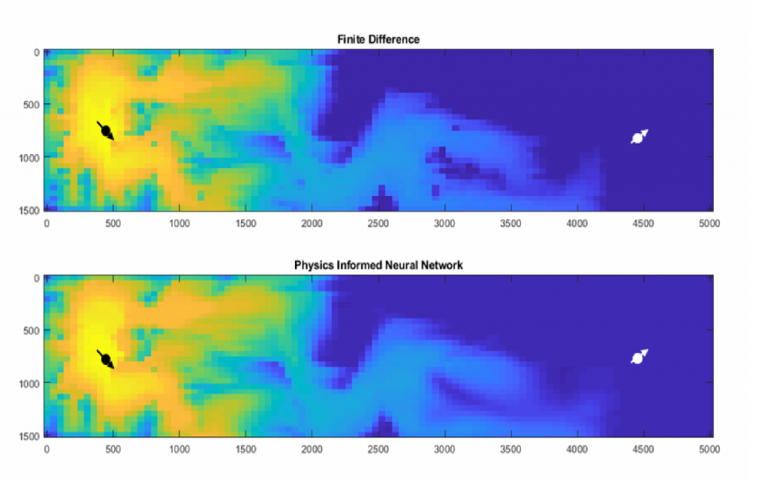
Cedric is researching the applicability and limitations of mesh-free reservoir simulations using physics-informed neural networks (PINNs). He’s keenly interested in the flow and transport problem in porous media (conservation of mass and Darcy flow). Cedric’s application is a Python-based reservoir simulator, which computes the pressure and concentrations of various fluids in a porous media and enables predictions that typically affect large, industrial energy projects. This includes the production of hydrocarbons, storage of carbon dioxide, water disposal, air storage, waste management, and so on.

Researchers previously tried to use the PINNs approach to capture the solution of a hyperbolic problem with nonconvex flux term (Riemann problem) in a forward setting with no data other than initial and boundary conditions. Unfortunately, these attempts were unsuccessful.

Before trying out SimNet, Cedric developed his own implementations of PINNs using Python and deep learning frameworks such as TensorFlow and Keras. He used various architectures of networks, such as residual, GAN, periodic activation, CNN, PDE-Net, and so on. However, it was difficult to implement all of them to find which one worked best or worked at all. The emergence of open-source code on GitHub made it easy to test these implementations out. The high overhead involved in every new implementation, such as environment setup, hardware configuration, modification of code to test his own problem, and so on, was not efficient.

Cedric wanted to have a good, unified framework maintained by a team of professional software developers to solve problems that allowed him to focus on the physics of the problem and extensively test the methods that have been recently published. His search for such a framework ended when he stumbled upon SimNet.

Cedric downloaded SimNet and started using fully connected networks with tanh activation functions and spatial weighing of the loss function. He discovered that SimNet’s general-purpose framework with multiple architectures and well-documented examples served as a good starting point. Its ability to emulate solutions with sharp shocks, introduce new dynamic constraints such as entropy and velocity saved him weeks of development. More importantly, it provided a quick turnaround on testing methods to determine their usefulness.

The problem presented here is that of incompressible, immiscible displacement of two phases in a porous medium. This is also referred to as transport problem and has been delineated in various forms over the years. It has been applied to the displacement of oil by water for waterflood problems in reservoir for over half a century. More recently, it’s been applied to the displacement of brine by CO2 in carbon sequestration applications. For more information, see Mechanism of Fluid Displacement in Sands and Theory of Gas Injection Processes.

Assume that a wetting phase (w) is displacing a nonwetting phase (n). Wettability is the preference of a fluid to be in contact with a solid surrounded by another fluid; for example, water is wetting on most surfaces compared to air. Conservation of mass applies to both phases. For the wetting phase:

phi frac{partial S_w}{partial t} + nabla q_w = 0 (1)

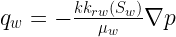
In this formula, phi is the porosity,  S_w is the saturation (or concentration) of that wetting phase, and is the saturation of the nonwetting. The flow rate of the wetting phase  q_w can be written as follows:

q_w = - frac{kk_{rw}(S_w)}{mu_w}nabla p (2)

In this formula,  k is the absolute permeability that quantifies the propensity of a material to allow liquid or gas to flow through it.  k_{rw}(S_w) is the wetting phase relative permeability that is function of the saturation and characterizes the effective permeability of a given phase in the presence or absence of it. A phase preferentially flows through a path where it is already present. Think of a drop of water dripping down from a window and following existing trails.

You can formulate the phase flux of the wetting phase  q_w as a function of the total flux q = q_w+q_n using a simple homogenization rule:                                               

q = -kleft[frac{k_{rw}(S_w)}{mu_w} + frac{k_{rn}(S_n)}{mu_n}right]nabla p (3)

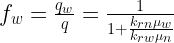
You can rewrite this equation as a function of the total flux. This gives rise to the fractional flow:

f_w = frac{q_w}{q} = frac{1}{1+frac{k_{rn}mu_w}{k_{rw}mu_n}} (4)

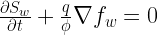
The conservation equation can now be written:

frac{partial S_w}{partial t} + frac{q}{phi}nabla f_w = 0 (5)

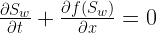
For a one-dimensional case where you assume that the total flux is equal to one pore volume injected per time step ( q = phi), you can obtain the equation:

frac{partial S_w}{partial t} + frac{partial f(S_w)}{partial x} = 0 (6)

In this formula, the fractional flow is a nonlinear equation defined as follows:

f_w(S) = frac{(S - S_{wc})^2}{(S - S_{wc})^2 + (1 - S - S_{nr})^2/M} (7)

In this formula, S_{wc} and S_{nr} are the residual (irreducible) saturations for the wetting and nonwettings resulting from trapping mechanisms and M is the endpoint mobility ratio defined as the ratio of endpoint-relative permeability and viscosity of both phases. We used the Corey and Brooks relative permeability relationship. For more information, see Hydraulic Properties of Porous Media.

The partial differential equation solved here is a hyperbolic of order 1 and the fractional flow term is nonconvex. It belongs to the class of Riemann conservation problem that is typically solved using finite volume methods. For more information, see Hyperbolic systems of conservation laws and the mathematical theory of shock waves.

With uniform Dirichlet boundary conditions:

S(x=0,t) = S_{inj}        (8)

S(x,t=0) = S_{wc}        (9)

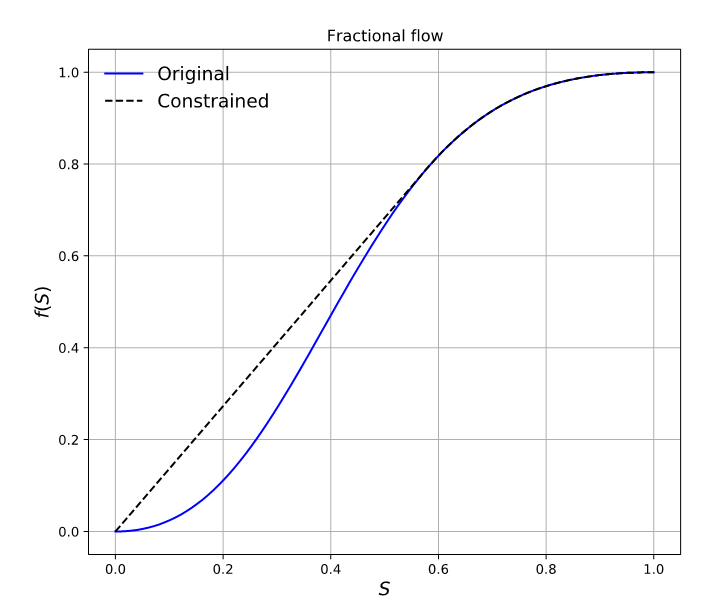
You can apply the method of characteristics (MOC) to build an analytical solution to this equation. For the MOC or any finite volume method to be conservative, you must modify the fractional flow term as shown in Figure 1.

Figure 1. Fractional flow curve (blue) along with Welge construction (dotted black) for case with Swc=Sor= 0. Source: Physics Informed Deep Learning for Flow and Transport in Porous Media

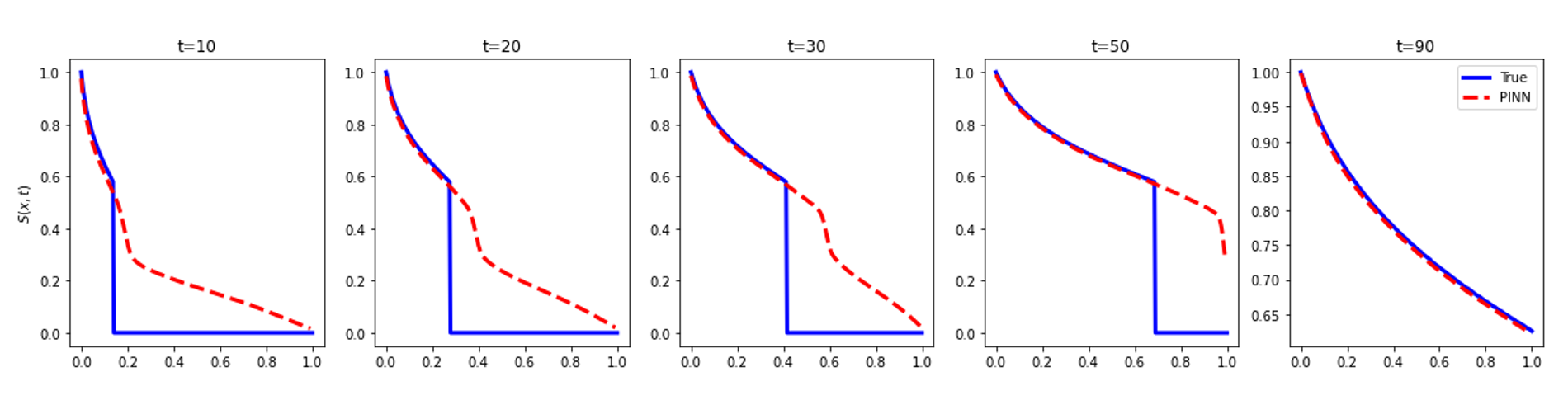
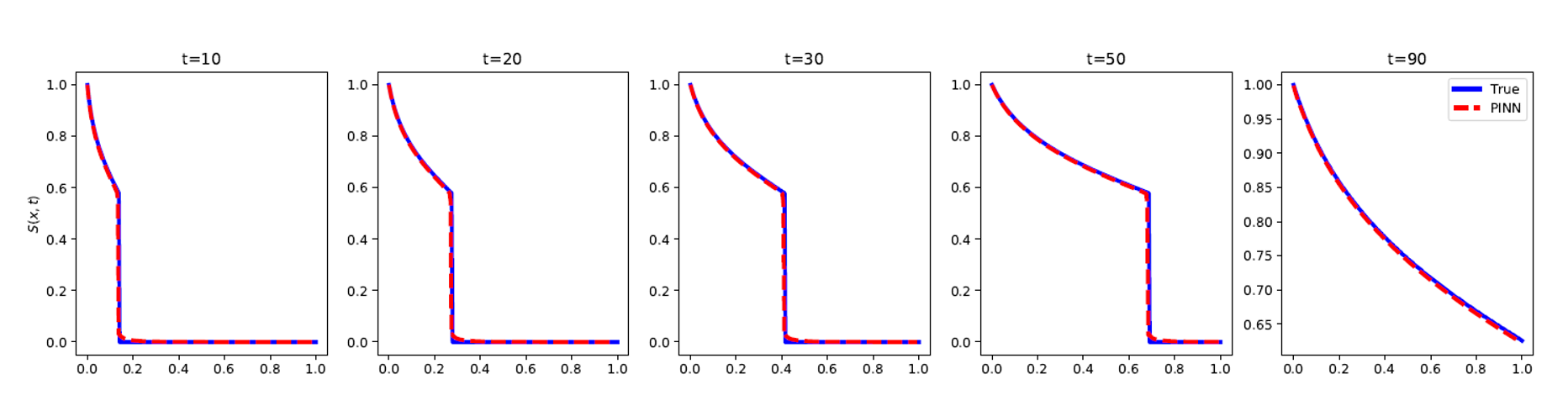
Until now, no other known method solved such a problem using a sampling method, so this remained an open question. A previous attempt by Fuks and Tchelepi concluded that physics-informed approaches were not suitable for the problem described (Figure 2).

Figure 2. Results of saturation inference computed using the PINN approach (dashed red) conditioned on the weak form of the hyperbolic problem. The reference solution using MOC is plotted in blue. Source: Physics Informed Deep Learning for Flow and Transport in Porous Media
Figure 3. Results of saturation inference using PINN (dashed red) vs MOC (blue) with velocity constraint and entropy condition. The convex hull of the fractional flow curve is used to model the displacement. Source: Physics Informed Deep Learning for Flow and Transport in Porous Media

Cedric’s research on this topic has now been published: Physics Informed Deep Learning for Flow and Transport in Porous Media.

Important theoretical milestones are now being reached on simple yet challenging 1D examples. Cedric plans on expanding his study to larger dimensions (2D and 3D), where the scalability of the code and the easy deployment on larger arrays will be put to the test. He expects to encounter similar issues and is looking forward to the gain provided by SimNet going from 2D to 3D, for example.

Cedric elaborated on his experience with SimNet. “SimNet’s clear APIs, clean and easily navigable code, environment and hardware configurations well handled with Docker containers, scalability, ease of deployment and the competent support team made it easy to adopt and has provided some very promising results. This has been great so far and we look forward to using SimNet on problems with much larger dimensions.”

To view the GTC’21 session, see Physics-Informed Neural Network for Flow and Transport in Porous Media. For more information about features and to download the toolkit, see NVIDIA SimNet.

Categories
Misc

High-Performance Python Communication with UCX-Py

TL;DR UCX/UCX-Py is an accelerated networking library designed for low-latency high-bandwidth transfers for both host and GPU device memory objects.  You can easily get started by installing through conda (limited to linux-64): Introduction RAPIDS is committed to delivering the highest achievable performance for the PyData ecosystem. There are now numerous GPU libraries for high-performance and … Continued
This post was originally published on the RAPIDS AI Blog.

TL;DR

UCX/UCX-Py is an accelerated networking library designed for low-latency high-bandwidth transfers for both host and GPU device memory objects.  You can easily get started by installing through conda (limited to linux-64):

> conda install -c rapidsai ucx-py ucx

Introduction

RAPIDS is committed to delivering the highest achievable performance for the PyData ecosystem. There are now numerous GPU libraries for high-performance and scalable alternatives to underlying common data science and analytics workflows. cuDF, which implements the Pandas DataFrame API, and cuML, which implements scikit-learn’s machine learning API, are two such accelerated libraries. These “scale-up” solutions, together with Dask, enable significant end-to-end performance improvements by combining state-of-the-art GPUs with distributed processing. However, with any scale-out solution, the bottleneck for distributed computation often lies with communication. We present here how easy it is to get started with our new Python communication library UCX-Py, based on OpenUCX, the Unified Communication X open framework, along with the current benchmarks.

UCX-Py allows RAPIDS to take advantage of hardware interconnects available on the system, such as NVLink (for direct GPU-GPU communication) and InfiniBand (for direct GPU-Fiber communication), thus providing higher bandwidth and lower latency for the application. UCX-Py does not only enable communication with NVLink and InfiniBand — including GPUDirectRDMA capability — but all transports supported by OpenUCX, including TCP and shared memory.

UCX-Py is a high-level library, meaning users are not required to do any complex message passing to be able to use it. The user triggers send on one process and receives on a different process, it’s that simple. More importantly, applications which already scale using Dask, can easily start using UCX with a small, two line change to existing code. Just switch to the UCX protocol, instead of the default TCP protocol.

Just like RAPIDS, UCX-Py is open source and currently hosted at https://github.com/rapidsai/ucx-py. Always up-to-date documentation is available in https://ucx-py.readthedocs.io/en/latest/.

Using UCX-Py with Dask

RAPIDS allows both multi-node and multi-GPU scalability by utilizing Dask, therefore Dask was the first and simplest use case for UCX-Py. While RAPIDS users may already be familiar with the dask-cuda package, one very simple use case is to start a cluster using all GPUs available in the system and connect a Dask client to it. Dask users often start a cluster as follows:

from dask_cuda import LocalCUDACluster
from distributed import Client
 
cluster = LocalCUDACluster(protocol="tcp")
client = Client(cluster)

The code above utilizes Python sockets for all communication over the TCP protocol. To switch to the UCX protocol for communication, there are two changes needed in the LocalCUDACluster constructor:

  • Specify the UCX protocol;
  • Specify the transport we want to use.

TCP over UCX

The simplest use of the UCX protocol in Dask is enabling TCP over UCX, and it looks as follows:

cluster = LocalCUDACluster(protocol="ucx", enable_tcp_over_ucx=True)

The change above does not need any special hardware and can be used in any machine that’s currently using dask-cuda (it also applies to LocalCluster in dask/distributed) as long as the UCX-Py package has been installed as well.

NVIDIA NVLink and NVSwitch

Now that we know how we can get started with UCX-Py in Dask, we can move on to more interesting cases. The first one is using NVLink (including NVSwitch if available) for all GPU-GPU communication, and we only add one more flag as seen below:

cluster = LocalCUDACluster(protocol="ucx", enable_tcp_over_ucx=True, enable_nvlink=True)

Note that in the above we also enable TCP over UCX, and it is a required step to allow NVLink. As a facility to users, the code above is equivalent to the one below (enable_tcp_over_ucx=True is implicit):

cluster = LocalCUDACluster(protocol="ucx", enable_nvlink=True)

NVIDIA InfiniBand

The last case we will discuss here is enabling InfiniBand. At this stage, you probably guessed that enabling it requires an enable_infiniband=True flag, and you guessed right. However, since InfiniBand requires communication between a GPU and an InfiniBand device, we need to specify the name of the correct InfiniBand interface to be used by each GPU. Suppose there is an InfiniBand interface named mlx5_0:1 available, a cluster could be created as follows:

cluster = LocalCUDACluster(protocol="ucx", enable_infiniband=True, ucx_net_devices="mlx5_0:1")

From a topological point-of-view, we prefer to select the InfiniBand device closest to the GPU, ensuring highest bandwidth and lowest latency. A complex system such as a DGX-1 or a DGX-2 may contain several GPUs and several InfiniBand interfaces, in such a case we don’t want to simply choose the first one, but the most optimal for that particular system. To address that, we introduced automatic detection of InfiniBand devices:

cluster = LocalCUDACluster(protocol="ucx", enable_infiniband=True, ucx_net_devices="auto")

It is also possible to have a custom configuration passing a function to the ucx_net_devices keyword argument, for that please check the documentation for the LocalCUDACluster class.

TCP, NVLink and InfiniBand

The transports listed above are not mutually exclusive, so you can use all of them together as well:

cluster = LocalCUDACluster(protocol="ucx", enable_tcp_over_ucx=True, enable_nvlink=True, enable_infiniband=True, ucx_net_devices="mlx5_0:1")

UCX with dask-cuda-worker CLI

All the options described above are also available in the dask-cuda-worker CLI. To use UCX with that, you must first start a dask-scheduler and choosing the UCX protocol:

DASK_UCX__CUDA_COPY=True DASK_UCX__TCP=True DASK_UCX__NVLINK=True DASK_UCX__INFINIBAND=True DASK_UCX__NET_DEVICES=mlx5_0:1 dask-scheduler --protocol="ucx"

The command above will start a scheduler and tell its address, which will be something such as ucx://10.10.10.10:8786 (note the protocol is now ucx://, as opposed to the default tcp://). Note also that we have to set Dask environment variables to that command to mimic the Dask-CUDA flags to enable each individual transport, this is because dask-scheduler is part of the mainline Dask Distributed project where we can’t overload it with all the same CLI arguments that we can with dask-cuda-worker, for more details on UCX configuration with Dask-CUDA, please see the Dask-CUDA documentation on Enabling UCX Communication.

We will then connect dask-cuda-worker to that address, and since the scheduler uses the ucx:// protocol, workers will too without any --protocol="ucx". It is still necessary to specify what transports workers need to use:

dask-cuda-worker ucx://10.10.10.10:8786 --enable-tcp-over-ucx --enable-nvlink --enable-infiniband --ucx-net-devices="auto"

Benchmarks

We want to analyze the performance gains of UCX-Py in two scenarios with a variety of accelerated devices. First, how does UCX-Py perform when passing host and device buffers between two endpoints for both InfiniBand and NVLink. Second, how does UCX-Py perform in a common data analysis workload.

When benchmarking 1GB messages between endpoints over NVLink we measured bandwidth of 46.5 GB/s — quite close to the theoretical limit of NVLink: 50 GB/s. This shows that the addition of a Python layer to UCX core (written in C) does not significantly impact performance. Using a similar setup, we configured UCX/UCX-Py to pass messages over InfiniBand. Measurements present a bandwidth of 11.2 GB/s in that case, which is also similarly near the hardware limit (12.5 GB/s) of Connect X-4 Mellanox InfiniBand controllers.

As the numbers above suggest, passing single message GPU objects between endpoints is very efficient and we now ask: how does UCX-Py perform in the context of a common workflow?  Dataframe merges are good candidates to benchmark as they are extremely common and require a high degree of communication. Additionally, a merge, performed by Dask-cuDF, will also test critical operations in RAPIDS and Dask libraries which can degrade communications, most notably serialization.

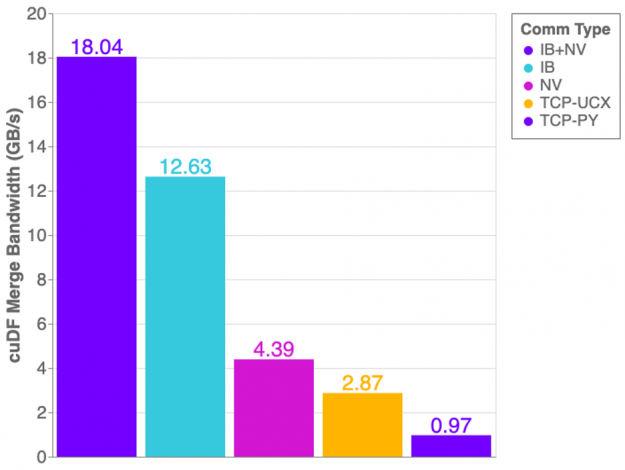
The graph in Figure 1 shows the cuDF merge benchmark performance on a DGX1 with all 8 GPUs in use. This workflow generates two dask-cudf dataframes with random, equally distributed data, and merges both dataframes into one.

 Measured bandwidth of cuDF merge benchmark with UCX-Py on a DGX-1 server. Utilizing both InfiniBand and NVLink transports reaches just over 18 GB/s, InfiniBand without NVLink reaches 12.6 GB/s, NVLink with TCP achieves 4.3 GB/s, TCP over UCX throughput is of 2.8 GB/s and TCP with Python Sockets (meaning no UCX involved) only achieve 970 MB/s.
Figure 1: Measured bandwidth of cuDF merge benchmark with UCX-Py on a DGX-1 server.

Overall we see improvements using UCX-Py compared to using Python Sockets for TCP communication. However, there are some unexpected results. If NVLink is capable of 32GB/s and InfiniBand is 12GB/s, why then does InfiniBand perform better than NVLink? The answer is: topology! The layout of hardware interconnection is of great importance and can often be complex.

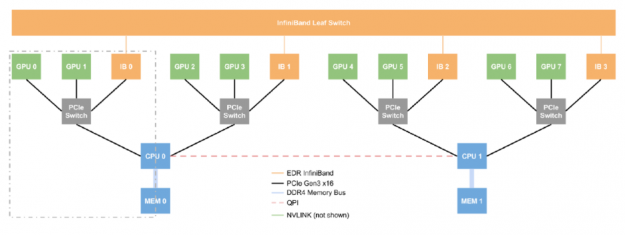
Represents the complex networking topology of a DGX-1 server
Figure 2: Networking topology of a DGX-1 server.

Figure 2 presents the layout of an NVIDIA DGX-1 server — we can think of this single box as a small supercomputer. The DGX-1 has eight P100 GPUs, four InfiniBand devices, and two CPUs. What is the most efficient route to take when passing data between GPU0 and GPU1? What about GPU2 and GPU7? GPU0 and GPU1 are connected via NVLink but GPU2 and GPU7 have direct communication lines, therefore, when passing data, we must perform two costly operations: Device-to-Host (moving data from GPU2 to the host) and Host-to-Device (moving data from the host to GPU7), and transferring data through main memory is expensive. Fortunately, a DGX-1 allows transfers between two GPUs that are not NVLink connected to use a more efficient transfer method than the costly operations described. With InfiniBand and GPUDirectRDMA, two GPUs can communicate without touching the main memory at all, allowing GPU7 to directly read GPU2’s memory via the InfiniBand interconnect only. 

Referring back to Figure 1, you can now see why only using InfiniBand outperforms the NVLink connection alone — Host-to-Device/Device-to-Host transfers are costly! However, when combining InfiniBand with NVLink we achieve more optimal performance. 

Further improvements

UCX-Py is under constant development, which means changes may occur without notice. Our ultimate commitment is to deliver high-performance communication to Python in a high-quality library package. With that said, we expect in the near future to keep on improving stability and ease-of-use, enabling users to benefit from enhanced performance with little to no effort to configure UCX-Py, thus automatically enabling accelerated communication hardware.

So far, we have tested UCX-Py mostly in DGX-1 and DGX-2 systems, where point-to-point and end-to-end performance was demonstrated. We scaled our testing up to one hundred Dask CUDA workers. We are constantly working to improve performance and stability, particularly for large scale workflows, and encourage users to engage with our team on GitHub and extend the discussion on UCX-Py.

Categories
Misc

Coming June to GFN Thursday: 38 More Games Streaming on GeForce NOW This Month

What a gamer wants. What a gamer needs. Games that’ll make you happy and cloud gaming that’ll set you free … to play your favorite PC games anywhere, anytime, on GeForce NOW. Get a sneak peek of all the exciting games coming in June this GFN Thursday. Starting with titles launching today. Keeping It Fresh Read article >

The post Coming June to GFN Thursday: 38 More Games Streaming on GeForce NOW This Month appeared first on The Official NVIDIA Blog.

Categories
Misc

Train Model for Pothole Detection to be used on raspberrypi

Hello, i followed random tutorials and tried training my custom model.

can somebody suggest me some tutorial or give me some tips on training an improved model?

any help would greatly be appreciated.

i am a beginner.

submitted by /u/abracadabra61
[visit reddit] [comments]

Categories
Misc

NOOB: How to get TensorFlow model to run on Jetson Nano?

Hello –

I built a model (for ANPR) using TensorFlow and EasyOCR. Over the past week or so, getting TensorFlow to install on the Jetson Nano has been next to impossible. Tons of issues with it (some are documented) and overall I found one person that was able to get it running well which took over 50hrs to install on the Jetson Nano.

This said, there has to be a better way to get a TensorFlow model to run on a Jetson Nano. Does anyone know how to go about doing this? Is this where ONNX comes in (if so, any ideas/resources you might be able to point me to that shows how?)

Maybe I should go down another rabbit hole and try to do ANPR with PyTorch as I have read in the NVIDIA forums that PyTorch seems to be a bit easier to run on the Jetson line?

Any/all thoughts/help is much appreciated.

Thanks!

submitted by /u/InstantAmmo
[visit reddit] [comments]