
Just like that, summer falls into September, and some of the most anticipated games of the year, like the Cyberpunk 2077: Phantom Liberty expansion, PAYDAY 3 and Party Animals, are dropping into the GeForce NOW library at launch this month. They’re part of 24 new games hitting the cloud gaming service in September. And the Read article >
Category: Misc
 Caching is as fundamental to computing as arrays, symbols, or strings. Various layers of caching throughout the stack hold instructions from memory while…
Caching is as fundamental to computing as arrays, symbols, or strings. Various layers of caching throughout the stack hold instructions from memory while pending on your CPU. They enable you to reload the page quickly and without re-authenticating, should you navigate away. They also dramatically decrease application workloads, and increase throughput by not re-running the same queries repeatedly.
Caching is not new to NVIDIA Triton Inference Server, which is a system tuned to answering questions in the form of running inferences on tensors. Running inferences is a relatively computationally expensive task that often calls on the same inference to run repeatedly. This naturally lends itself to using a caching pattern.
The NVIDIA Triton team recently implemented the Triton response cache using the Triton local cache library. They have also built a cache API to make this caching pattern extensible within Triton. The Redis team then leveraged that API to build the Redis cache for NVIDIA Triton.
In this post, the Redis team explores the benefits of the new Redis implementation of the Triton Caching API. We explore how to get started and discuss some of the best practices for using Redis to supercharge your NVIDIA Triton instance.
What is Redis?
Redis is an acronym for REmote DIctionary Server. It is a NoSQL database that operates as a key-value data structure store. Redis is memory-first, meaning that the entire dataset in Redis is stored in memory, and optionally persisted to disk, based on configuration. Because it is a key-value database completely held in memory, Redis is blazingly fast. Execution times are measured in microseconds, and throughputs in tens of thousands of operations a second.
The remarkable speed and typical access pattern of Redis make it ideal for caching. Redis is synonymous with caching and is consequentially one of the built-in distributed caches of most major application frameworks across a variety of developer communities.
What is local cache?
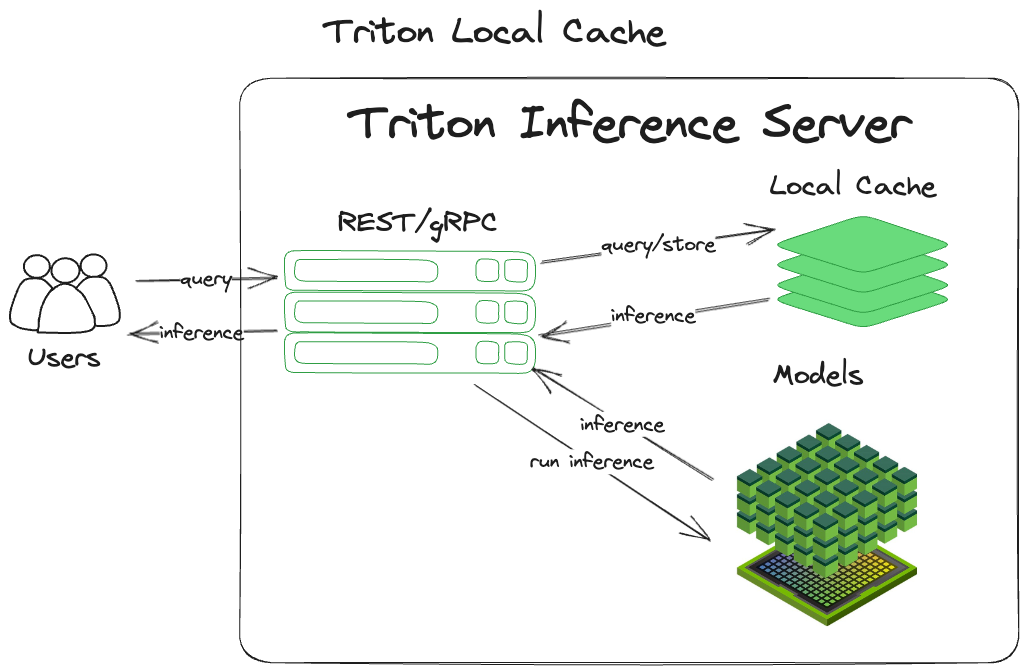
The local cache is an in-memory derivation of the most common caching pattern out there (cache-aside). It is simple and efficient, making it easy to grasp and implement. After receiving a query, NVIDIA Triton:
- Computes a hash of the input query, including the tensor and some metadata. This becomes the inference key.
- Checks for a previously inferred result for that tensor at that key.
- Returns any results found.
- Performs the inference if no results are found.
- Caches the inference in memory using the key for storage.
- Returns the inference.
‘Local’ means that it is staying local to the process and storing the cache in the system’s main memory. Figure 1 shows the implementation of this pattern.
Benefits of local cache
There are a variety of benefits that flow naturally from using this pattern. Because the queries are cached, they can be retrieved again easily without rerunning the tensor through the models. Because everything is maintained locally in the process memory, there is no need to leave the process or machine to retrieve the cached data. These two in concert can dramatically increase throughput, as well as decrease the cost of this computation.
Drawbacks of local cache
This technique does have drawbacks. Because the cache is tied directly into the process memory, each time the Triton process restarts, it starts from square one (generally referred to as a cold start). You will not see the benefits from caching while the cache warms up. Also, because the cache is process-locked, other instances of Triton will not be able to share the cache, leading to duplication of caching across each node.
The other major drawback concerns resource contention. Since the local cache is tied to the process, it is limited to the resources of the system that Triton runs on. This means that it is impossible to horizontally scale the resources allocated to the cache (distributing the cache across multiple machines), which limits the options for expanding the local cache to vertical scaling. This makes the server running Triton bigger.
Benefits of distributed caching with Redis
Unlike local caching, distributed caching leverages an external service (such as Redis) to distribute the cache off the local server. This confers several advantages to the NVIDIA Triton caching API:
- Redis is not bound to the available system resources of the same machine as Triton, or for that matter, a single machine.
- Redis is decoupled from Triton’s process life cycle, enabling multiple Triton instances to leverage the same cache.
- Redis is extremely fast (execution times are typically sub-milliseconds).
- Redis is a significantly more specialized, feature-rich, and tunable caching service compared to the Triton local cache.
- Redis provides immediate access to tried and tested high availability, horizontal scaling, and cache-eviction features out of the box.
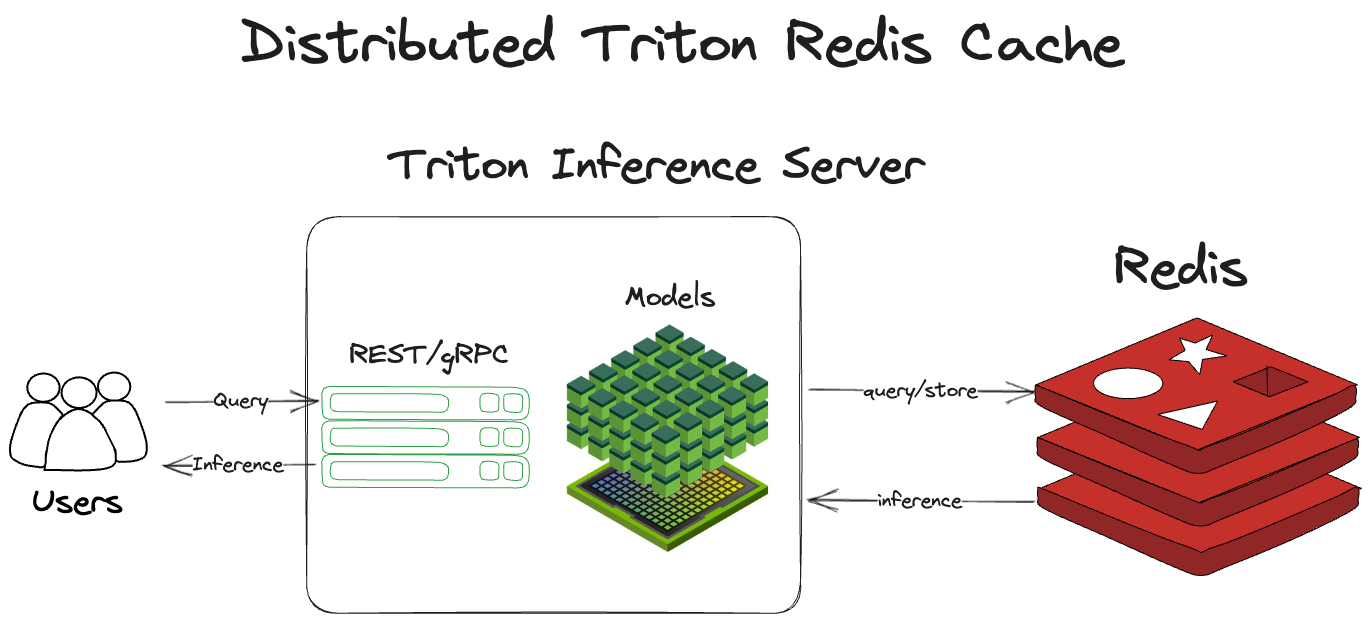
Distributed caching with Redis works much the same way as the local cache. Rather than staying within the same process, it crosses out of the Triton server process to Redis to check the cache and store inferences. After receiving a query, NVIDIA Triton:
- Computes a hash of the input query, including the tensor and some metadata. This becomes the inference key.
- Checks Redis for a previous run inference.
- Returns that inference, if it exists.
- Runs the tensor through Triton if the inference does not exist.
- Stores the inference in Redis.
- Returns the inference.
Architecturally, this is shown in Figure 2.
Distributed cache set up and configuration
To set up the distributed Redis cache requires two top-level steps:
- Deploy your Redis instance.
- Configure NVIDIA Triton to point at the Redis instance.
Triton will take care of the rest for you. To learn more about Redis, see redis.io, docs.redis.com, and Redis University.
To configure Triton to point at your Redis instance, use the --cache-config options in your start command. In the model config, enable the response cache for the model with {{response_cache { enable: true }}}.
tritonserver --cache-config redis,host=localhost --cache-config redis,port=6379The Redis cache calls on you to minimally configure the host and port of your Redis instance. For a full enumeration of configuration options, see the Triton Redis Cache GitHub repo.
Best practices with Redis
Redis is lightweight, easy to use, and extremely fast. Even with its small footprint and simplicity, there is much you can configure in and around Redis to optimize it for your use case. This section highlights best practices for using and configuring Redis.
Minimize round-trip time
The only real drawback of using an external service like Redis over an in-process memory cache is that the queries to Redis will, at least, have to cross process. They typically need to cross server boundaries as well.
Because of this, minimizing round-trip times (RTT) is of paramount importance in optimizing the use of Redis as a cache. The topic of how to minimize RTT is far too complex a topic to dive into in this post. A couple of key tips: maintain the locality of your Redis servers to your Triton servers and have them physically close to each other. If they are in a data center, try to keep them in the same rack or availability zone.
Scaling and high availability
Redis Cluster enables you to scale your Redis instances horizontally over multiple shards. The cluster includes the ability to replicate your Redis instance. If there is a failure in your primary shard, the replica can be promoted for high availability.
Maximum memory and eviction
If Redis memory is not capped, it will use all the available memory on the system that the OS will release to it. Set the maxmemory configuration key in redis.conf. But what happens if you set maxmemory and Redis runs out of memory? The default is, as you might expect, to stop accepting new writes to Redis.
However, you can also set an eviction policy. An eviction policy uses some basic intelligence to decide which keys might be good candidates to kick out of Redis. Allowing Redis to evict keys that no longer make sense to store enables it to continue accepting new writes without interruption when the memory fills.
For a full explanation of different Redis eviction policies, see key eviction in the Redis manual.
Durability and persistence
Redis is memory-first, meaning everything is stored in memory. If you do not configure persistence and the Redis process dies, it will essentially return to a cold-started state. (The cache will need to ‘warm up’ before you get the benefits from caching.)
There are two options for persisting Redis. Taking periodic snapshots of the state of Redis in .rdb files and keeping a log of all write commands in the append-only file. For a full explanation of these methods, see persistence in the Redis manual.
Speed comparison
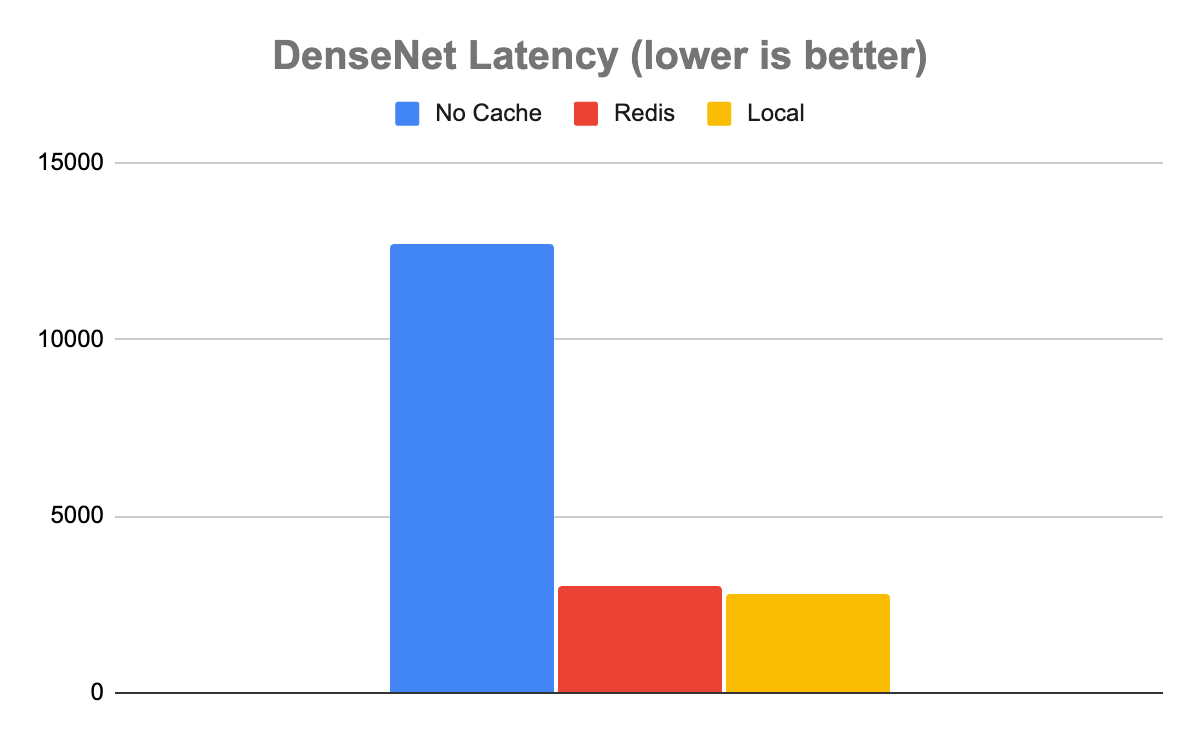
Getting down to brass tacks, this section explores a comprehensive difference between the performance of Triton without Redis and Triton with Redis. In the interest of simplicity, we leveraged the perf_analyzer tool the Triton team built for measuring performance with Triton. We tested with two separate models, DenseNet and Simple.
We ran Triton Server version 23.06 on a Google Cloud Platform (GCP) n1-standard-4 VM with a single NVIDIA T4 GPU. We also ran a vanilla open-source Redis instance on a GCP n2-standard-4 VM. Finally, we ran the Triton client image in Docker on a GCP e2-medium VM.
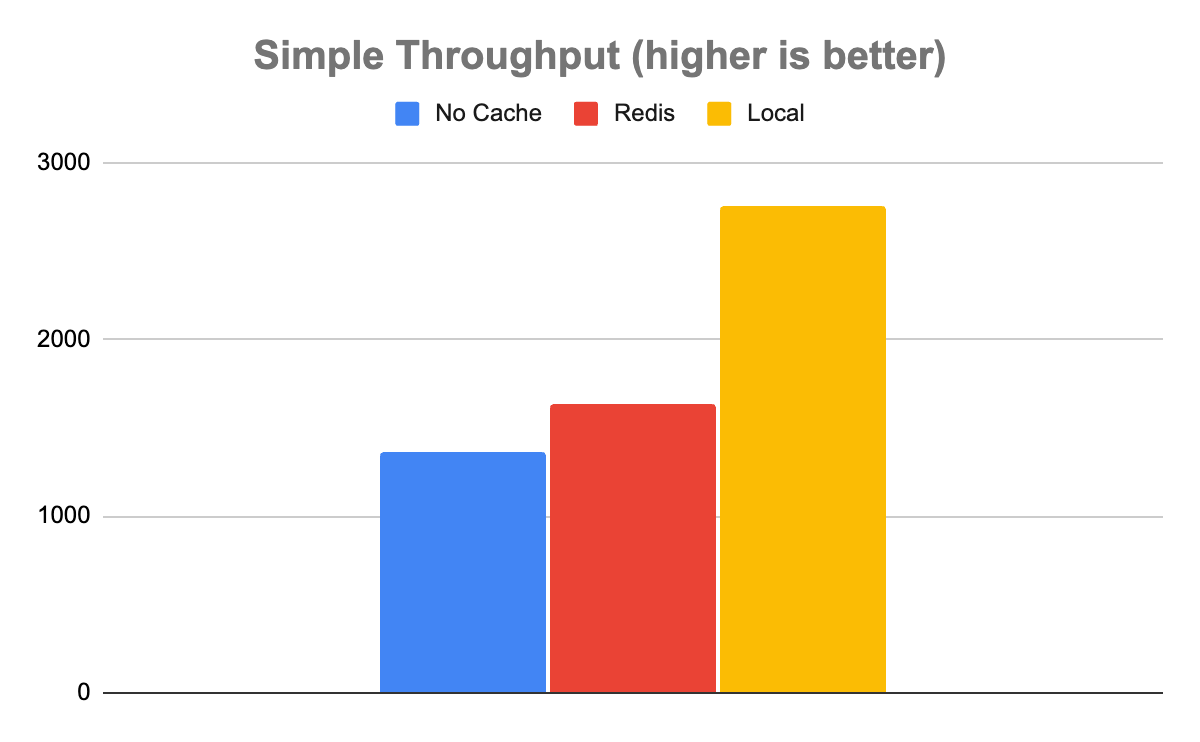
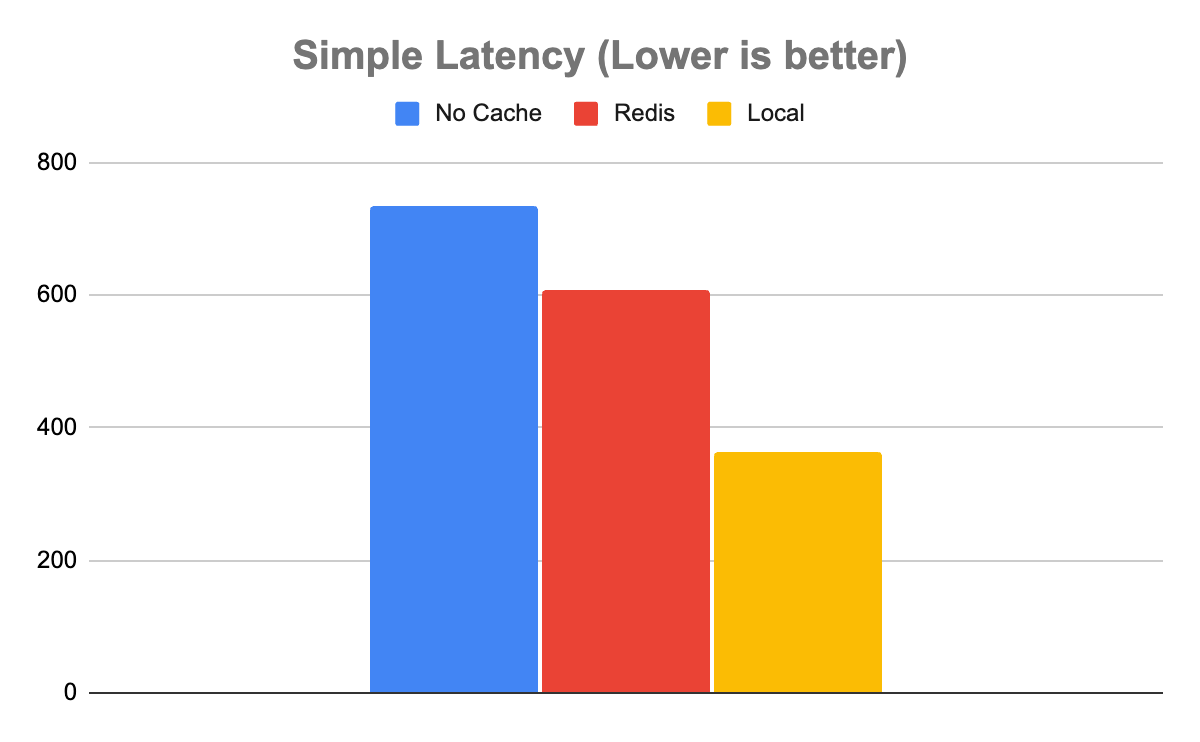
We ran the perf_analyzer tool with both the DenseNet and Simple models, 10 times on each caching configuration, with no caching, with Redis as the cache, and with the local cache as the cache. We then averaged the results of these runs.
It is important to note that these runs assume a 100% cache-hit rate. So, the measurement is the difference between the performance of Triton when it has encountered the entry in the past and when it has not.
We used the following command for the DenseNet model:
perf_analyzer -m densenet_onnx -u triton-server:8000We used the following command for the Simple model:
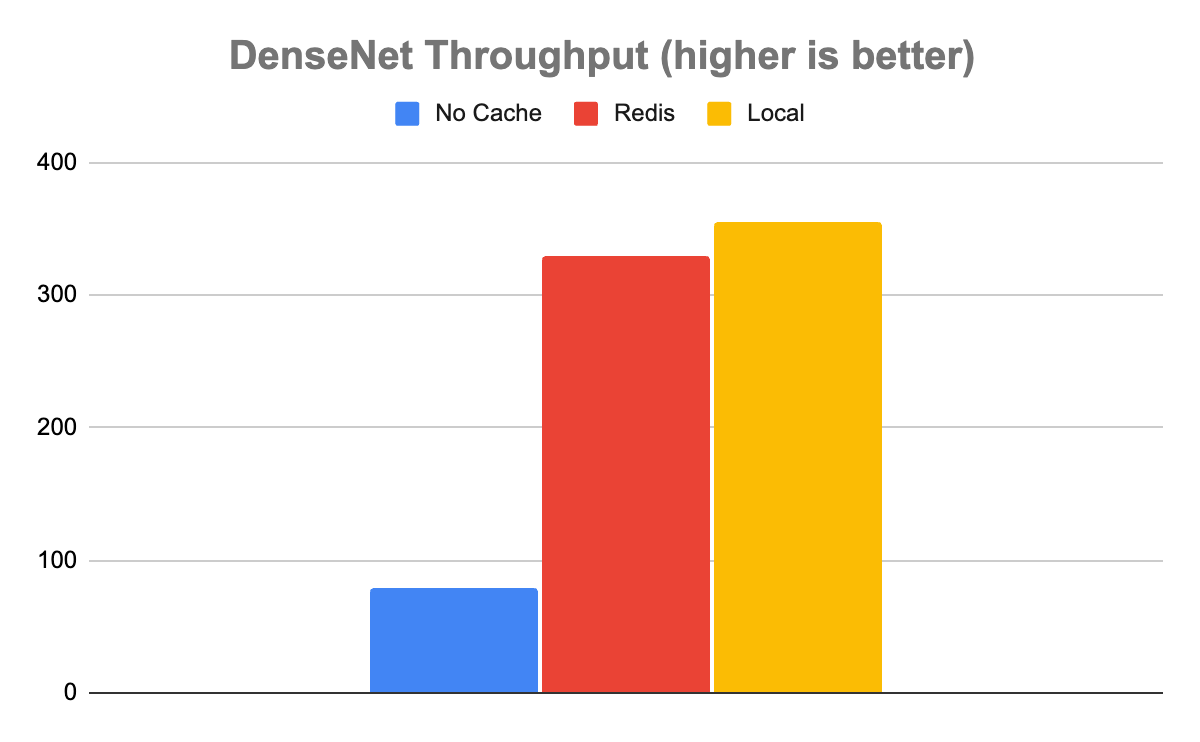
perf_analyzer -m simple -u triton-server:8000In the case of the DenseNet model, the results showed that using either cache was dramatically better than running with no cache. Without caching, Triton was able to handle 80 inferences per second (inference/sec) with an average latency of 12,680 µs. With Redis, it was about 4x faster, processing 329 inference/sec with an average latency of 3,030 µs.
Interestingly, while local caching was somewhat faster than Redis, as you would expect it to be, it was only marginally faster. Local caching resulted in a throughput of 355 inference/sec with a latency of 2,817 µs, only about 8% faster. In this case, it’s clear that the speed tradeoff of caching locally versus in Redis is a marginal one. Given all the extra benefits that come from using a distributed versus a local cache, distributed will almost certainly be the way to go when handling these kinds of data.
The Simple model tells a slightly more complicated story. In the case of the simple model, not using any cache enabled a throughput of 1,358 inference/sec with a latency of 735 µs. Redis was somewhat faster with a throughput of 1,639 inference/sec and a latency of 608 µs. Local was faster than Redis with a throughput of 2,753 inference/sec with a latency of 363 µs.
This is an important case to note, as not all uses are created equal. The system of record, in this case, may be fast enough and not worth adding the extra system for the 20% boost in throughput of Redis. Even with the halving of latency in the case of the local cache, it may not be worth the resource contention, depending on other factors such as cache hit rate and available system resources.
Best practices for managing trade-offs
As shown in the experiment, the difference between models, expected inputs, and expected outputs is critically important for assessing what, if any, caching is appropriate for your Triton instance.
Whether caching adds value is largely a function of how computationally expensive your queries are. The more computationally expensive your queries, the more each query will benefit from caching.
The relative performance of local versus Redis will largely be a function of how large the output tensors are from the model. The larger the output tensors, the more the transport costs will impact the throughput allowable by Redis.
Of course, the larger the output tensors are, the fewer output tensors you’ll be able to store in the local cache before you run out of room and begin contending with Triton for resources. Fundamentally, these factors need to be balanced when assessing which caching solution works best for your deployment of Triton.
| Benefits | Drawbacks |
| 1. Horizontally scalable 2. Effectively unlimited memory access 3. Enables high availability and disaster recovery 4. Removes resource contention 5. Minimizes cold starts |
A distributed Redis cache requires calls over the network. Naturally, you can expect somewhat lower throughput and higher latency as compared to the local cache. |
Summary
Distributed caching is an old trick that developers use to boost system performance while enabling horizontal scalability and separation of concerns. With the introduction of the Redis Cache for Triton Inference Server, you can now leverage this technique to greatly increase the performance and efficiency of your Triton instance, while managing heavier workloads and enabling multiple Triton instances to share in the same cache. Fundamentally, by offloading caching to Redis, Triton can concentrate its resources on its fundamental role—running inferences.
Get started with Triton Redis Cache and NVIDIA Triton Inference Server. For more information about setting up and administering Redis instances, see redis.io and docs.redis.com.
 Learn to create an end-to-end machine learning pipeline for large datasets with this virtual, hands-on workshop.
Learn to create an end-to-end machine learning pipeline for large datasets with this virtual, hands-on workshop.
 Episode 5 of the NVIDIA CUDA Tutorials Video series is out. Jackson Marusarz, product manager for Compute Developer Tools at NVIDIA, introduces a suite of tools…
Episode 5 of the NVIDIA CUDA Tutorials Video series is out. Jackson Marusarz, product manager for Compute Developer Tools at NVIDIA, introduces a suite of tools to help you build, debug, and optimize CUDA applications, making development easy and more efficient.
This includes:
IDEs and debuggers: integration with popular IDEs like NVIDIA Nsight Visual Studio Edition, NVIDIA Nsight Visual Studio Code Edition, and NVIDIA Nsight Eclipse simplifies code development and debugging for CUDA applications. These tools adapt familiar CPU-based programming workflows for GPU development, offering features like intellisense and code completion.
System-wide insights: NVIDIA Nsight Systems provides system-wide performance insights, visualization of CPU processes, GPU streams, and resource bottlenecks. It also traces APIs and libraries, helping developers locate optimization opportunities.
CUDA kernel profiling: NVIDIA Nsight Compute enables detailed analysis of CUDA kernel performance. It collects hardware and software counters and uses a built-in expert system for issue detection and performance analysis.
Episode 5 of the NVIDIA CUDA Tutorials Video series is out. Jackson Marusarz, product manager for Compute Developer Tools at NVIDIA, introduces a suite of tools to help you build, debug, and optimize CUDA applications, making development easy and more efficient.
Learn about key features for each tool, and discover the best fit for your needs.
Resources
- Learn more about NVIDIA Developer Tools.
- Download the CUDA toolkit.
- Dive deeper or ask questions in CUDA Developer Tools forums.
Each year, nearly 32 million people travel through the Bengaluru Airport, or BLR, one of the busiest airports in the world’s most populous nation. To provide such multitudes with a safer, quicker experience, the airport in the city formerly known as Bangalore is tapping vision AI technologies powered by Industry.AI. A member of the NVIDIA Read article >
In the global entertainment landscape, TV show and film production stretches far beyond Hollywood or Bollywood — it’s a worldwide phenomenon. However, while streaming platforms have broadened the reach of content, dubbing and translation technology still has plenty of room for growth. Deepdub acts as a digital bridge, providing access to content by using generative Read article >
Dramatic gains in hardware performance have spawned generative AI, and a rich pipeline of ideas for future speedups that will drive machine learning to new heights, Bill Dally, NVIDIA’s chief scientist and senior vice president of research, said today in a keynote. Dally described a basket of techniques in the works — some already showing Read article >
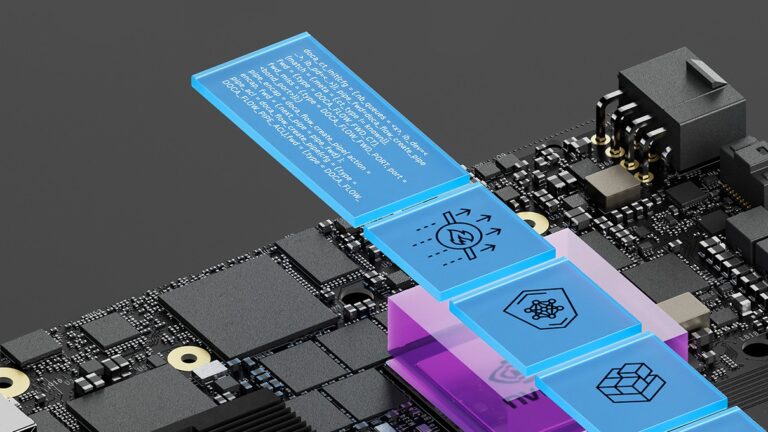 NVIDIA DOCA SDK and acceleration framework empowers developers with extensive libraries, drivers, and APIs to create high-performance applications and services…
NVIDIA DOCA SDK and acceleration framework empowers developers with extensive libraries, drivers, and APIs to create high-performance applications and services for NVIDIA BlueField DPUs and ConnectX SmartNICs. It fuels data center innovation, enabling rapid application deployment.
With comprehensive features, NVIDIA DOCA serves as a one-stop-shop for BlueField developers looking to accelerate data center workloads and AI applications at scale.
With over 10,000 developers already benefiting, NVIDIA DOCA is now generally available, granting access to a broader developer community to leverage the BlueField DPU platform for innovative AI and cloud services.
New NVIDIA DOCA 2.2 features and enhancements
NVIDIA DOCA 2.2 introduces new features and enhancements for offloading, accelerating, and isolating network, storage, security, and management infrastructure within the data center.
Programmability
The NVIDIA BlueField-3 DPU—in conjunction with its onboard, purpose-built data path accelerator (DPA) and the DOCA SDK framework—offers an unparalleled platform. It is now available for developers to create high-performance and scalable network applications that demand high throughput and low latency.
Data path accelerator
NVIDIA DOCA 2.2 delivers several enhancements to leverage the BlueField-3 DPA programming subsystem. DOCA DPA, a new compute subsystem part of the DOCA SDK package, offers a programming model for offloading communication-centric user code to run on the DPA processor. DOCA DPA helps to offload the CPU traffic and increase the performance through DPU acceleration.
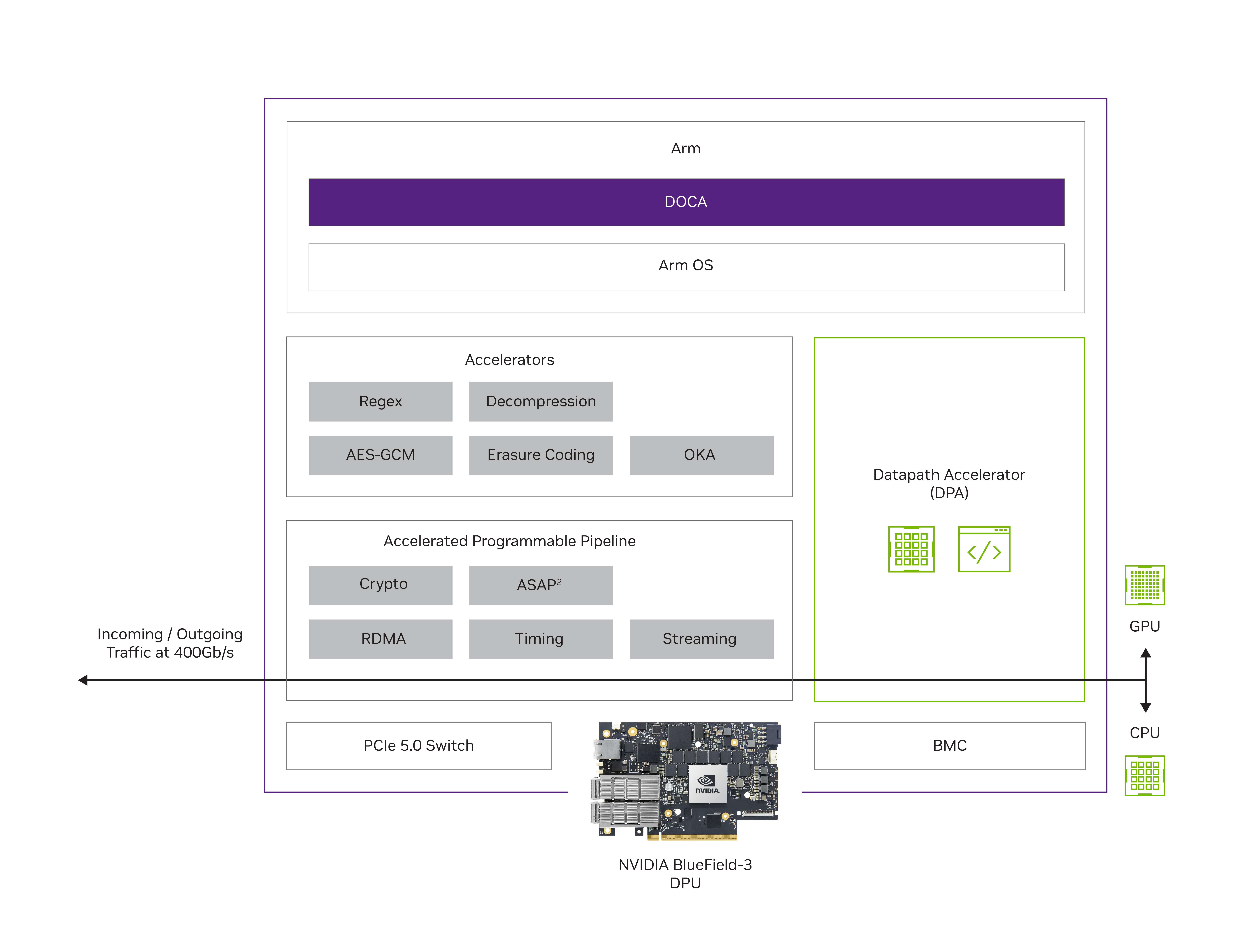
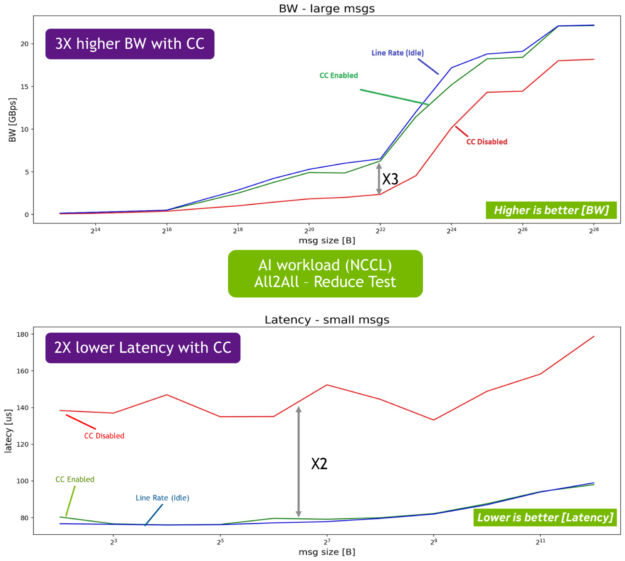
DOCA DPA also offers significant development benefits, including greater flexibility when creating custom emulations and congestion controls. Customized congestion control is critical for AI workflows, enabling performance isolation, improving fairness, and preventing packet drop on lossy networks.
The DOCA 2.2 release introduces the following SDKs:
DOCA-FlexIO: A low-level SDK for DPA programming. Specifically, the DOCA FlexIO driver exposes the API for managing and running code over the DPA.
DOCA-PCC: An SDK for congestion-control development that enables CSP and enterprise customers to create their own congestion control algorithms to increase stability and efficient network operations through higher bandwidth and lower latency.
NVIDIA also supplies the necessary toolchains, examples, and collateral to expedite and support development efforts. Note that NVIDIA DOCA DPA is available in both DPU mode and NIC mode.
Networking
NVIDIA DOCA and the BlueField-3 DPU together enable the development of applications that deliver breakthrough networking performance with a comprehensive, open development platform. Including a range of drivers, libraries, tools, and example applications, NVIDIA DOCA continues to evolve. This release offers the following additional features to support the development of networking applications.
NVIDIA DOCA Flow
With NVIDIA DOCA Flow, you can define and control the flow of network traffic, implement network policies, and manage network resources programmatically. It offers network virtualization, telemetry, load balancing, security enforcement, and traffic monitoring. These capabilities are beneficial for processing high packet workloads with low latency, conserving CPU resources and reducing power usage.
This release includes the following new features that offer immediate benefits to cloud deployments:
Support for tunnel offloads – GENEVE and GRE: Offering enhanced security, visibility, scalability, flexibility, and extensibility, are the building blocks for site communication, network isolation, and multi-tenancy. Specifically, GRE tunnels used to connect separate networks and establish secure VPN communication support overlay networks, offer protocol flexibility, and enable traffic engineering.
Support per-flow meter with bps/pps option: Essential in cloud environments to monitor/analyze traffic (measure bandwidth or packet rate), manage QoS (enforce limits), or enhance security (block denial-of-service attacks).
Enhanced mirror capability (FDB/switch domain): Used for monitoring, troubleshooting, security analysis, and performance optimization, this added functionality also provides better CPU utilization for mirrored workloads.
OVS-DOCA (Beta)
OVS-DOCA is a highly optimized virtual switch for NVIDIA Network Services. An extremely efficient design promotes next-generation performance and scale through an NVIDIA NIC or DPU. OVS-DOCA is now available in DOCA for DPU and DOCA for Host (binaries and source).
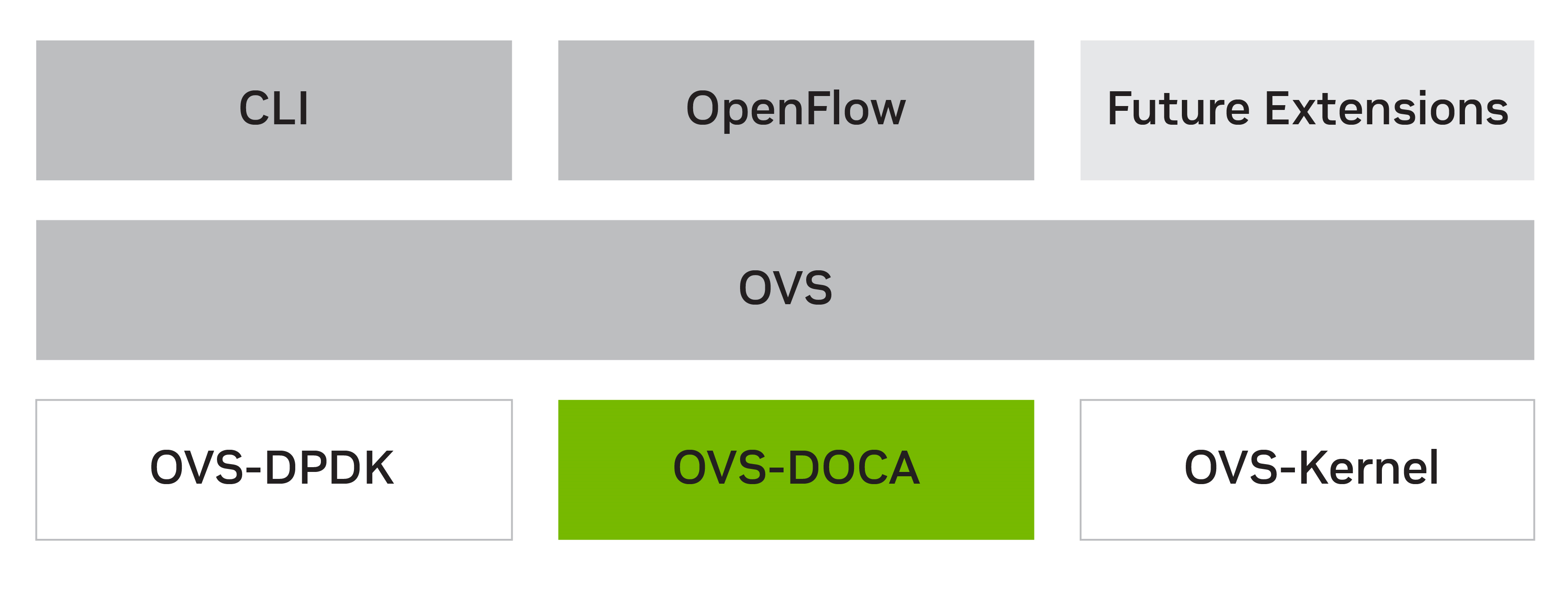
Based on Open vSwitch, OVS-DOCA offers the same northbound API, OpenFlow, CLI, and data interface, providing a drop-in replacement alternative to OVS. Using OVS-DOCA enables faster implementation of future NVIDIA innovative networking features.
BlueField-3 (enhanced) NIC mode (Beta)
This release benefits from an enhanced BlueField-3 NIC mode, currently in Beta. In contrast to BlueField-3 DPU mode, where offloading, acceleration, and isolation are all available, BlueField-3 NIC mode only offers acceleration features.
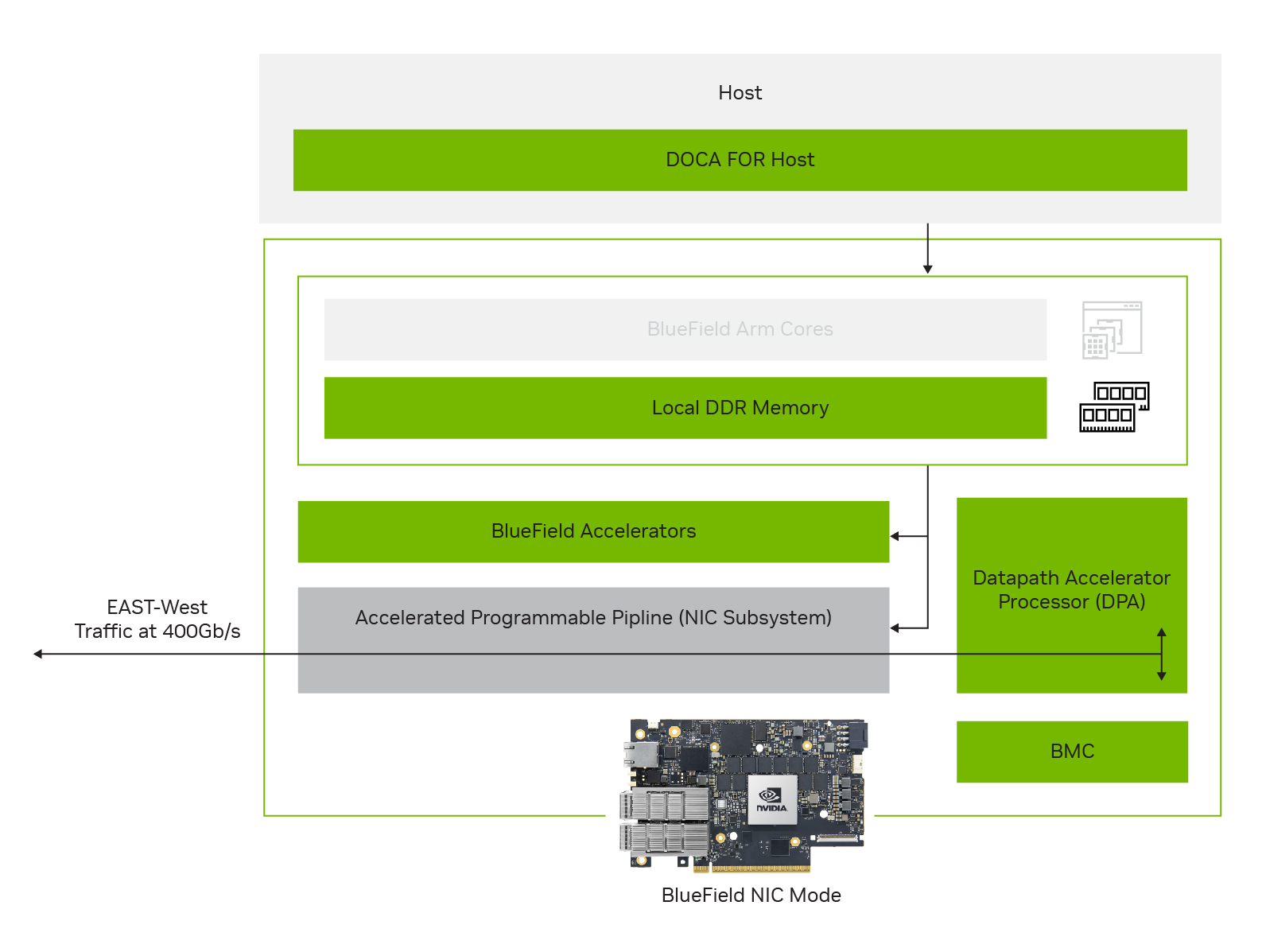
While continuing to leverage the BlueField low power and lower compute-intensive SKUs, the enhanced BlueField-3 NIC mode offers many advantages over the current ConnectX BlueField-2 NIC mode, including:
- Higher performance and lower latency at scale using local DPU memory
- Performant RDMA with Programmable Congestion Control (PCC)
- Programmability with DPA and additional BlueField accelerators
- Robust platform security with device attestation and on-card BMC
Note that BlueField-3 NIC mode will be productized as a software mode, not a separate SKU, to enable future DPU-mode usage. As such, BlueField-3 NIC mode is a fully supported software feature available on all BlueField-3 SKUs. DPA programmability for any BlueField-3 DPU operating in NIC mode mandates the installation of DOCA on the host and an active host-based service.
Services
NVIDIA DOCA services are containerized DOCA-based programs that provide an end-to-end solution for a given use case. These services are accessible through NVIDIA NGC, from which they can be easily deployed directly to the DPU. DOCA 2.2 gives you greater control and now enables offline installation of DOCA services.
NGC offline service installation
DOCA services installed from NGC require Internet connectivity. However, many customers operate in a secure production environment without Internet access. Providing the option for ‘nonconnected’ deployment enables service installation in a fully secure production environment, simplifying the process and avoiding the already unlikely scenario whereby each server would need a connection to complete the installation process.
For example, consider the installation of DOCA Telemetry Service (DTS) in a production environment to support metrics collection. The full installation process is completed in just two steps:
- Step 1: NGC download on connected server
- Step 2: Offline installation using internal secure delivery
Summary
NVIDIA DOCA 2.2 plays a pivotal and indispensable role in driving data center innovation and transforming cloud and enterprise data center networks for AI applications. By providing a comprehensive SDK and acceleration framework for BlueField DPUs, DOCA empowers developers with powerful libraries, drivers, and APIs, enabling the creation of high-performance applications and services.
With several new features and enhancements to DOCA 2.2, a number of immediate gains are available. In addition to the performance gains realized through DPU acceleration, the inclusion of DOCA-FlexIO and DOCA-PCC SDK offers developers accelerated computing for AI-centric benefits. These SDKs enable the creation of custom emulations and algorithms, reducing the time to market, and significantly improving the overall development experience.
Additionally, networking-specific updates to NVIDIA DOCA FLOW and OVS-DOCA offer simplified delivery pathways for software-defined networking and security solutions. These features increase efficiency and enhance visibility, scalability, and flexibility, essential for building sophisticated and secure infrastructures.
With wide-ranging contributions to data center innovation, AI application acceleration, and robust network infrastructure, DOCA is a crucial component of NVIDIA AI cloud services. As the industry moves towards more complex and demanding computing requirements, the continuous evolution of DOCA and integration with cutting-edge technologies will further solidify its position as a trailblazing platform for empowering the future of data centers and AI-driven solutions.
Download NVIDIA DOCA to begin your development journey with all the benefits DOCA has to offer. For more information, see the following resources:
 NVIDIA is driving fast-paced innovation in 5G software and hardware across the ecosystem with its OpenRAN-compatible 5G portfolio. Accelerated computing…
NVIDIA is driving fast-paced innovation in 5G software and hardware across the ecosystem with its OpenRAN-compatible 5G portfolio. Accelerated computing hardware and NVIDIA Aerial 5G software are delivering solutions for key industry stakeholders such as telcos, cloud service providers (CSPs), enterprises, and academic researchers.
TMC recently named the NVIDIA MGX with NVIDIA Grace Hopper Superchip (GH200), and NVIDIA Aerial Research Cloud as two of the 2023 INTERNET TELEPHONY Open RAN Products of the Year. The award “recognizes and honors companies that are the most innovative, and disruptive Open RAN products and solutions that have not just contributed to the growth and development of the industry, but have also delivered positive results.”
The awards showcase the deepening capabilities of the NVIDIA 5G ecosystem and illustrate how NVIDIA is helping the ecosystem to address particular market challenges. In particular, two key contributions stand out. First, the MGX with GH200 superchip delivers the most modular and ready-to-deploy accelerated computing solution for generative AI and 5G, driving ROI for telcos and CSPs. Second, Aerial Research Cloud offers the research community the most powerful, yet fully open, platform to do groundbreaking 5G+ and 6G research.
MGX with GH200: generative AI and 5G on NVIDIA accelerated cloud
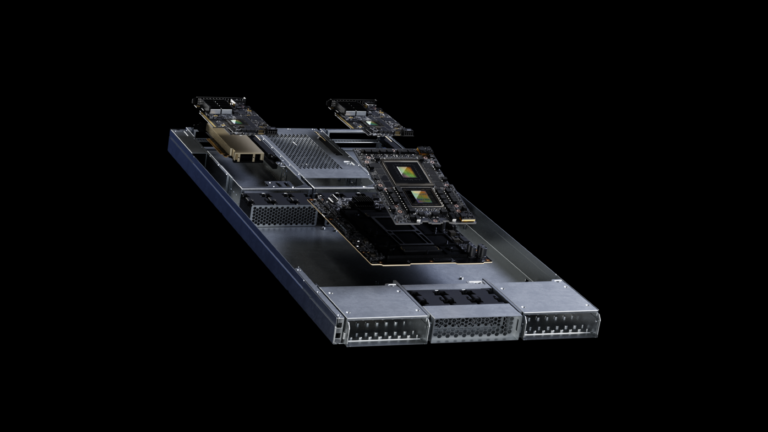
The MGX with GH200 superchip features the NVIDIA GH200, which combines the NVIDIA Grace CPU and the NVIDIA H100 Tensor Core GPU with NVLink Chip-to-Chip in a single superchip in the MGX Reference Design (Figure 1). This combination can be used for a wide variety of use cases, from generative AI to 5G, with NVIDIA Aerial software at the edge and cloud.
The MGX with GH200 includes the NVIDIA BlueField-3 Data Processing Unit (DPU) targeted at telcos and CSPs. This enables them to deploy secure and accelerated computing platforms to run both generative AI and 5G for improving ROI and reducing TTM.
BlueField-3 inclusion in MGX enables crucial capabilities including accelerated VPC networking, zero-trust security, composable storage, and elastic GPU computing. Additionally, the NVIDIA Spectrum Ethernet switch with BlueField-3 DPU delivers a highly precise timing protocol for 5G as well as optimized routing for demanding AI workloads.
“The MGX with GH200-based generative AI and 5G data center platform is designed to improve the performance, scalability, and automated resource utilization of AI, 5G, and other telco-specific workloads from the edge to the cloud. This innovative solution will greatly benefit telcos who can leverage their space, power, and network connectivity to become AI factories of the future,” says Ronnie Vasishta, senior vice president for telecoms at NVIDIA.
Thanks to the GH200, the MGX server delivers one cloud platform for 5G and generative AI. This combination enables telcos and CSPs to maximize using their compute infrastructure by running 5G and generative AI interchangeably, boosting ROI significantly compared to a single-purpose 5G RAN infrastructure.
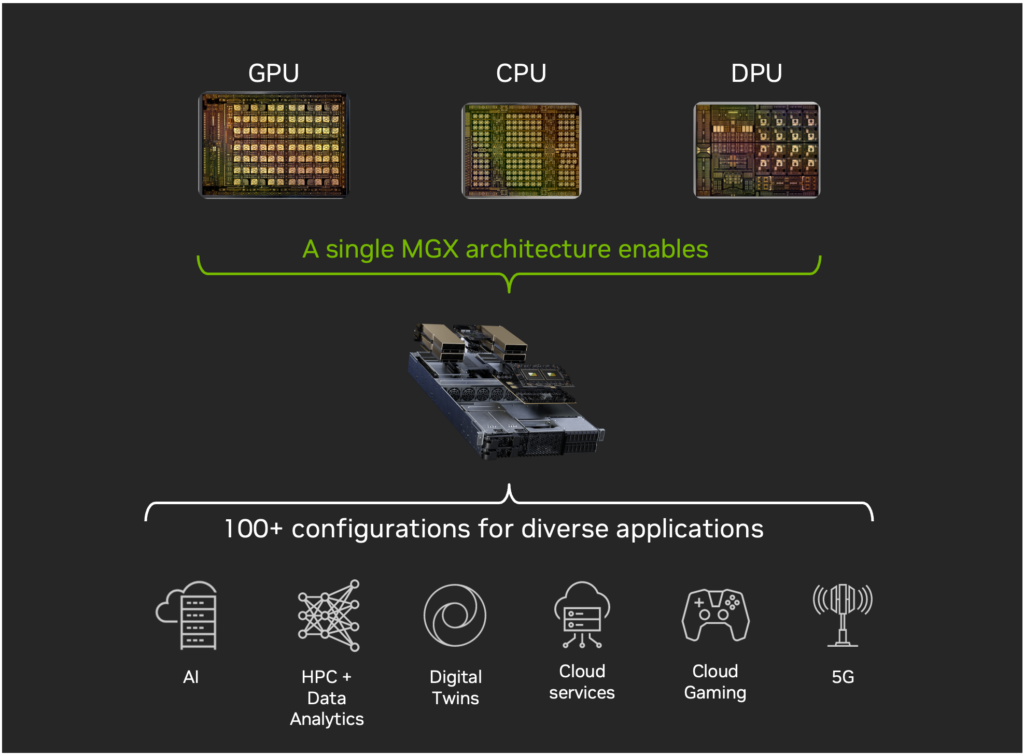
At COMPUTEX 2023, NVIDIA announced that it is collaborating with Softbank on a pioneering platform for generative AI and 5G/6G applications based on MGX with GH200. SoftBank plans to roll it out at new, distributed AI data centers across Japan.
NVIDIA Aerial Research Cloud: accelerated computing for 5G+ and 6G research
Aerial Research Cloud provides developers, researchers, operators, and network equipment providers with all the requisite components to deploy a campus network for research. It is delivered in collaboration with the Open Air Alliance (OIA) enabling researchers to do groundbreaking work on 5G+ and 6G. In the last 6 months, three partners have launched networks based on the platform, with more in progress.
“Aerial Research Cloud is targeted at research and innovation use cases. It offers a fully featured, and the industry’s first open, software-defined, programmable (in C), ML-ready performant cloud service for wireless research,” said Vasishta.
Figure 2 features a 3GPP release 15 compliant solution which is operational over-the-air, and an O-RAN 7.2 split campus 5G SA 4T4R wireless stack, with all network elements from the radio access network and 5G core. It is based on NVIDIA Aerial SDK Layer 1, which is integrated with OAI’s distributed unit, centralized unit, or 5G NR gNB and 5G core node network elements.
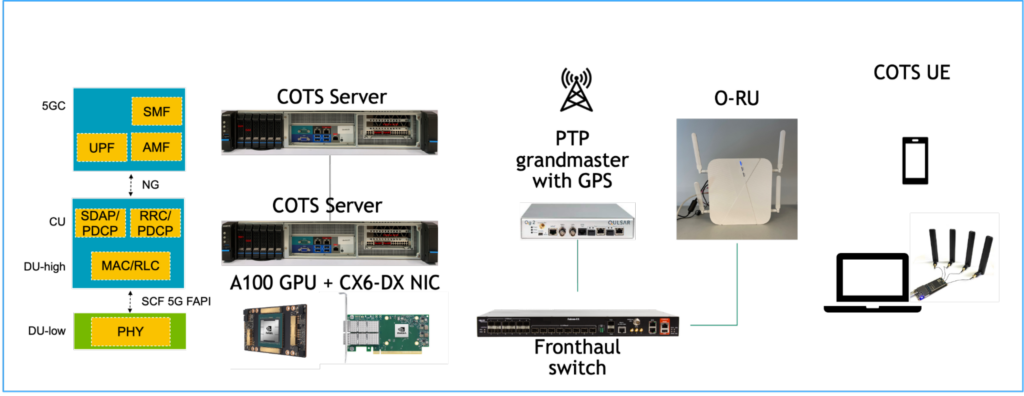
Aerial Research Cloud also supports developer onboarding and algorithm development in real-time wireless networks. It uses a blueprint to ease onboarding, staging, and integrating 5G Advanced network components and verification steps through bi-directional UDP traffic. Lastly, it provides complete access to source code in C/C++, to jump-start customizations and next-generation wireless algorithm research.
What’s next
TMCnet’s award recognizes how NVIDIA is shaping the future of 5G and the OpenRAN community. The MGX with the GH200 platform is uniquely positioned to support the AI-driven innovation that will be essential for 6G networks. OpenRAN and other telco workloads benefit greatly from the MGX platform’s ability to deliver high performance, scalability, and resource efficiency. The Aerial Research Cloud roadmap will continue to develop features in advanced wireless technologies of interest to innovators including AI and ML.
These solutions, and more, from the NVIDIA 5G portfolio are being showcased at NVIDIA GTC 2024.
As generative AI and large language models (LLMs) continue to drive innovations, compute requirements for training and inference have grown at an astonishing pace. To meet that need, Google Cloud today announced the general availability of its new A3 instances, powered by NVIDIA H100 Tensor Core GPUs. These GPUs bring unprecedented performance to all kinds Read article >