I have 10k+ documents which belong either to class 0 or 1. I want to train a model by feeding it each sentence in a document through a textvectorize layer ➡️ embedding layer ➡️ lstm layer Then concat all lstm layers for each sentence feed them to 1 dense layer with outputsize of 128 ➡️ dense layer outputsize of 1 with softmax as activation.
Number of sentences in each document is somewhere between 0 and 5000. Each sentence has between 1-5 words.
I have managed to create a model for predicting which class a sentence most likely belong to. But i want to basically extend it to take all sentences from an exampledocument for classifying entire document. Each sentence is not related to the other.
While trying to run the training code for my model, the following error happens:
Traceback (most recent call last):
File “C:UsersDiogo AlpendreOneDrive – IPLeiriaPara arrumarDocumentosGitHubT22_AD_Detectiondatasetsfstudent_datasetfstudent_dataset.py”, line 6, in <module>
import tensorflow_datasets as tfds
File “C:UsersDiogo AlpendreAppDataLocalProgramsPythonPython39libsite-packagestensorflow_datasets__init__.py”, line 64, in <module>
from tensorflow_datasets import vision_language
File “C:UsersDiogo AlpendreAppDataLocalProgramsPythonPython39libsite-packagestensorflow_datasetsvision_language__init__.py”, line 20, in <module>
from tensorflow_datasets.vision_language.wit import Wit
File “C:UsersDiogo AlpendreAppDataLocalProgramsPythonPython39libsite-packagestensorflow_datasetsvision_languagewit__init__.py”, line 18, in <module>
from tensorflow_datasets.vision_language.wit.wit import Wit
File “C:UsersDiogo AlpendreAppDataLocalProgramsPythonPython39libsite-packagestensorflow_datasetsvision_languagewitwit.py“, line 25, in <module>
csv.field_size_limit(sys.maxsize)
OverflowError: Python int too large to convert to C long
Initially I installed it using pip but my CPU does not have AVX support. A solution to this that I found online is that if you build tensorflow from source, it will somehow work around this. However I started the compilation this morning at 10am… now it’s 6PM and it’s still going… my computer is literally just a repurposed office machine so it is not the most powerful but this seems way too long, is this normal?
Does anyone have a favorite pretrained TF LITE Model for general image classifications? I have a database of a few thousands images and I’d like to add tags to them. Any .tflite that also has a .txt file for labeling would work. Would like for the image classification to be as broad and accurate as possible (obviously I’m asking for a lot here). Thanks for the help!
Despite the feats of modern medicine, as many as 250,000 Americans die from medical errors each year — more than 6 times the number killed in car accidents. Smart hospital AI can help avoid some of these fatalities in healthcare, just as computer vision-based driver assistance systems can improve road safety, according to AI leader Read article >
We currently have a decent machine learning pipeline going on but new projects/demands are coming and we’re now lacking coputational power to run everything in time. Since hardware prices skyrocketed since the begining of this pandemic, a local upgrade would be very expensive, so we’re looking for alternatives.
Can anyone suggest and comment your experience with some of these cloud GPU services? We’re running trainings 24/7 on our local machines and more “horsepower” would be appreciated. We’re looking into Paperspace Gradient, but it seems a bit of an overkill (but still cheap) and AWS.
As one can see the results (0.2 and -1.17) are completely different. Same saved_model was used in all cases.
Note: TF-serving is run under docker-compose and the service “tf-serving” is using the official tensorflow/serving image
I would appreciate any hits and testing suggestions.
If there are better solutions to run multiple TF models in production than TF-serving (except Cloud-based solutions like SageMaker) please share some knowledge with me.
Notes:
Batching is disabled by default settings, but I disabled it manually too
There are 4 different models that produce different type of output (single value, set of values, bitmap data). ALL 4 have different result while being served by TFServing and plain TF. Dimensions of the output tensors are fine, values they have are “wrong”.
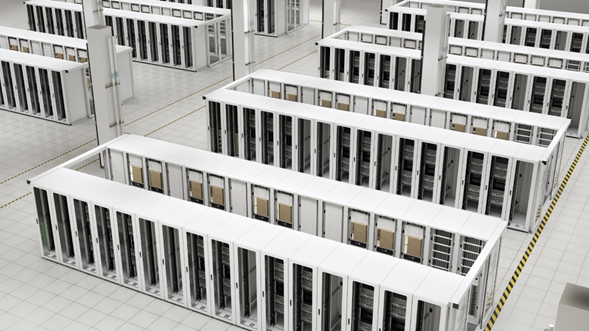
cuFFTMp is a multi-node, multi-process extension to cuFFT that enables scientists and engineers to solve challenging problems on exascale platforms.
Today, NVIDIA announces the release of cuFFTMp for Early Access (EA). cuFFTMp is a multi-node, multi-process extension to cuFFT that enables scientists and engineers to solve challenging problems on exascale platforms.
FFTs (Fast Fourier Transforms) are widely used in a variety of fields, ranging from molecular dynamics, signal processing, computational fluid dynamics (CFD) to wireless multimedia and machine learning applications. With cuFFTMp, NVIDIA now supports not only multiple GPUs within a single system, but many GPUs across multiple nodes.
Figure 1 shows cuFFTMp reaching over 1.8 PFlop/s, more than 70% of the peak machine bandwidth for a transform of that scale.
Figure 1. cuFFTMp (weak scaling) performances on the Selene cluster
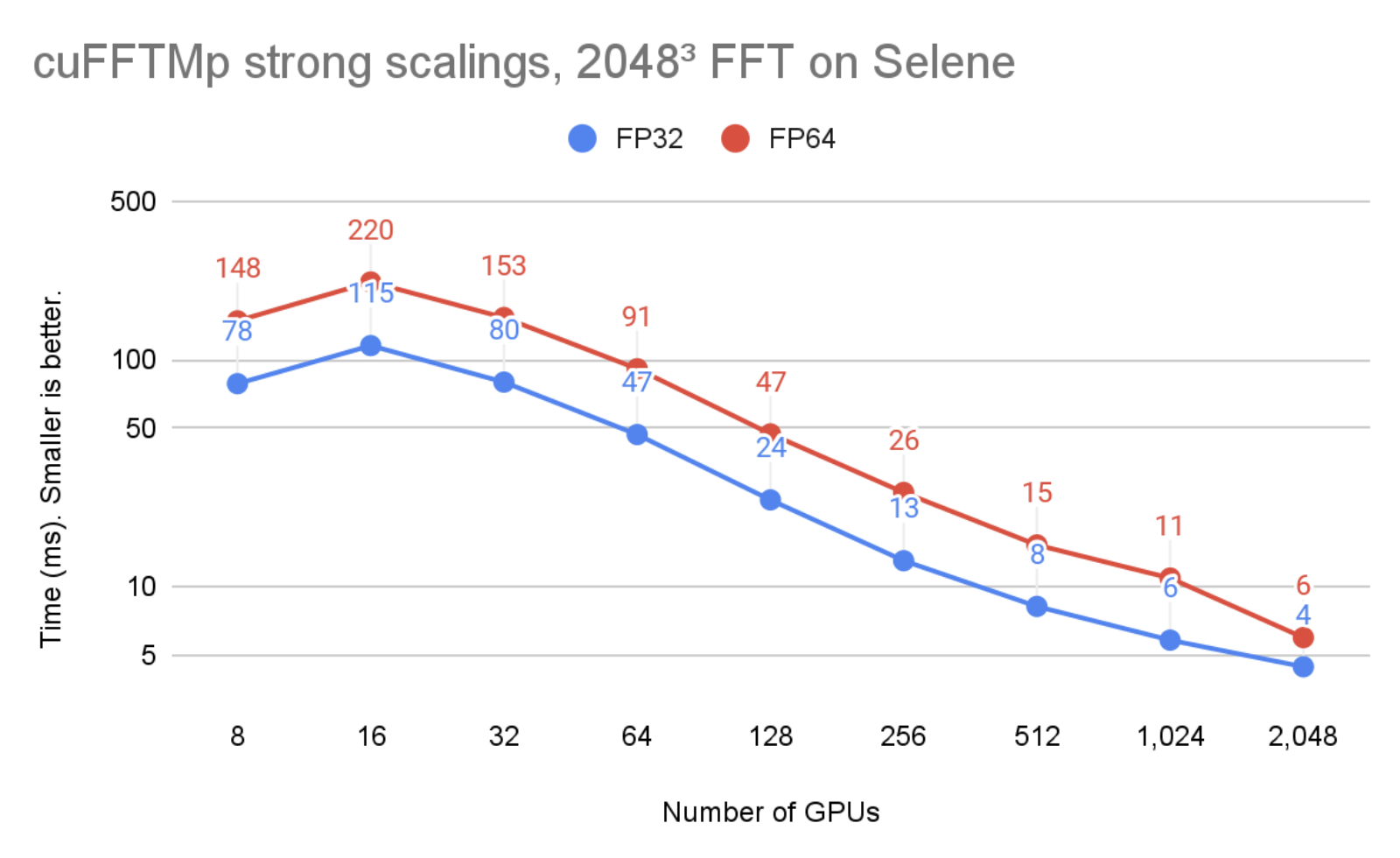
In Figure 2, the problem size is kept unchanged but the number of GPUs is increased from 8 to 2048. You can see that cuFFTMp successfully strong-scales the problem, bringing the single-precision time from 78ms with 8 GPUs (1 node) to 4ms with 2048 GPUs (256 nodes).
Figure 2. cuFFTMp (strong scaling) performances on the Selene cluster
Figure 1 and 2 were run on the Selene cluster. Selene is made of NVIDIA DGXA100, 8xA100-80GB per node with NVSwitch (300 GB/s/GPU, bidirectional) and Mellanox Infiniband HDR (200 GB/s/node, bidirectional). Tests were ran using CUDA 11.4 and the NVIDIA HPC SDK 21.9 Docker container, available at nvcr.io/nvidia/nvhpc:21.9-runtime-cuda11.4-ubuntu20.04. GPU application clocks were set to the maximum.
Performance and scalability
Distributed 3D FFTs are well-known to be communication-bound because of global collective communications of the MPI_Alltoallv type. MPI_Alltoallv is the main bottleneck for distributed FFTs due to low internode bandwidth relative to high compute capabilities, and accelerator-aware MPI implementations of all_to_all type of communications vary in quality.
cuFFTMp uses NVSHMEM, a new communication library based on the OpenSHMEM standard and designed for NVIDIA GPUs by providing kernel-initiated communications. NVSHMEM creates a global address space that includes the memory of all GPUs in the cluster. Performing communication from inside CUDA kernels enables fine-grained, remote data access that reduces synchronization cost and takes advantage of the massive parallelism in the GPU to hide communication overheads.
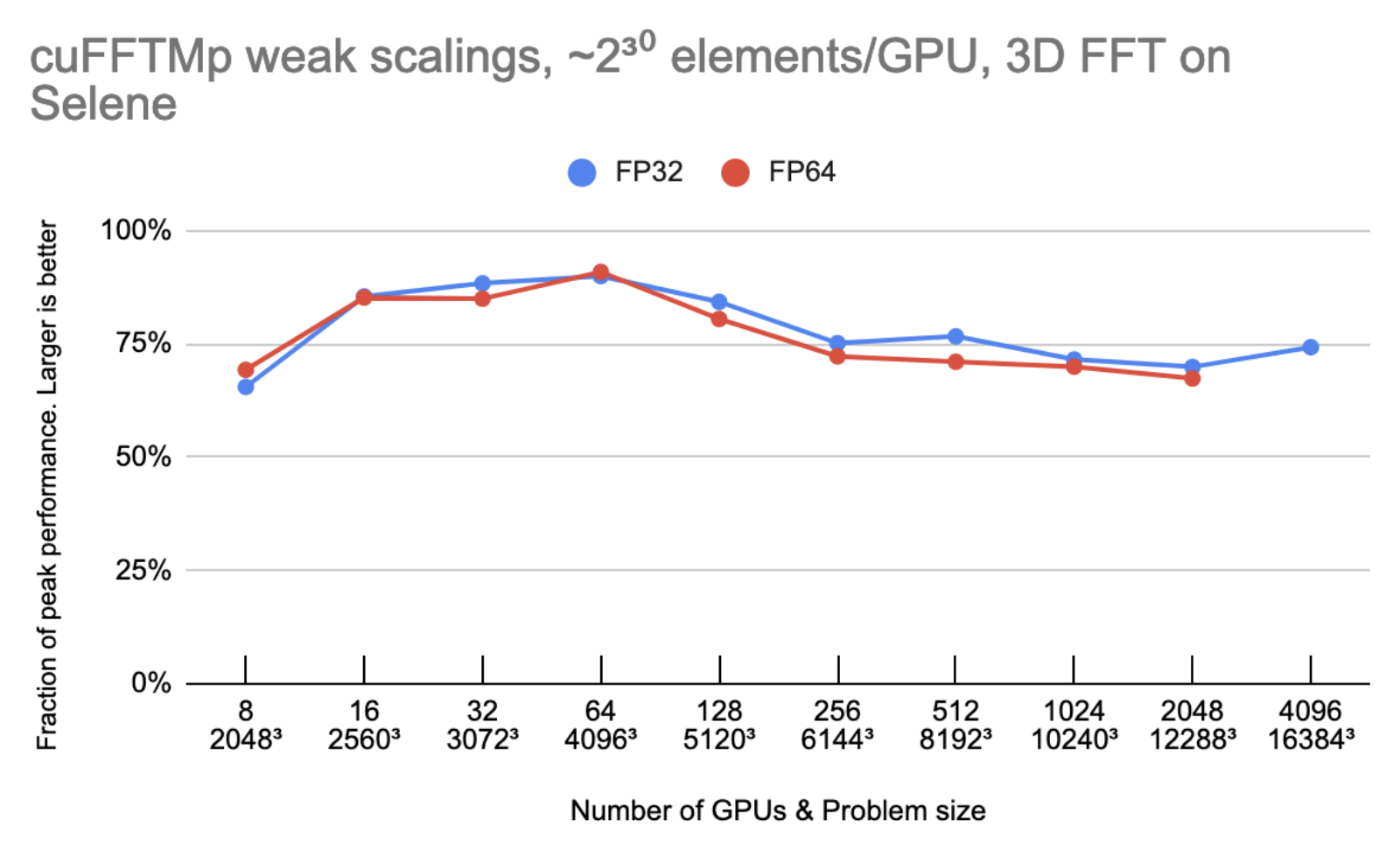
Figure 3 shows that cuFFTMp is able to maintain roughly 75% peak as the number of GPUs are doubled.
Figure 3. Weak scalings of cuFFTMp on the Selene cluster, displayed as a fraction of the peak performances
Peak performance is using 2000 GB/s/gpu for bidirectional global memory bandwidth, 300 GB/s/gpu for bidirectional NVLink bandwidth and 25 GB/s/gpu for Infiniband bandwidth.
Let N be the 1D transform size and G the number of GPUs. Every GPU owns N3/G elements (8 or 16 bytes each), and the model assumes that N3/G elements are read/written six times to or from global memory and N3/G2 elements are sent one time from every GPU to every other GPU. On 4096 GPUs, the time spent in non-InfiniBand communications accounts for less than 10% of the total time.
MPI portability and multi-architecture support
As mentioned earlier, the performances of cuFFTMp do not depend on the MPI implementation. For portability, cuFFTMp requires MPI to be launched and to manage data distributions on the CPUs.
Currently cuFFTMp statically links to NVSHMEM. NVSHMEM uses a small MPI “bootstrap plugin” (nvshmem_bootstrap_mpi.so), which is built using MPI and automatically loaded at runtime. This bootstrap targets the OpenMPI version included in the HPC SDK. For user applications that depend on another MPI implementation, the EA package includes helper scripts to build a bootstrap targeting a different MPI.
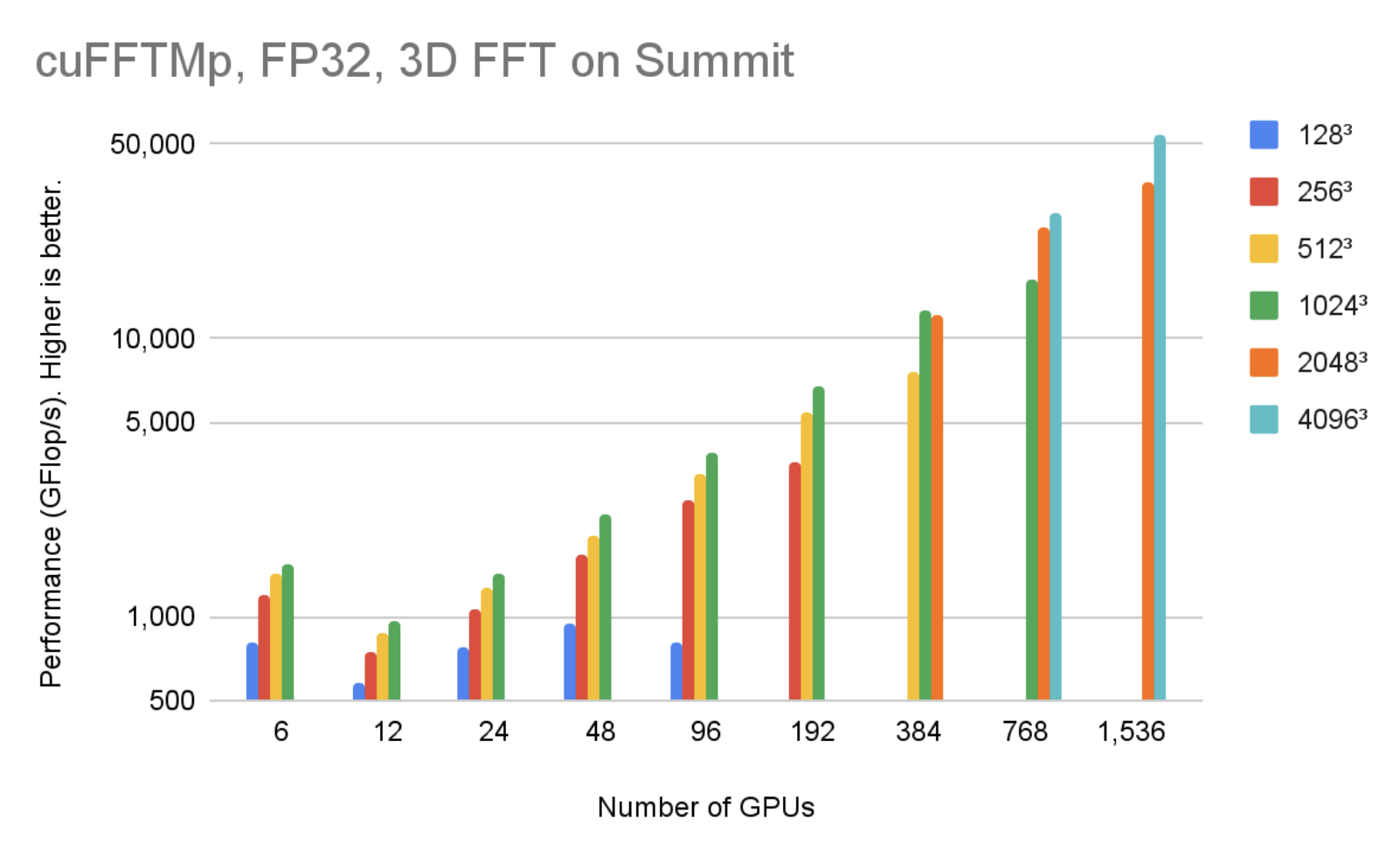
cuFFTMp supports both Linux x86_64 and IBM POWER architecture. You can download the EA package for different architectures. Figure 4 shows that, using 1536 V100 GPUs in 256 nodes, cuFFTMp can reach over 50 TFlop/s transforming 40963 complex data points with only 5% of the Summit system.
Figure 4. cuFFTMp (FP32) performances on the Summit cluster
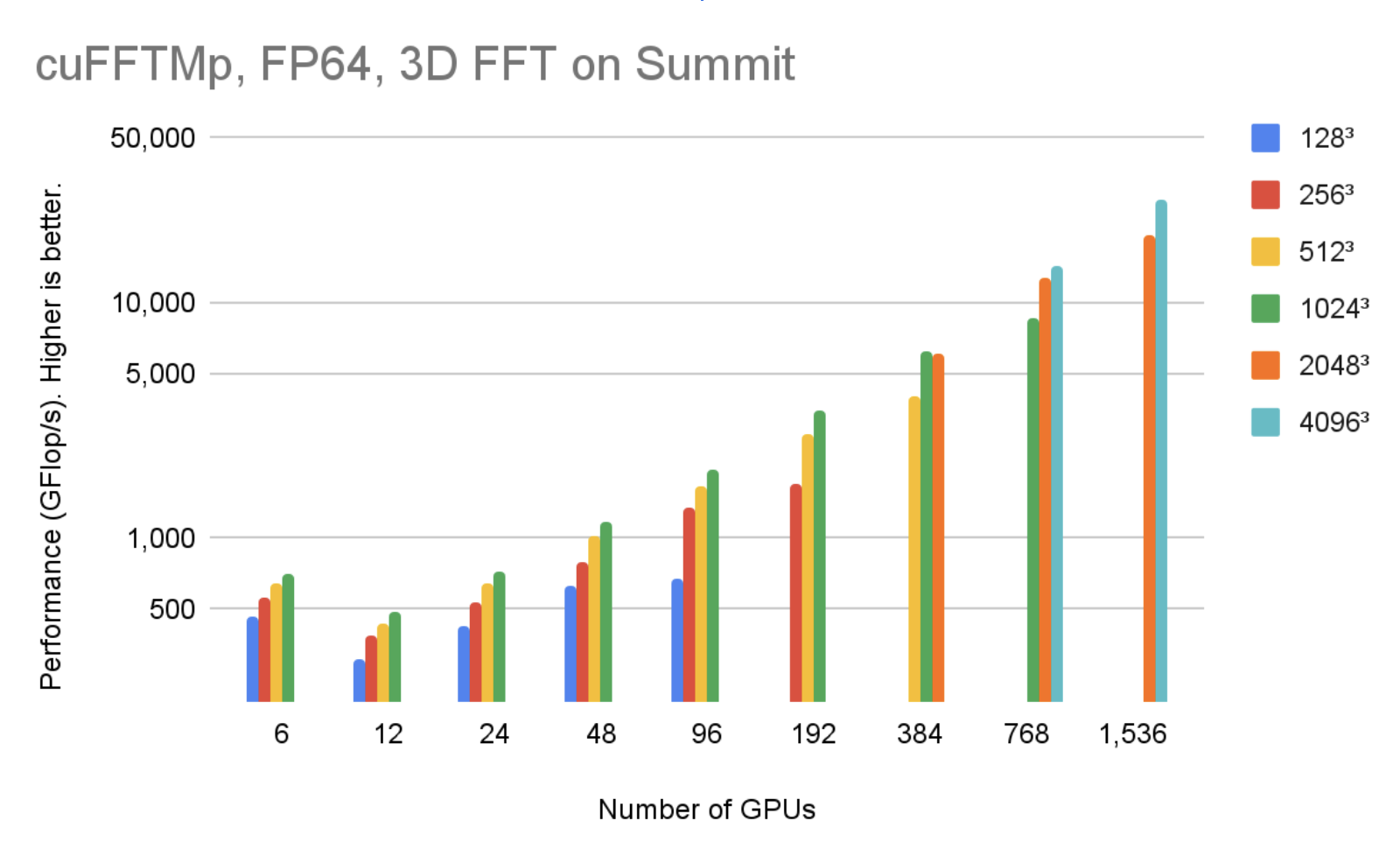
Figure 5 shows that, using 1536 V100 GPUs in 256 nodes, cuFFTMp can reach over 40 TFlop/s transforming 40963 complex data points with only 5% of the Summit system.
Figure 5. cuFFTMp (FP64) performances on the Summit cluster
Easy transition to cuFFTMp
cuFFTMp is simply an extension to the current multi-GPU cuFFT library. Most existing multi-GPU functions apply to cuFFTMp. As a distributed, multiprocess library, cuFFTMp requires MPI to be bootstrapped (“launched”) and expects that data is distributed among MPI processes. The following table shows the code required to convert an application from using multi-GPU cuFFT to cuFFTMp.
Multi-GPU, single-process cuFFT
cuFFTMp
#include
#include #include
MPI_Init(&argc, &argv); int rank, size; MPI_Comm_rank(MPI_COMM_WORLD, &rank); MPI_Comm_size(MPI_COMM_WORLD, &size); cudaSetDevice(my_device);
size_t my_NX = (NX / size) + (rank size ? 1 : 0);
// host buffer h_f size NX*NY*NZ
// host buffer h_f size my_NX*NY*NZ
cufftHandle plan_c2c; cufftCreate(&plan_c2c);
for (auto i = 0; i whichGPUs[i] = i; cufftXtSetGPUs(plan_c2c, NGPUS, whichGPUs)
Slab, pencil, and block decompositions are typical names of data distribution methods in multidimensional FFT algorithms for the purposes of parallelizing the computation across nodes. cuFFTMp EA only supports optimized slab (1D) decompositions, and provides helper functions, for example cufftXtSetDistribution and cufftMpReshape, to help users redistribute from any other data distributions to cuFFTMp’s slab data distribution.
The cuFFTMp EA package includes C++ and Fortran samples that cover a range of use cases: C2C, R2C/C2R, different plans sharing workspace, and shuffling data from one distribution to the other or redistributing across GPUs. cuFFTMp provides full support for Fortran applications, using the HPC SDK 21.7+ compilers and wrappers included in the EA package.
To understand turbulence flow behavior, a research team at the Tata Institute of Fundamental Research-Hyderabad India (TFRI) developed Fluid3D, a CFD package applying direct numerical simulation (DNS) of the Navier-Stokes equations with pseudo-spectral methods. By porting Fluid3D to cuFFTMp and CUDA, the team can now simulate higher Reynolds number flow on thousands of GPUs within a few hours, an impossible task using the MPI CPU version.
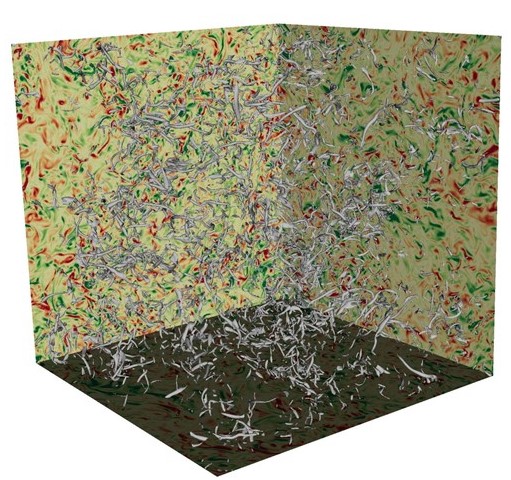
In Figure 6, turbulent flows consist of vortices of different scales, and energy is transferred from larger scales of motion to the small scales. It is important to simulate and understand the isotropic behavior of the smallest turbulent structures in large DNS runs.
Figure 6. DNS turbulence flow simulation using Fluid3D
DNS is a key tool to improve the understanding of turbulence flows, and pseudo-spectral methods are commonly used because of their computational efficiency and accuracy.
The challenge of turbulence flow simulation is the need to attain high Reynolds (Re) numbers. To maintain the computational stability, the Re number is limited by the grid resolution, that is, Re2.25N3, where N is the number of grid points in each dimension. Therefore, simulating high Re number turbulence flows requires numerical resolutions that can be computationally costly or even prohibitive.
Table 1 shows the grid resolutions required for the maximum Re numbers and the memory requirements for the simulations.
Grid resolution
Simulated Reynolds number
Memory requirement (GB)
10243
199.2
88
20483
316.2
704
40963
501.9
5,632
81923
796.8
45,056
122883
1044.1
152,064
163843
1264.8
360,448
Table 1. The Turbulence DNS package Fluid3D requires large numerical resolution and system memory to simulate high Reynolds number flow
Fluid3D uses a second-order exponential Adams-Bashforth time-stepping method in the Fourier space. The simulations are typically integrated over tens of thousands of time steps, computing nine 3D-FFTs per time step. FFTs dominate the overall simulation runtime. The elapsed wall time per time step is an important metric to gauge whether the time to solution for a particular configuration of numerical experiment is reasonable.
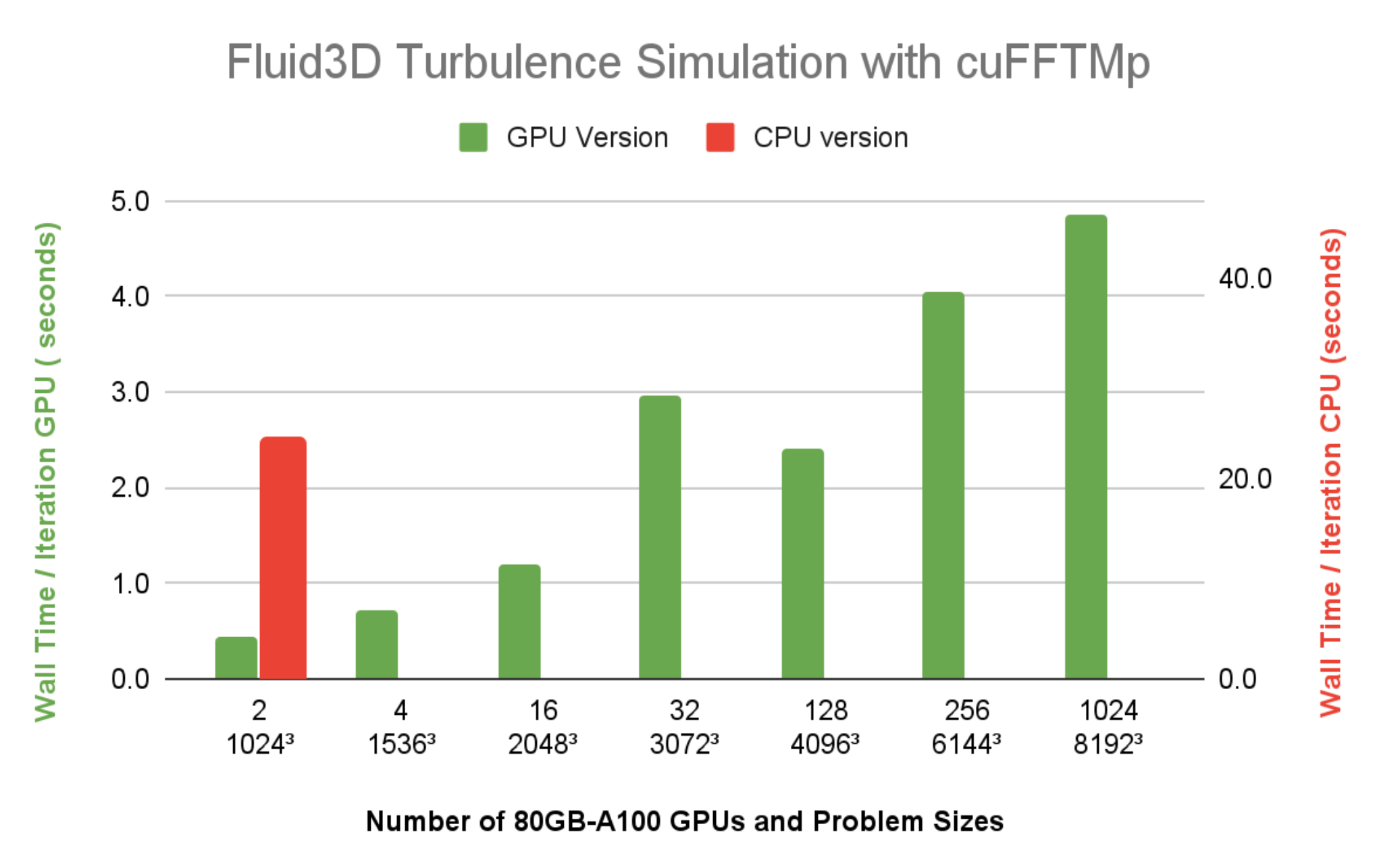
Figure 7 shows the wall time per time step of Fluid3D is under 5 seconds, at a resolution of 81923, using 1024 A100 GPUs (128 nodes) on Selene. The CPU version with FFTW-MPI, takes 23.9 seconds per time iteration, for a resolution of 10243 problem size using 64 MPI ranks on a single 64-core CPU node. Compared to the wall time running the same 10243 problem size using two A100 GPUs, it’s clear that the speedup of Fluid3D from a CPU node to a single A100 is more than 20x.
Figure 7. Wall time per time step of Fluid3D DNS running on Selene
Get started with cuFFTMp
Interested in trying out cuFFTMp to transition your application to run on multiple nodes? Head over to the Getting Started page of cuFFTMp EA. After downloading cuFFTMp, play with the sample code and see how similar they are to the multi-GPU version and how they can scale over multiple nodes.
We continue working on improving cuFFTMp, including adding batched APIs, as well as data compression to minimize communications. If you have questions or new feature requests, contact product manager Matthew Nicely.
Acknowledgments
Special thanks to Prasad Perlekar’s team at Tata Institute of Fundamental Research in Hyderabad, India, for giving us access to the multiphase turbulence flow code Fluid3D and becoming the first adopter of cuFFTMp.
We also thank the entire NVSHMEM team at NVIDIA for their help supporting the development of cuFFTMp.

 cuFFTMp is a multi-node, multi-process extension to cuFFT that enables scientists and engineers to solve challenging problems on exascale platforms.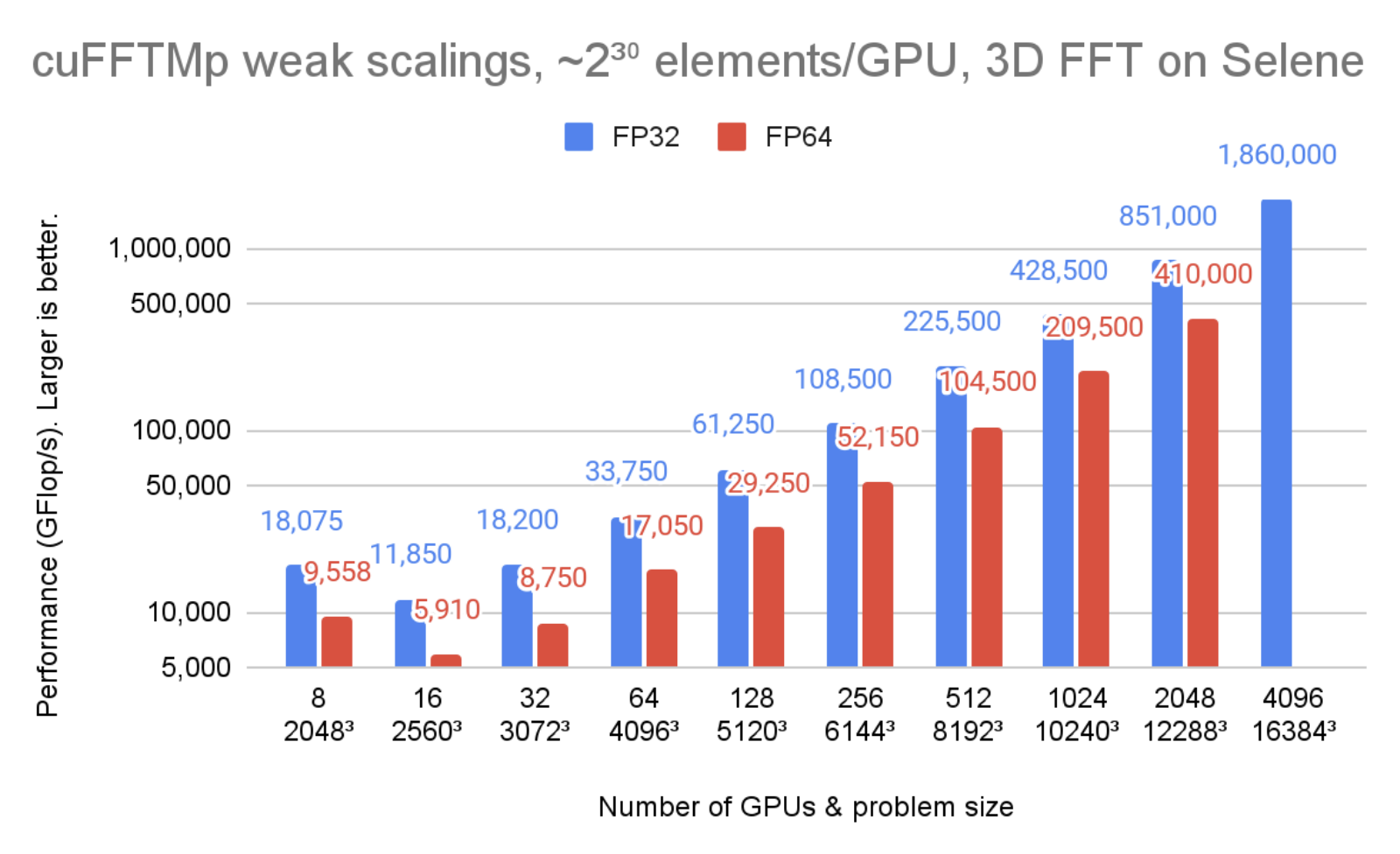
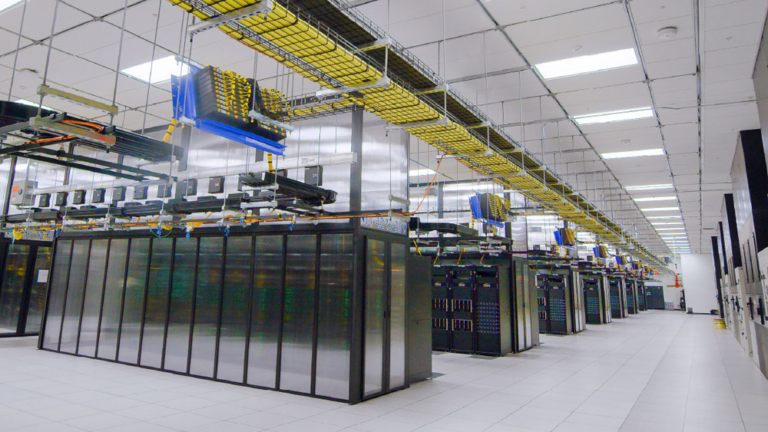 Meta’s AI supercomputer — the largest NVIDIA DGX A100 customer system to date — will deliver 5 exaflops of AI performance.