With NVIDIA Jetson embedded platforms, teams at the DARPA SubT Challenge detected objects with both high accuracy and high throughput.
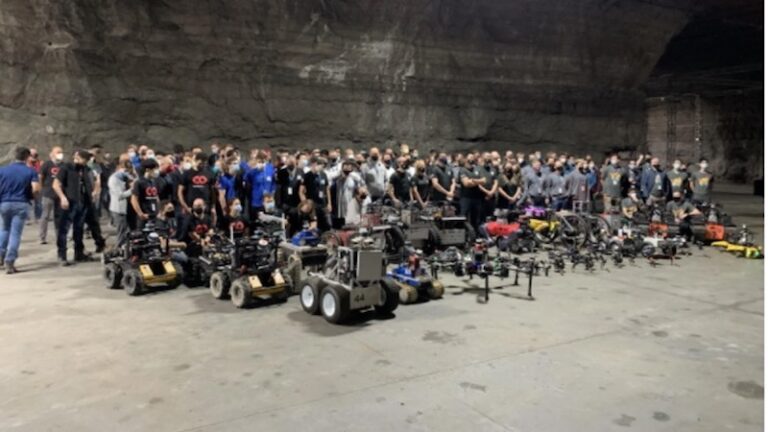
Performing real-time inference with high accuracy is a challenging task, especially in a poor-visibility environment. With NVIDIA Jetson embedded platforms, teams at the recently concluded Defense Advanced Research Projects Agency (DARPA) Subterranean (SubT) Challenge were able to detect objects of interest with both high accuracy and high throughput. In this post, we will cover the results, systems, and challenges faced by teams in the final leg of the systems competition.
The SubT Challenge is an international robotics competition organized and coordinated by DARPA. The competition encourages researchers to develop new approaches for robots to map, navigate, and search environments that pose various challenges such as poor visibility, presence of hazards, unknown maps, or poor communication infrastructure.
The challenge consists of three preliminary circuit events: Tunnel Circuit, Urban Circuit, and Cave Circuit (canceled due to the COVID-19 pandemic), as well as a final integrated challenge course. Each circuit and the final event are held in different environments with various types of terrain. According to the event organizers, the competition was held over 3 years in different phases with the final event held in September of 2021 in Louisville, KY.
Competitors in the SubT Challenge leveraged NVIDIA technology for both their hardware and software needs. Teams used desktop/server GPUs to train models that were deployed on robots using NVIDIA Jetson embedded platform for real-time detection of artifacts and objects of interest–the main criteria used to determine the winning team. Five out of seven competitors also used the Jetson platform to perform real-time object detection.
The SubT Challenge
The SubT Challenge is inspired by real-world scenarios faced by first responders during search and rescue operations or disaster response.
The state-of-the-art methods developed through this competition will help reduce the risk of casualties of search and rescue personnel and first responders while they explore the unknown underground environments. Additionally, the autonomous robots will assist personnel in exploring the environment to find survivors, objects of interest, and access locations that are otherwise risky for humans.
Figure 1. The DARPA Subterranean Challenge explores innovative approaches and new technologies to map, navigate, and search complex underground environments. — Image courtesy of DARPA.
Technical challenges
The competition incorporates various technical challenges such as dealing with unknown, unstructured, and uneven terrain that some robots might not be able to maneuver easily.
These environments typically would not have any infrastructure for communication with the central command. From a perception perspective, these environments will have poor visibility where the robots must find artifacts and objects of interest.
The competing teams were tasked with addressing these challenges by developing novel sensor fusion methods as well as developing new or modifying existing robotic platforms with different capabilities to locate and detect objects of interest.
Team CERBERUS
Team CERBERUS (CollaborativE walking and flying RoBots for autonomous ExploRation in Underground Settings) is a joint consortium between several universities and industrial organizations worldwide.
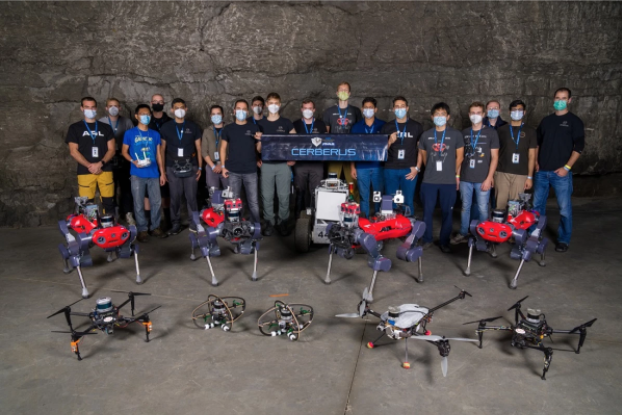
Figure 2. Team CERBERUS members with their multicopter drones, ANYmal C quadruped robots, and Super Mega Bot.
The team participated in the competition with four quadruped robots called ANYmal, five primarily in-house-built drones with variable size and payload capacity, and a rover robot in the form of Super Mega Bot. In the competition finals, the team ended up using four ANYmal robots and the Super Mega Bot for exploration and artifact detection.
Each ANYmal robot was equipped with two CPU-based computers and an NVIDIA Jetson AGX Xavier. The rover robot was equipped with an NVIDIA GTX 1070 GPU.
The CERBERUS team used a modified version of the You Only Look Once (YOLO) model for object detection. The model was trained on 40,000 labeled images using two NVIDIA RTX 3090 GPUs.
The trained model was further optimized using TensorRT before being deployed on Jetson for real-time inference. The Jetson AGX Xavier was able to perform inference at a collective rate of 20 Hz. In the competition finals, the CERBERUS team was the first to detect 23 of the 40 artifacts located in the environment, clinching the number one spot.
The CERBERUS team also used GPUs for the elevation mapping of the terrain and training the locomotion policy controller of the ANYmal quadruple robot. The elevation mapping was done in real-time using Jetson AGX Xavier. The ANYmal robot’s locomotion policy training for the rough terrain was done offline using desktop GPUs.
Team Co-STAR
Led by researchers at NASA’s Jet Propulsion Laboratory (JPL) in Southern California along with other universities and industrial collaborators, team Collaborative SubTerranean Autonomous Robots (Co-STAR) was the winner of the 2020 competition focused on exploring complex underground urban environments.
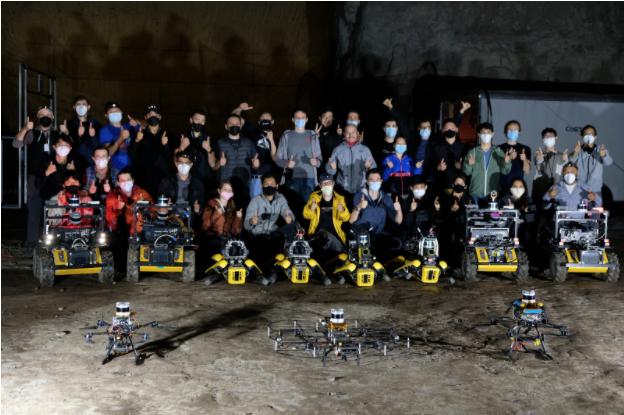
Figure 3. Members of team Co-STAR with their robots (Spot, Husky, and drones).
They also successfully participated in the 2021 competition in mixed artificial and natural environments, placing fifth. The Co-STAR team entered the competition with four Spots, four Husky robots, and two drones.
Following an unexpected hardware issue in the final run, the team ended up using one Spot and three Husky robots. Each robot was equipped with a CPU-based computer along with one NVIDIA Jetson AGX Xavier.
For object detection, team Co-STAR used RGB and thermal images. They used the medium variant of the YOLO v5 model to process high-resolution images for real-time inference. The team trained two different models to perform inference on captured RGB and thermal images.
The image-based model was trained using approximately 54,000 labeled frames whereas the thermal image model was trained using about 2,400 labeled images. For training the model on their customized dataset, team Co-STAR used a pretrained YOLO v5 model on the COCO dataset and performed transfer learning using the NVIDIA Transfer Learning Toolkit (known as TAO Toolkit).
The models were trained using two on-premise NVIDIA A100 GPUs and an AWS instance that consisted of eight V100 GPUs. Before deploying the models on Jetson AGX Xavier, the team pruned the models using TensorRT.
Using this setup, team Co-STAR was able to perform inference at 28 Hz with RGB images received from five RealSense cameras and images received from one thermal camera. In the final run, the robots were able to detect all 13 artifacts present in the designated areas. The exploration time was limited due to the delayed deployment caused by unexpected hardware issues at the deployment site.
Equipped with the NVIDIA Jetson platform and NVIDIA GPU hardware, teams competing in the DARPA SubT event were able to effectively train models for real-time inference, addressing the challenge posed by underground environments with accurate object detection.
Nsight Compute kernel profiler now includes Range Replay, Memory Analysis, and Guided Analysis enhancements.
NVIDIA Nsight Compute is an interactive kernel profiler for CUDA applications. It provides detailed performance metrics and API debugging through a user interface and a command-line tool. Nsight Compute 2022.1 brings updates to improve data collection modes enabling new use cases and options for performance profiling.
This release of Nsight Compute extends the existing replay modes with the highly requested feature of Range Replay. Range Replay captures and replays complete ranges of CUDA API calls and kernel launches within the profiled application. Metrics are associated with the entire range as opposed to individual kernels.This allows the tool to execute kernels without serialization and support profiling kernels that need to be run concurrently for correctness or performance reasons. A range consists of a start and an end marker; and includes all CUDA API calls and kernels launched between these markers from any CPU thread.
Figure 1. Visualization of Range Replay: After capturing the range, each pass collects performance information for the entire range.
Memory Analysis
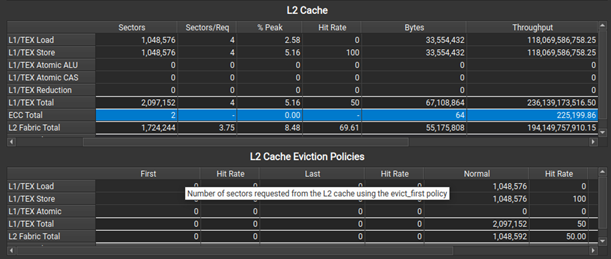
When profiling on A100, a new L2 Cache Eviction Policies table in the Memory Analysis section helps you understand the number of accesses and achieved hit rates by the various cache eviction policies. In the same section, the L2 Cache table now has a new ECC row to show traffic created from enabling hardware Error Correction Code on the GPU.
Figure 2. Improvements to the Memory Workload Analysis tables: ECC and L2 cache eviction policy information.
Guided Analysis
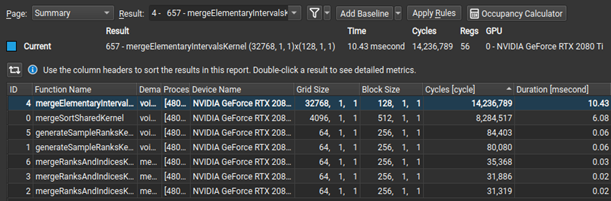
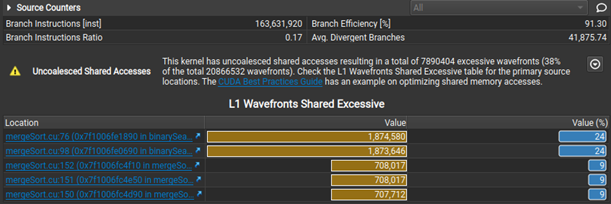
Nsight Compute now makes it easier to select initial analysis targets in multiresult collection by dynamically selecting between the Summary and Details pages when opening a report. Rules were extended to detect non-fused floating-point instructions as an optimization opportunity. Last, but not least, when the Uncoalesced Memory Access rules are triggered, they show a table of the five most valuable instances, making it easier to inspect and resolve them on the Source page.
Figure 3. Opening multiresult reports now shows the Summary page, allowing you to sort results and decide on the optimization order.
Figure 4. Both Uncoalesced Memory Access rules present results in a more concise and sorted format.
Additional improvements
Further improvements include an Occupancy Calculator auto-update. There is also a new ‘Thread Instructions Executed’ metric and register name tooltips for the Register Dependency columns in the Source page, as well as NVLink updates.
At GTC in November of 2021, we released insightful assets showcasing Nsight tools capabilities:
Learn how edge computing is powering efficient energy operations, protecting worker health and safety, and improving power grid resiliency.
Each day, energy flows throughout our lives – from the fuel that powers cars and planes, to the gas used for stove top cooking, to the electricity that keeps the lights on in homes and businesses. Oil, gas, and electricity are mature commodity markets, but AI is transforming the processes used to produce, transport, and deliver these resources.
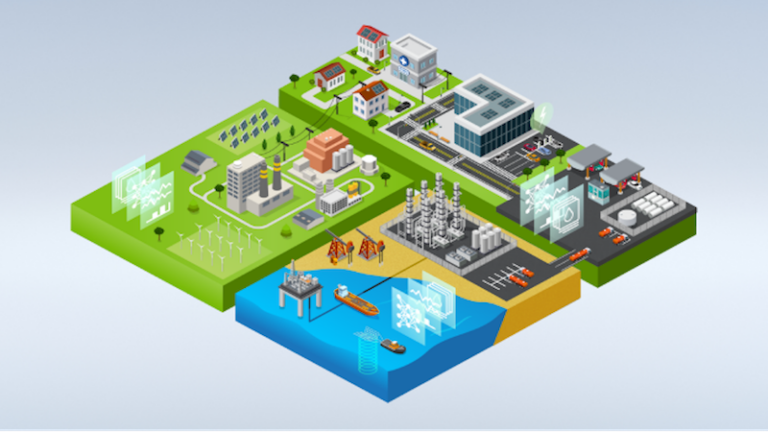
Enter AI deployed at the edge: on oil rigs, within power plants, riding along utility trucks, even embedded in smart buildings. Oil and gas enterprises and utilities are using AI and edge computing to improve operational efficiency, protect worker health and safety, integrate renewable energy, increase grid resiliency, and provide more reliable and affordable sources of energy to consumers.
Figure 1. Noteworthy AI, a member of NVIDIA Inception, put smart cameras on FirstEnergy’s trucks in a pilot that showed how edge computing can monitor millions of pole-mounted assets. Image courtesy of Noteworthy AI.
As companies and countries race to decarbonize and meet net-zero emissions goals, edge AI will play a key role managing distributed energy resources such as electric vehicles, home batteries, solar panels, and wind farms to enhance power grid resiliency and accelerate the energy transition. The following examples highlight the top AI use cases across the energy industry, including:
Software-defined smart grids: Future smart meters will use edge computing to optimize power flow, detect grid anomalies, deliver more reliable energy at a lower cost, and unlock opportunities for new energy applications. Utilidata, a leading grid-edge software company, is developing a software-defined smart grid chip with NVIDIA that will power next-generation smart meters to increase grid resiliency, decarbonization, and consumer value.
Autonomous operations: Industrial sites, such as oil rigs and power plants, require extensive monitoring for efficiency and safety because liquid, steam, or oil leakages can be catastrophic, costly, and wasteful. Global energy leaders, such as Siemens Energy, are using AI and machine learning to deliver a path to autonomous power plants. The company trains AI models using thousands of images and video streams from millions of onsite cameras and sensors to detect process anomalies. These models are deployed at the edge in power plants and use real-time inferencing to identify leaks. Rig operators are using computer vision, deep learning, and intelligent video analytics (IVA) to monitor heavy machinery, detect potential hazards, and alert workers in real-time to protect their health and safety, prevent accidents, and assign repair technicians for maintenance.
Pipeline optimization: Oil and gas enterprises rely on finding the best-fit routes to transfer oil to refineries and eventually fuel stations. Edge AI can calculate the optimal flow of oil to ensure reliability of production and protect long-term pipeline health. Using IVA, these companies can inspect pipelines for defects that could lead to dangerous failures and automatically alert pipeline operators. Further downstream, NVIDIA ReOpt uses GPU-accelerated solvers for logistics and route optimization, which can efficiently route fuel to fueling stations.
Power grid maintenance: With proactive maintenance, utilities can accurately detect defects and reduce unplanned outages to better serve customers. FirstEnergy worked with Noteworthy AI, a NVIDIA Inception member, on a pilot project to automate utility pole inspections. Fixed camera systems powered by NVIDIA Jetson were secured to the roof of service trucks and collected standardized, high-resolution images of their utility poles, power lines, and pole-mounted assets. The images were analyzed at the edge to determine if repairs or vegetation management was needed. Edge computing can help monitor the estimated 185 million utility poles in the United States, and reduce the tens of millions of dollars spent each year by utilities to manually track and maintain poles.
Power grid simulation: Intelligent forecasting using GPU-accelerated grid simulations combined with historical data on energy usage and weather can inform more efficient generation, distribution, and management of energy resources to consumers. AI helps manage the bidirectional flow of power in a grid, delivering reliable energy to residents and enterprises while automating the process for consumers to sell their additional energy back to the grid.
Thanks to edge AI, the future of energy is more sustainable than ever. Explore how NVIDIA is building an ecosystem to accelerate the energy transition.
From the largest firms trading on Wall Street to banks providing customers with fraud protection to fintechs recommending best-fit products to consumers, AI is driving innovation across the financial services industry. New research from NVIDIA found that 78 percent of financial services professionals state that their company uses accelerated computing to deliver AI-enabled applications through Read article >
GeForce NOW is taking cloud gaming to new heights. This GFN Thursday delivers an upgraded streaming experience as part of an update that is now available to all members. It includes new resolution upscaling options to make members’ gaming experiences sharper, plus the ability to customize streaming settings in session. The GeForce NOW app is Read article >
I have replicated an architecture from one of the research papers and running it on GPU gives Out Of Memory even on colab (The model is quite deep and huge). So naturally, I want to train it using a TPU.
The same code using GPU doesn’t cause any issue. However it throws this error if I train on TPU:
InvalidArgumentError: 9 root error(s) found. (0) INVALID_ARGUMENT: {{function_node __inference_train_function_56959}} Reshape’s input dynamic dimension is decomposed into multiple output dynamic dimensions, but the constraint is ambiguous and XLA can’t infer the output dimension %reshape.8395 = f32[3,3,2,86,86,32]{5,4,3,2,1,0} reshape(f32[<=18,86,86,32]{3,2,1,0} %convolution.8393), metadata={op_type=”BatchToSpaceND” op_name=”model/conv2d_3/Conv2D/BatchToSpaceND”}.
Hi everyone. I’m trying to make tensorflow use my NVIDIA GTX 1060 gpu in my laptop. I created a python environment and installed tensorflow, python, pip, etc. I am using Ubuntu on Windows (so wsl-ubuntu). On CMD, the nvidia-smi command is showing my GPU. But with tensorflow, I get the following error:
2022-01-26 21:45:36.677191: E tensorflow/stream_executor/cuda/cuda_driver.cc:271] failed call to cuInit: CUDA_ERROR_NO_DEVICE: no CUDA-capable device is detected 2022-01-26 21:45:36.678074: I tensorflow/stream_executor/cuda/cuda_diagnostics.cc:156] kernel driver does not appear to be running on this host (DESKTOP-P8QAQC0): /proc/driver/nvidia/version does not exist Num GPUs Available: 0
I have CUDA 11.5 and 11.6 installed, with cudNN 8.3.2.44 installed. I manually copied and pasted the files into the CUDA directory and ran the exe (exe didn’t seem to install files though). I am not sure what else to do. Help would be really appreciated!
I have trained a TensorFlow modal with faces of people I want to detect.
While it detects the people and gives the correct label to the faces, I trained the model to detect. If I point the webcam at a face that I did not train the model with, it gives a label of one of the people I trained the model with.
I’ve tried many things to stop this, but nothing has worked.
I can share all the code and faces I am trying to detect if needed, but is there any way to stop this?
Any advice is greatly appreciated! I’m still learning TensorFlow and while I’m a little better than my pervious posts I’m still learning!
This month the NGC catalog added new containers, model resumes, container security scan reports, and more to help identify and deploy AI software faster.
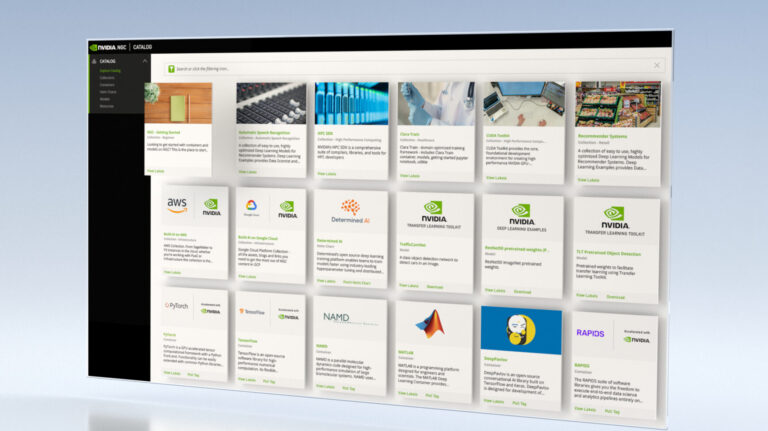
The NVIDIA NGC catalog is a hub for GPU-optimized deep learning, machine learning, and HPC applications. With highly performant software containers, pretrained models, industry-specific SDKs, and Jupyter Notebooks the content helps simplify and accelerate end-to-end workflows.
New features, software, and updates to help you streamline your workflow and build your solutions faster on NGC include:
Model resumes
The NGC catalog offers state-of-the-art pretrained models that help you build your custom models faster with just a fraction of the training data.
Now, every model comes with a resume that provides information on model architecture, training parameters, training datasets, performance, and limitations to help you make informed decisions before downloading the model. They also include instructions on how to use the model so you can focus on AI development.
View the demo video and explore models for applications like speech and computer vision in various industries including Retail, Healthcare, Smart Cities, and Manufacturing.
Container security scan reports
All the container images in the NGC catalog are scanned for CVEs, malware, crypto keys, open ports, and more.
Now, the containers come with a security scan report, which provides a security rating of that image, breakdown of CVE severity by package, and links to detailed information on CVEs.
The scan reports are available on the latest as well as the previous versions of the images and with the entire NGC catalog scanned every 30 days. If you’re using an older version with high or critical severity, the scan report will flag the vulnerabilities and suggest remedies.
View the demo video for more details and explore application containers for deep learning, machine learning, and HPC.
TAO Toolkit
The latest version of the TAO Toolkit is now available for download. The TAO Toolkit, a CLI, and Jupyter notebook-based version of TAO, brings together several new capabilities to help you speed up your model creation process.
M-Star CFD is a multiphysics modeling package used to simulate fluid flow, heat transfer, species transport, chemical reactions, particle transport, and rigid-body dynamics.
M-Star CFD contains M-Star Build (to prepare models and specify simulation parameters), M-Star Solve (to run simulations), and M-Star Post (to render and plot data.)
HPC applications
Latest versions of the popular HPC applications are also available in the NGC catalog.

 With NVIDIA Jetson embedded platforms, teams at the DARPA SubT Challenge detected objects with both high accuracy and high throughput.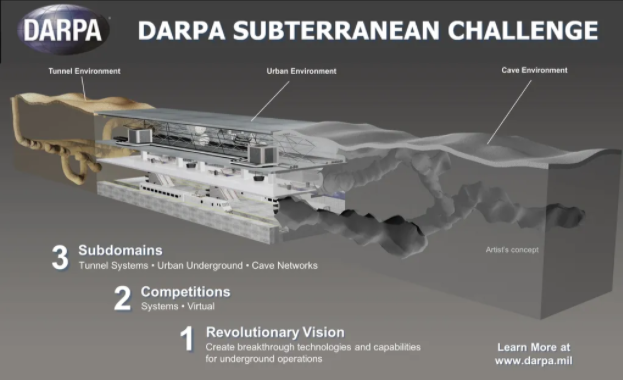
 Nsight Compute kernel profiler now includes Range Replay, Memory Analysis, and Guided Analysis enhancements.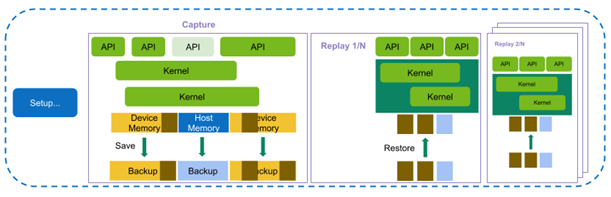
 Learn how edge computing is powering efficient energy operations, protecting worker health and safety, and improving power grid resiliency.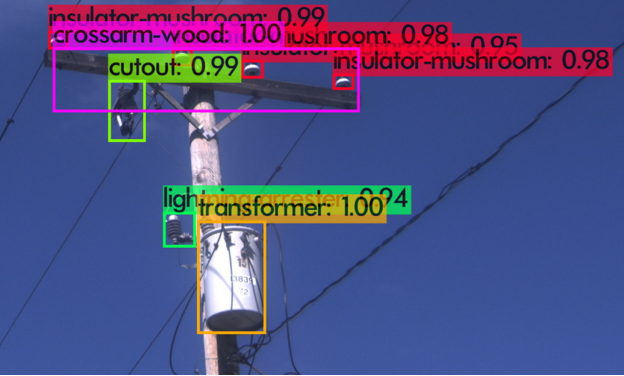
 This month the NGC catalog added new containers, model resumes, container security scan reports, and more to help identify and deploy AI software faster.