Read about the new EC2 G5 instance that powers remote graphics, visual computing, AI/ML training, and inference workloads on AWS cloud.
Today, AWS announced the general availability of the new Amazon EC2 G5 instances, powered by NVIDIA A10G Tensor Core GPUs. These instances are designed for the most demanding graphics-intensive applications, as well as machine learning inference and training simple to moderately complex machine learning models on the AWS cloud.
The new EC2 G5 instances feature up to eight NVIDIA A10G Tensor Core GPUs that are optimized for advanced visual computing workloads. With support for NVIDIA RTX technology and more RT (ray tracing) cores than any other NVIDIA GPU instance on AWS, it offers up to 3X better graphics performance. Based on NVIDIA Ampere Architecture, G5 instances offer up to 3X higher performance for machine learning inference and 3.3X higher performance for machine learning training, compared to the previous generation Amazon EC2 G4dn instances.
Customers can use the G5 instances to accelerate a broad range of graphics applications like interactive video rendering, video editing, computer-aided design, photorealistic simulations, 3D visualization, and gaming. G5 instances also deliver the best user experience for real-time AI inference performance at scale for use-cases like content and product recommendations, voice assistants, chatbots, and visual search.
Getting the most out of EC2 G5 instances using NVIDIA optimized software
To unlock the breakthrough graphics performance on the new G5 instances, creative and technical professionals can use the NVIDIA RTX Virtual Workstation (vWS) software, available from the AWS Marketplace. Only available from NVIDIA, these NVIDIA RTX vWS advancements include hundreds of certified professional ISV applications, support for all of the leading rendering apps, and optimization with all major gaming content.
NVIDIA RTX technology delivers exceptional features like ray tracing and AI-denoising. Creative professionals can achieve photorealistic quality with accurate shadows, reflections, and refractions—creating amazing content faster than ever before.
NVIDIA RTX vWS also supports Deep Learning Super Sampling (DLSS). This gives designers, engineers, and artists the power of AI for producing the highest visual quality, from anywhere. They can also take advantage of technologies like NVIDIA Iray and NVIDIA OptiX for superior rendering capabilities.
Developers on AWS can use state-of-the-art pretrained AI models, GPU-optimized deep learning frameworks, SDKs, and end-to-end application frameworks from the NGC Catalog on AWS Marketplace soon. In particular, developers can take advantage of NVIDIA TensorRT and NVIDIA Triton Inference Server to optimize inference performance and serve ML models at scale using G5 instances.
Developers have multiple options to take advantage of NVIDIA-optimized software on AWS. Whether you provision and manage the G5 instances yourself or leverage them in AWS managed services like Amazon Elastic Kubernetes service (EKS) or Amazon Elastic Container Service (ECS).
Learn more about the EC2 G5 instances and get started. >>
NVIDIA Omniverse, a simulation and design collaboration platform for 3D virtual worlds, is already being evaluated by 700+ companies and 70,000 individuals.
TIME magazine today named NVIDIA Omniverse one of the 100 Best Inventions of 2021, saying the project is “making it easier to create ultra-realistic virtual spaces for…real-world purposes.”
Omniverse — a scalable, multi-GPU, real-time reference development platform for 3D simulation and design collaboration — is being evaluated by more than 700 companies and 70,000 individuals to create virtual worlds and unite teams, their assets, and creative applications in one streamlined interface.
“Virtual worlds are for more than just gaming—they’re useful for planning infrastructure like roads and buildings, and they can also be used to test autonomous vehicles,” TIME wrote in the story, which hits the newsstands Nov. 22. “The platform combines the real-time ray-tracing technology of the brand’s latest graphics processing units with an array of open-source tools for collaborating live in photorealistic 3-D worlds.”
The list of 100 inventions, which TIME describes as “groundbreaking,” is based on multiple factors including originality, creativity, efficacy, ambition and impact. These projects, says TIME, are changing how we live, work, play and think about what’s possible.
In this week’s GTC keynote, NVIDIA CEO Jensen Huang announced the general availability of NVIDIA Omniverse Enterprise, and showed how companies like Ericsson, BMW and Lockheed Martin are using the platform to create digital twins to simulate 5G networks, build a robotic factory and prevent wildfires.
He also revealed a host of new features for Omniverse, and powerful new capabilities including Omniverse Avatar for interactive conversational AI assistants and Omniverse Replicator, a powerful synthetic data generation engine for training autonomous vehicles and robots.
At the inaugural NVIDIA Omniverse Developer Day at GTC, developers were introduced to a new way to build, license, and distribute native applications, extensions, connectors, and microservices for the platform — opening new paths to market for millions of developers. To get started with NVIDIA Omniverse, download the free open beta for individuals, or explore Omniverse Enterprise. Omniverse users have access to a wide range of technical resources, tutorials and more with the NVIDIA Developer Program.
hi guys lately I find a TensorFlow Lite model and I wanna use it on my android app (the link of the model below) and I didn’t find input and the outputs
and if I wondering if there a way to see the inputs and outputs type
The model filename is something like `Mobilenet_V1_1.0_224_quant.tflite`
I understand that 224 is the input size but I’m not sure what the 1.0 represents. It would be useful if someone can tell me what the 1.0 means. Feel free to link some docs that would give me insight if you find that easier 🙂
So let’s say I have 1 metric I want to monitor across the mode fitting process. So far, I’ve adapted the default CallBack function which allows me to get one single value for that given metric in each epoch. With this, I can save a time-series (just as with CSV logger) plot to check for the performance evolution but it doesn’t provide robustness results. Therefore, I would like to get the metric value for every sample in each epoch and save it, allowing me to get a time-series plot with a 95% confidence.
Hey, I am doing skin cancer classification with 9 classes, i am having a problem with overfitting as my train Accuracy can reach up to 90 with test acc=50 at best.
I have tried dropout, l2,l1 data augmentation lowering my network size, class weights, all it did was a longer training epoch with the same results as test acc never improved.
I am using cnn, is there another architect I can use? can I transfer this problem to “one vs all”?using TensorFlow ?
Hello I’m trying to make an image classifier which classifies given tomato plant leaf as [‘Tomato___Early_blight’, ‘Tomato___Septoria_leaf_spot’, ‘Tomato___healthy’]. I took the dataset from here It is already augmented and from that I took only Tomato plant leaf images and further reduced it to only three classes as mentioned before.
Here is my code
import tensorflow as tf
from tensorflow import keras
from tensorflow.keras.preprocessing.image import ImageDataGenerator
from tensorflow.keras.preprocessing.image import load_img, img_to_array
As you can see my model validation accuracy is good but its classifications are really bad even for the images from training dataset. How can I solve this problem .
Apologies if this information is readily available and I couldn’t find it. Would it be appropriate to set up a dedicated server strictly for tensorflow in a business environment? The goal would be classifying document imagines. The volume, I can only estimate, would be 1 to 4 million.
Recommender systems are the economic engine of the Internet. It is hard to imagine any other type of applications with more direct impact in our daily digital lives: Trillions of items to be recommended to billions of people. Recommender systems filter products and services among an overwhelming number of options, easing the paradox of choice … Continued
Recommender systems are the economic engine of the Internet. It is hard to imagine any other type of applications with more direct impact in our daily digital lives: Trillions of items to be recommended to billions of people. Recommender systems filter products and services among an overwhelming number of options, easing the paradox of choice that most users face.
Embeddings play a critical role in modern DL-based recommender architectures, encoding individual information for billions of entities (users, products, and their characteristics). As the amount of data increases, so does the size of the embedding tables, now spanning multiple GBs to TBs. There are unique challenges in training this type of DL system, with its huge embedding tables with sparse access patterns spanning potentially multiple GPUs, if not nodes.
This post focuses on how the NVIDIA Merlin recommendation system framework addresses these challenges and introduces an optimized embedding implementation that is up to 8x more performant than other frameworks’ embedding layers. This optimized implementation is also made available as a TensorFlow plugin that works seamlessly with TensorFlow and acts as a convenient drop-in replacement for the TensorFlow native embedding layers.
Embeddings
Embedding is a machine learning technique that represents each object of interest (users, products, categories, and so on) as a dense numerical vector. Embedding tables are hence nothing other than a specific type of key-value store, with keys being the ID used to uniquely identify objects and values being vectors of real numbers.
Embedding is a key building block in modern DL recommender systems, typically lying immediately after the input layer and before “feature interaction” and dense layers. Embedding layers are learned from data and end-to-end training, just like other layers of a deep neural network. It is the embedding layers that differentiate DL recommender models from other types of DL workloads: they contribute an enormous number of parameters to the model but require little to no computation, while the compute-intensive dense layers have a much smaller number of parameters.
Take a specific example: The original Wide and Deep model has several dense layers of size [1024, 512, 256], hence only a few million parameters, while its embedding layers can have billions of entries, and multiple billions of parameters. This contrasts with, for example, a BERT model architecture popular in the NLP domain, where the embedding layer has only tens of thousands of entries amounting to several millions of parameters, but the dense feed-forward and attention layers consist of several hundreds of millions of parameters. This differentiation also leads to another observation: the amount of compute per byte of input data for DL recommender networks is typically much smaller compared to other types of DL models.
Why optimizing embeddings matters for recommender workflows
To understand why optimization of the embedding layer and related operations matters, here are the challenges of training embeddings: size and access speed.
Size
With online platforms and services acquiring hundreds of millions to even billions of users, and with the number of unique products on offer reaching billions, it is not surprising that embedding tables are increasing in size.
Naturally, it presents a significant challenge fitting a TB-scale model on a single node of compute, let alone a single compute accelerator. For reference, the largest NVIDIA A100 GPU is currently equipped with 80 GB of HBM.
Access speed
Training recommender systems is inherently a memory bandwidth-intensive task. This is because each training sample or batch usually involves a small number of entities in the embedding tables. These entries must be retrieved to calculate the forward pass, then updated in the backward pass.
The CPU main memory has high capacity but limited bandwidth, with high-end models typically in the high tens of GB/s range. The GPU, on the other hand, has limited memory capacity but high bandwidth. An NVIDIA A100 80-GB GPU offers 2 TB/s of memory bandwidth.
Solutions
These challenges have been addressed in different ways. For example, keeping the entire embedding table on main memory solves the size issue. However, it most often results in extremely slow training throughput that is often dwarfed by the amount and velocity of new data, forbidding the system to be retrained in a timely manner.
Alternatively, the embedding can be carefully spread across multiple GPUs and multiple nodes, only to be bogged down by the communication bottleneck, resulting in sustained severe GPU-compute under-utilization and training performance just on par with pure CPU training.
The embedding layer is one of the major bottlenecks in recommender systems. Optimizing the embedding layer is key to unlocking the GPU’s high compute throughput.
In the next section, we discuss how the NVIDIA Merlin HugeCTR recommender framework solves the challenges of large-scale embeddings, by using NVIDIA technologies such as GPUDirect remote direct memory access (RDMA), NVIDIA Collective Communications Library (NCCL), NVLink, and NVSwitch. It unlocks both the high-compute and high-bandwidth capacity of the GPU, while addressing the memory capacity problem with out-of-the-box, multi-GPU, multinode support and model parallelism.
Overview of NVIDIA Merlin HugeCTR embeddings
NVIDIA Merlin addresses the challenges of training large-scale recommender systems. It’s an end-to-end recommender framework that accelerates all phases of recommendation system development, from data preprocessing to training and inference. NVIDIA Merlin HugeCTR is an open-source, recommender system, dedicated DL framework. In this post, we focus on one specific aspect of HugeCTR: embedding optimization.
There are two ways to leverage the embedding optimization work in HugeCTR:
Using the native NVIDIA Merlin HugeCTR framework for your training and inference workloads
Using the NVIDIA Merlin HugeCTR TensorFlow plugin, which is designed to work seamlessly with TensorFlow
Native HugeCTR embedding optimization
To overcome the embedding challenges and enable faster training, HugeCTR implemented its own embedding layer, which includes a GPU-accelerated hash table, efficient sparse optimizers implemented in a memory-saving manner, and various embedding distribution strategies. It harnesses NCCL as its inter-GPU communication primitives.
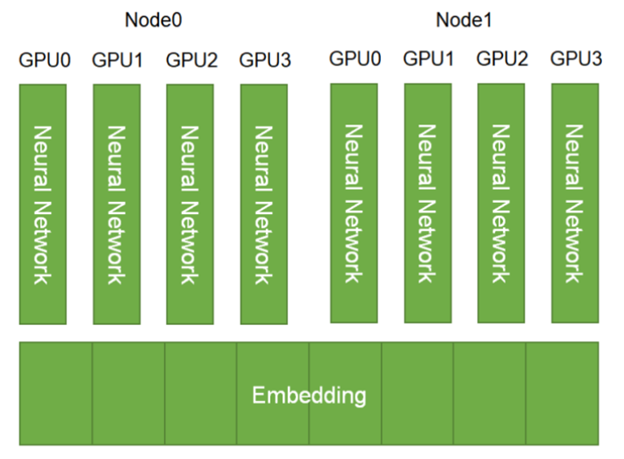
Built with scalability in mind, HugeCTR supports model parallelism for the embedding layer by default. The embedding tables are distributed across the available GPUs and nodes. The dense layers, on the other hand, employ data parallelism (Figure 1).
Figure 1. Embedding layer parallelism in HugeCTR
The Tencent recommendation team is one of the first adopters of the native HugeCTR framework, making heavy use of its native embedding layers. In a recent interview, Xiangting Kong, lead of the Tencent Advertising and Deep Learning Platform said, “HugeCTR, as a recommendation training framework, is integrated into the [Tencent] advertising recommendation training system to make the update frequency of model training faster, and more samples can be trained to improve online effects.”
HugeCTR TensorFlow plugin
All components of the NVIDIA Merlin framework are open-source and designed to be interoperable with the larger deep learning and data science ecosystem. Our long-term vision is to accelerate recommendation workloads on the GPU, regardless of your preferred framework. The HugeCTR TensorFlow embedding plugin was created as a step towards realizing this goal.
At a high level, the TensorFlow embedding plugin is designed by leveraging many of the same embedding optimization techniques that were employed for the native HugeCTR embedding layer. In particular, this would be the GPU hash table and NCCL under the hood for inter-GPU communication.
The HugeCTR embedding plugin is designed to work conveniently and seamlessly with TensorFlow as a drop in replacement for the TensorFlow-native embedding layers, such as tf.nn.embedding_lookup and tf.nn.embedding_lookup_sparse. It also offers advanced features out of the box, such as model parallelism that distributes the embedding tables over multiple GPUs.
Here’s how to make use of the TensorFlow embedding plugin. The full example is available at the HugeCTR repository, where we also provide a full benchmarking notebook for reproducing the performance figures.
The most convenient way to access the HugeCTR embedding plugin is through using the NGC NVIDIA Merlin TensorFlow training Docker image, in which it is precompiled and installed, along with other components of the NVIDIA Merlin framework, as well as TensorFlow. The most up-to-date version can be pulled directly from the HugeCTR repository, compiled and installed on the fly. When TensorFlow is updated, the plugin must also be recompiled for the newly installed TensorFlow version.
For comparison, here’s how the native TensorFlow embedding layers are used. First, you initialize a 2D-array variable to hold the value of the embeddings. Then, use tf.nn.embedding_lookup to look up the embedding value corresponding to a list of IDs.
embedding_var = tf.Variable(initial_value=initial_value, dtype=tf.float32, name='embedding_variables')

@tf.function
def _train_step(inputs, labels):
    emb_vectors = tf.nn.embedding_lookup([self.embedding_var], inputs)
    ...

for i, (inputs, labels) in enumerate(dataset):
    _train_step(inputs)
In the same fashion, the HugeCTR embedding plugin can be employed. First, you initialize an embedding layer. Next, this embedding layer is used to look up the corresponding embedding values for a list of IDs.
import sparse_operation_kit as sok

emb_layer = sok.All2AllDenseEmbedding(max_vocabulary_size_per_gpu,
                                      embedding_vec_size,
                                      slot_num, nnz_per_slot)

@tf.function
def _train_step(inputs, labels):
    emb_vectors = emb_layer(inputs)
    ...

for i, (inputs, labels) in enumerate(dataset):
    _train_step(inputs)
The HugeCTR embedding plugin is designed to work seamlessly with TensorFlow, including other layers and optimizers such as Adam and sgd. Before TensorFlow v2.5, the Adam optimizer was a CPU-based implementation.
To fully realize the potential of the HugeCTR embedding plugin, we also provide a GPU-based plugin_adam version in sok.optimizers.Adam. Starting from TensorFlow v2.5, the standard Adam optimizer tf.keras.optimizers.Adam, which now comes with a GPU implementation, can be used with similar accuracy and performance.
Performance benchmark
In this section, we showcase the performance of the HugeCTR TensorFlow embedding plugin through synthetic and real use cases.
Synthetic data
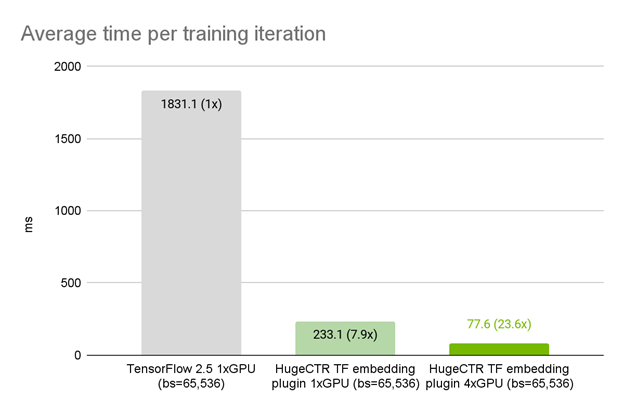
In this example, we use a synthetic dataset with 100 feature fields, each with 10 lookups, and a vocabulary size of 8192. The recommender model is an MLP with six layers, each of size 1024. Using the exact model architecture, optimizer, and data loader in TensorFlow, we observed that on 1x A100 GPU, the HugeCTR embedding plugin improves the average iteration time by 7.9x compared to the native TensorFlow embedding layer (Figure 2).
When being strong-scaled from one to four A100 GPUs, we observed a total speedup of 23.6x. This benefit of multi-GPU scaling is provided by the HugeCTR embedding plugin by default. Under the hood, the embedding plugin automatically distributes the table corresponding to feature fields on to the available GPUs in a model parallel fashion. This contrasts with the native TensorFlow embedding layer, where a significant extra effort is required for distributed model-parallel multi-GPU training. The TensorFlow distribution strategies, MirroredStrategy and MultiWorkerMirroredStrategy, are both designed to do data-parallel synchronized training.
Figure 2. HugeCTR TensorFlow embedding plugin performance on NVIDIA DGX A100 80GB on synthetic dataset
Real use case: Meituan recommender systems
The Meituan recommender systems team is one of the first teams to adopt the HugeCTR TensorFlow plugin with great success. At first, the team optimized their training framework based on CPU, but as their models became more and more complex, it was difficult to optimize the training framework more deeply. Now, Meituan is working on integrating NVIDIA HugeCTR into their training system based on A100 GPUs.
“A single server with 8x A100 GPUs can replace hundreds of workers in the CPU based training system. The cost is also greatly reduced. This is a preliminary optimization result, and there is still much room to optimize in the future,” shared Jun Huang, senior technical expert at Meituan.
Meituan used DIEN as the recommendation model. The total number of embedding parameters is tens of billions, and there are thousands of feature fields in each sample. As the range of input features is not fixed and unknown in advance, the team uses hash tables to uniquely identify each input feature before feeding into an embedding layer.
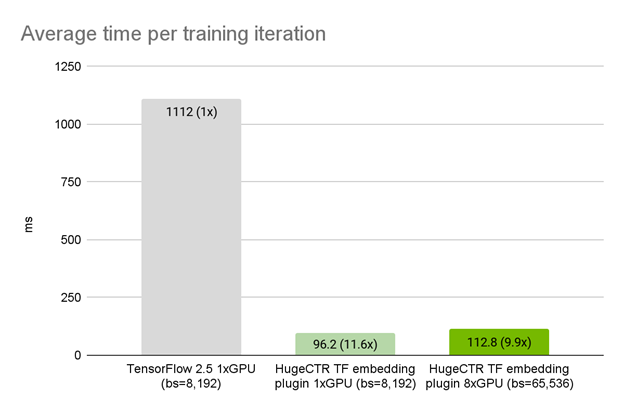
Using the exact model architecture, optimizer, and data loader in TensorFlow, we observed that on a single A100 GPU, the HugeCTR embedding plugin achieved a 11.5x speedup compared to the original TensorFlow embedding. With weak scaling, the iteration time on 8x A100 GPUs only increased slightly to 1.17x that of 1x A100 GPU (Figure 3).
Figure 3. HugeCTR TensorFlow embedding plugin performance on NVIDIA DGX A100 80GB on Meituan data
Conclusion
The HugeCTR TensorFlow embedding plugin is available today from the HugeCTR GitHub repository, as well as from the NGC NVIDIA Merlin TensorFlow container. If you are a TensorFlow user looking to build and deploy large-scale recommender systems with large embedding tables, the HugeCTR TensorFlow plugin is a great effortless drop-in replacement for TensorFlow embedding lookup layers.
Try it out to see the full potential of your GPUs unlocked. If you feel that you need even more performance and optimization, then the full-fledged native HugeCTR framework might be the next thing that you want to try.

 Read about the new EC2 G5 instance that powers remote graphics, visual computing, AI/ML training, and inference workloads on AWS cloud.
 NVIDIA Omniverse, a simulation and design collaboration platform for 3D virtual worlds, is already being evaluated by 700+ companies and 70,000 individuals.




 Recommender systems are the economic engine of the Internet. It is hard to imagine any other type of applications with more direct impact in our daily digital lives: Trillions of items to be recommended to billions of people. Recommender systems filter products and services among an overwhelming number of options, easing the paradox of choice …