Categories
Misc

GPU Dashboards in Jupyter Lab

Learn how NVDashboard in Jupyter Lab is a great open-source package to monitor system resources for all GPU and RAPIDS users to achieve optimal performance and day to day model and workflow development.

This post was originally published on the RAPIDS AI blog here.

Introduction

NVDashboard is an open-source package for the real-time visualization of NVIDIA GPU metrics in interactive Jupyter Lab environments. NVDashboard is a great way for all GPU users to monitor system resources. However, it is especially valuable for users of RAPIDS, NVIDIA’s open-source suite of GPU-accelerated data-science software libraries.

Given the computational intensity of modern data-science algorithms, there are many cases in which GPUs can offer game-changing workflow acceleration. To achieve optimal performance, it is absolutely critical for the underlying software to use system resources effectively. Although acceleration libraries (like cuDNN and RAPIDS) are specifically designed to do the heavy lifting in terms of performance optimization, it can be very useful for both developers and end-users to verify that their software is actually leveraging GPU resources as intended. While this can be accomplished with command-line tools like nvidia-smi, many professional data scientists prefer to use interactive Jupyter notebooks for day-to-day model and workflow development.
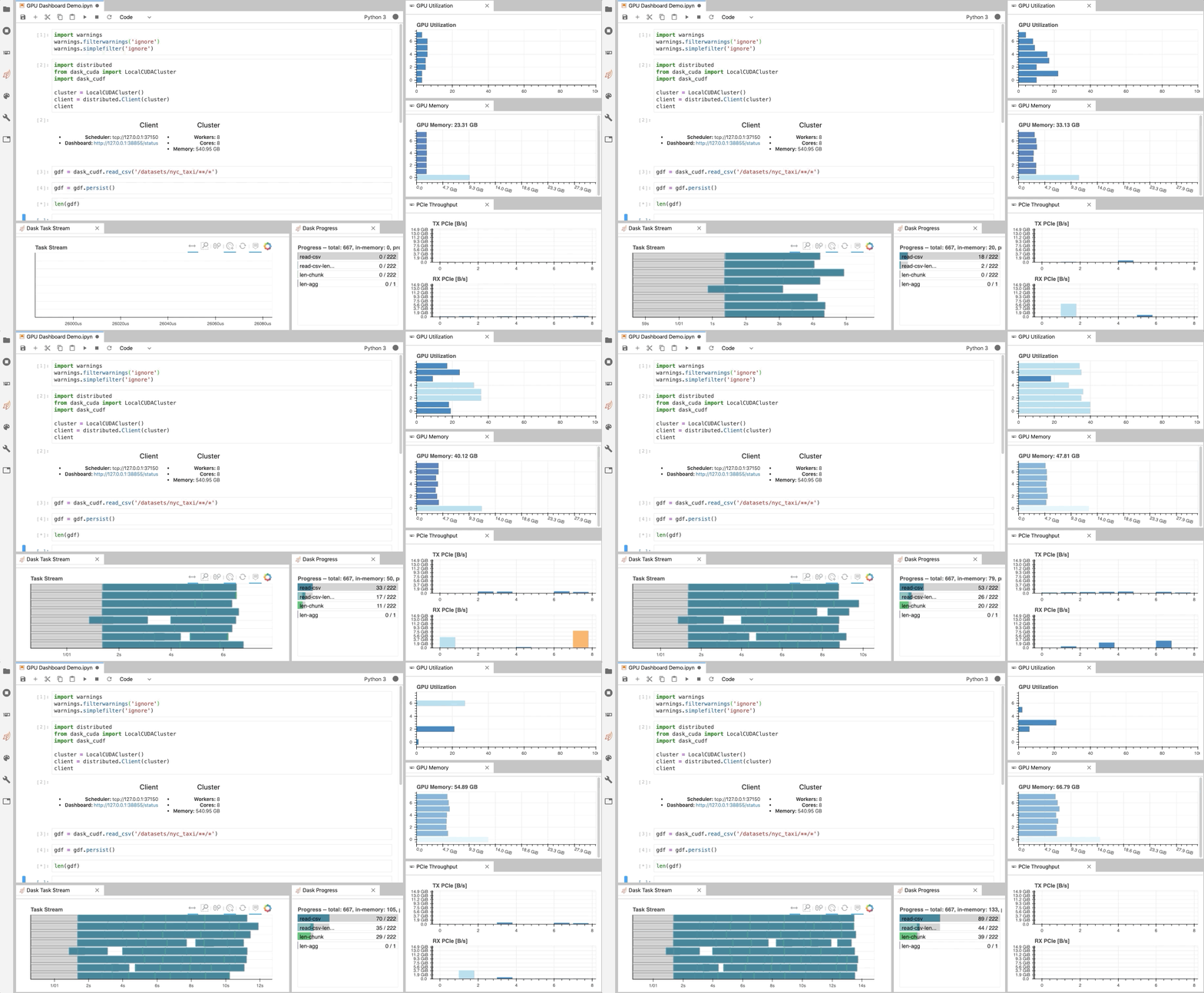
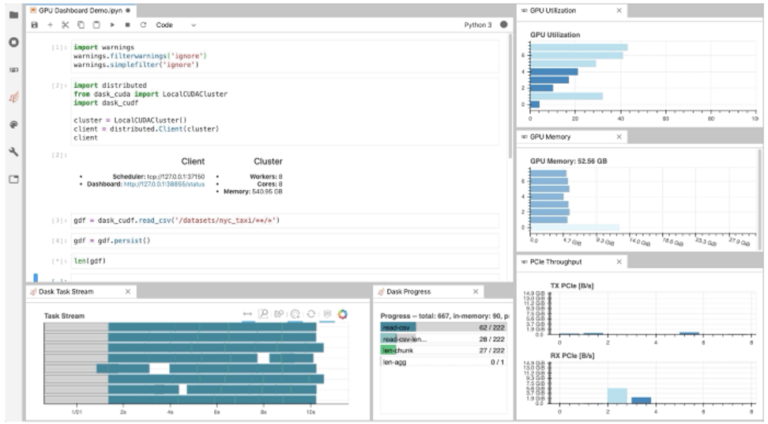
Figure 1: The NVDashboard Jupyter-Lab extension in action. The GPU dashboards are shown along the right-hand side of the screen, while two dask-labextension dashboards are shown on the bottom left) [GIF].

As illustrated in Fig. 1, NVDashboard enables Jupyter notebook users to visualize system hardware metrics within the same interactive environment they use for development. Supported metrics include:

  • GPU-compute utilization
  • GPU-memory consumption
  • PCIe throughput
  • NVLink throughput

The package is built upon a Python-based dashboard server, which support the Bokeh visualization library to display and update figures in real time[1] . An additional Jupyter-Lab extension embeds these dashboards as movable windows within an interactive environment. Most GPU metrics are collected through PyNVML, an open-source Python package composing wrappers for the NVIDIA Management Library (NVML). For this reason, the available dashboards can be modified/extended to display any queryable GPU metrics accessible through NVML.

Using NVDashboard

The nvdashboard package is available on PyPI, and consists of two basic components:

  • Bokeh Server: The server component leverages the wonderful Bokeh visualization library to display and update GPU-diagnostic dashboards in real time. The desired hardware metrics are accessed with PyNVML, an open-source python package composing wrappers for the NVIDIA Management Library (NVML). For this reason, NVDashboard can be modified/extended to display any queryable GPU metrics accessible through NVML, easily from Python.
  • Jupyter-Lab Extension: The Jupyter-Lab extension makes embedding the GPU-diagnostic dashboards as movable windows within an interactive Jupyter-Lab environment.

The Jupyter Lab Extension

The practice of directly querying hardware metrics is often the best way to validate efficient run-time behavior, and this is especially true for interactive Jupyter-notebook users. In this case, the development process is often iterative, and improper GPU utilization results in huge productivity losses. As shown in Fig. 1, NVDashboard makes visualizing resource utilization easy for Jupyter-Lab users right alongside their code.

To install both the server and client-side components, run the following in a terminal:

$ pip install jupyterlab-nvdashboard
$ jupyter labextension install jupyterlab-nvdashboard

After NVDashborad is installed, a “GPU Dashboards” menu should be visible along the left-hand side of your Jupyter-Lab environment (see Fig. 2). Clicking on one of these buttons automatically adds a movable window, with a real-time display of the desired dashboard.

Figure 2: Main menu for the Jupyter-Lab extension.

It is important to clarify that NVDashboard automatically monitors the GPU resources for the entire machine, not only those being used by the local Jupyter environment. The Jupyter-Lab eExtension can certainly be used for non-iPython/notebook development. For example, in Fig. 3, the “NVLink Timeline” and “GPU Utilization” dashboards are being used within a Jupyter-Lab environment to monitor a multi-GPU deep-learning workflow executed from the command line.
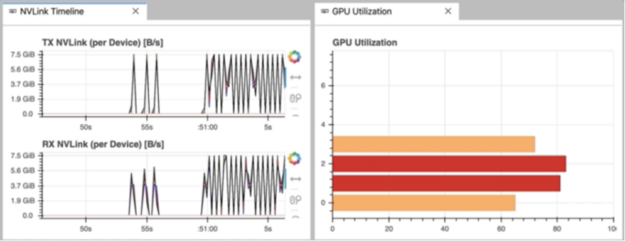
Figure 3: The “NVLink Timeline” dashboard being used with Jupyter Lab [GIF].

The Boker server

While the Jupyter-Lab extension is certainly ideal for fans of iPython/notebook-based development, other GPU users can also access the dashboards using a sandalone Bokeh server. This is accomplished by running.

$ python -m jupyterlab_nvdashboard.server

After starting the Bokeh server, the GPU dashboards are accessed by opening the appropriate url in a standard web browser (for example, http://:). As shown in Fig. 4, the main menu lists all dashboards available in NVDashboard.
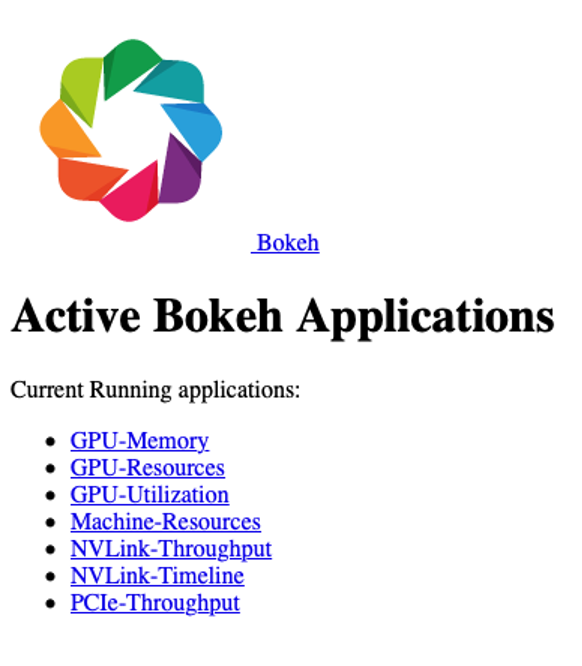
Figure 4: The main menu for the Bokeh-server component of NVDashboard.

For example, selecting the “GPU-Resources” link opens the dashboard shown in Fig. 5, which summarizes the utilization of various GPU resources using aligned timeline plots.
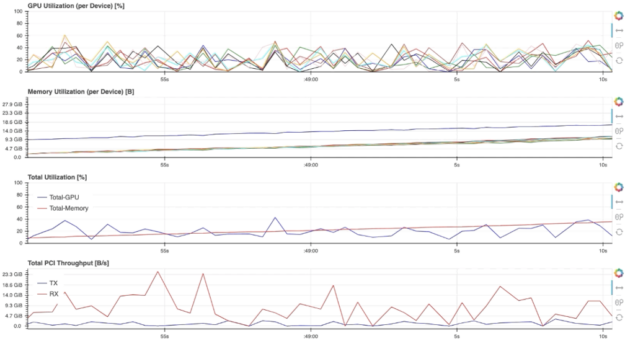
Figure 5: The “GPU Resources” dashboard being used outside of Jupyter Lab [GIF].

To use NVDashboard in this way, only the pip-installation step is needed (the lab extension installation step can be skipped):

$ pip install jupyterlab-nvdashboard

Alternatively, one can also clone the jupyterlab-nvdashboard repository, and simply execute the server.py script (for example, python jupyterlab_nvdashboard/server.py ).

Implementation details

The existing nvdashboard package provides a number of useful GPU-resource dashboards. However, it is fairly straightforward to modify existing dashboards and/or create completely new ones. In order to do this, you simply need to leverage PyNVML and Bokeh.

PyNVML dasic

PyNVML is a python wrapper for the NVIDIA Management Library (NVML), which is a C-based API for monitoring and managing various states of NVIDIA GPU devices. NVML is directly used by the better-known NVIDIA System Management Interface (nvidia-smi). According to the NVIDIA developer site, NVML provides access to the following query-able states (in additional to modifiable states not discussed here):

  • ECC error counts: Both correctable single bit and detectable double bit errors are reported. Error counts are provided for both the current boot cycle and for the lifetime of the GPU.
  • GPU utilization: Current utilization rates are reported for both the compute resources of the GPU and the memory interface.
  • Active compute process: The list of active processes running on the GPU is reported, along with the corresponding process name/id and allocated GPU memory.
  • Clocks and PState: Max and current clock rates are reported for several important clock domains, as well as the current GPU performance state.
  • Temperature and fan speed: The current core GPU temperature is reported, along with fan speeds for non-passive products.
  • Power management: For supported products, the current board power draw and power limits are reported.
  • Identification: Various dynamic and static information is reported, including board serial numbers, PCI device ids, VBIOS/Inforom version numbers and product names.

Although several different python wrappers for NVML currently exist, we use the PyNVML package hosted by GoAi on GitHub. This version of PyNVML uses ctypes to wrap most of the NVML C API. NVDashboard utilizes only a small subset of the API needed to query real-time GPU-resource utilization, including:

  • nvmlInit(): Initialize NVML. Upon successful initialization, the GPU handles are cached to lower the latency of data queries during active monitoring in a dashboard.
  • nvmlShutdown(): Finalize NVML
  • nvmlDeviceGetCount(): Get the number of available GPU devices
  • nvmlDeviceGetHandleByIndex(): Get a handle for a device (given an integer index)
  • nvmlDeviceGetMemoryInfo(): Get a memory-info object (given a device handle)
  • nvmlDeviceGetUtilizationRates(): Get a utilization-rate object (given a device handle)
  • nvmlDeviceGetPcieThroughput(): Get a PCIe-throughput object (given a device handle)
  • nvmlDeviceGetNvLinkUtilizationCounter(): Get an NVLink utilization counter (given a device handle and link index)

In the current version of PyNVML, the python function names are usually chosen to exactly match the C API. For example, to query the current GPU-utilization rate on every available device, the code would look something like this:

In [1]: from pynvml import *
In [2]: nvmlInit()
In [3]: ngpus = nvmlDeviceGetCount()
In [4]: for i in range(ngpus):
…: handle = nvmlDeviceGetHandleByIndex(i)
…: gpu_util = nvmlDeviceGetUtilizationRates(handle).gpu
…: print(‘GPU %d Utilization = %d%%’ % (i, gpu_util))
…:
GPU 0 Utilization = 43%
GPU 1 Utilization = 0%
GPU 2 Utilization = 15%
GPU 3 Utilization = 0%
GPU 4 Utilization = 36%
GPU 5 Utilization = 0%
GPU 6 Utilization = 0%
GPU 7 Utilization = 11%

Note that, in addition to the GitHub repository, PyNVML is also hosted on PyPI and Conda Forge.

Dashboard Code

In order to modify/add a GPU dashboard, it is only necessary to work with two files (jupyterlab_bokeh_server/server.py and jupyterlab_nvdashboard/apps/gpu.py). Most of the PyNVML and bokeh code needed to add/modify a dashboard will be in gpu.py. It is only necessary to modify server.py in the case that you are adding or changing a menu/display name. In this case, the new/modified name must be specified in routes dictionary (with the key being the desired name, and the value being the corresponding dashboard definition):

routes = {
   "/GPU-Utilization": apps.gpu.gpu,
   "/GPU-Memory": apps.gpu.gpu_mem,
   "/GPU-Resources": apps.gpu.gpu_resource_timeline,
   "/PCIe-Throughput": apps.gpu.pci,
   "/NVLink-Throughput": apps.gpu.nvlink,
   "/NVLink-Timeline": apps.gpu.nvlink_timeline,
   "/Machine-Resources": apps.cpu.resource_timeline,
}

In order for the server to constantly refresh the PyNVML data used by the bokeh applications, we use bokeh’s ColumnDataSource class to define the source of data in each of our plots. The ColumnDataSource class allows an update function to be passed for each type of data, which can be called within a dedicated callback function (cb) for each application. For example, the existing gpu application is defined like this:

Note that the real-time update of PyNVML GPU-utilization data is performed within the source.data.update() call. With the necessary ColumnDataSource logic in place, the standard GPU definition (above) can be modified in many ways. For example, swapping the x and y axes, specifying a different color palette, or even changing the figure from an hbar to something else entirely.

Users should feel free to open a pull request to contribute valuable improvements/additions — Community engagement is certainly encouraged!

Jupyter Lab extension code

In order to package this up as a Jupyter Lab extension we need our bokeh server to be run when Jupyter Lab starts. We can do this by adding jupyter-server-proxy as a dependency and registering an entrypoint in our setup.py:

entry_points={
   'jupyter_serverproxy_servers': [
       'nvdashboard = jupyterlab_nvdashboard:launch_server',
   ]
},

This results in Jupyter Lab launching our bokeh server when it is run and proxying traffic through from /nvdashboard to it.

Then we can write a JavaScript frontend extension for Jupyter Lab which adds a sidebar menu with a list of dashboards which are opened as IFrames in new tabs in the interface. This is installed by running jupyter labextension install jupyterlab-nvdashboard.

There is also a custom Bokeh server endpoint in the Python side of things which serves a list of all the available dashboards and their URLs as a json file at /nvdashboard/index.json. The front end can use this json file to populate the menu automatically. This means that if we want to add any new dashboards we can do everything on the Python side by adding new Bokeh apps and the Jupyter Lab extension will pick them up automatically.
Categories
Misc

L1 and L2 norms for 4-D Conv layer tensor

(TensorFlow 2.4.1 and np 1.19.2) – For a defined convolutional layer as follows:

conv = Conv2D( filters = 3, kernel_size = (3, 3), activation='relu', kernel_initializer = tf.initializers.GlorotNormal(), bias_initializer = tf.ones_initializer, strides = (1, 1), padding = 'same', data_format = 'channels_last' ) # and a sample input data- x = tf.random.normal(shape = (1, 5, 5, 3), mean = 1.0, stddev = 0.5) x.shape # TensorShape([1, 5, 5, 3]) # Get output from the conv layer- out = conv(x) out.shape # TensorShape([1, 5, 5, 3]) out = tf.squeeze(out) out.shape # TensorShape([5, 5, 3]) 

Here, the three filters can be accessed as: conv.weights[0][:, :, :, 0], conv.weights[0][:, :, :, 1] and conv.weights[0][:, :, :, 2] respectively.

If I want to compute the L2 norms for all of the three filters/kernels, I am using the code:

# Compute L2 norms- # Using numpy- np.linalg.norm(conv.weights[0][:, :, :, 0], ord = None) # 0.85089666 # Using tensorflow- tf.norm(conv.weights[0][:, :, :, 0], ord = 'euclidean').numpy() # 0.85089666 # Using numpy- np.linalg.norm(conv.weights[0][:, :, :, 1], ord = None) # 1.0733316 # Using tensorflow- tf.norm(conv.weights[0][:, :, :, 1], ord = 'euclidean').numpy() # 1.0733316 # Using numpy- np.linalg.norm(conv.weights[0][:, :, :, 2], ord = None) # 1.0259292 # Using tensorflow- tf.norm(conv.weights[0][:, :, :, 2], ord = 'euclidean').numpy() # 1.0259292 

How can I compute L2 norm for the given conv layer’s kernels (by using ‘conv.weights’)?

Also, what’s the correct way for computing L1 norm for the same conv layer’s kernels?

submitted by /u/grid_world
[visit reddit] [comments]

Categories
Misc

Does TensorFlow-Lite Micro support LSTM layers?

I was looking through the documentation and its currently not clear, in some sources it’s said that subgraphs are not supported, but the tensorflow page says unidirectional lstms are supported, and I am confused, can anyone point me to TFLM implementation of an LSTM?

submitted by /u/LatePenguins
[visit reddit] [comments]

Categories
Misc

AI in the Sky: NVIDIA GPUs Help Researchers Remove Clouds from Satellite Images

Satellite images can be a fantastic civil engineering tool — at least when clouds don’t get in the way.  Now researchers at Osaka University have shown how to use GPU-accelerated deep learning to remove these clouds.  The scientists from the university’s Division of Sustainable Energy and Environmental Engineering used a “generative adversarial network” or GAN.  Read article >

The post AI in the Sky: NVIDIA GPUs Help Researchers Remove Clouds from Satellite Images appeared first on The Official NVIDIA Blog.

Categories
Misc

Competition and Community Insights from NVIDIA’s Kaggle Grandmasters

In this post, we summarize questions and answers from GTC sessions with NVIDIA’s Kaggle Grandmaster team.  Additionally, we answer audience questions we did not get a chance during these sessions. Q: How do you decide which competitions to join? Ahmet: I read the competition description and evaluation metric. Then I give myself several days to … Continued
In this post, we summarize questions and answers from GTC sessions with NVIDIA’s Kaggle Grandmaster team.  Additionally, we answer audience questions we did not get a chance during these sessions.

Q: How do you decide which competitions to join?

Ahmet: I read the competition description and evaluation metric. Then I give myself several days to think about if I have any novel ideas that I can try on. If I do not have any interesting ideas, then I do not join. But sometimes I just join for learning and improving my skills.

Q: Is mathematics mandatory for winning a competition?

Kazuki: Not mandatory, but you may want to understand the competition metric and how machine learning models work. For example, the linear model and tree model are totally different. So those would generate good results when ensembling.

Q: How do you approach a competition?

Bojan: On the first day, I always submit a sample so that I am on the leaderboard. Traditionally, I have not been very big on data analysis or EDA, which is one of my weaknesses. But recently, I started doing more and changing my approach.

One thing I always do is see how easy it is to ensemble different models in a competition. This dictates my strategy in the long run. If ensembling slightly different models can give a nice boost, it means that building many diverse models is important. However, if ensembling does not give you a big boost, then feature engineering or coming up with creative features is more important in the long run.

One of the strategies is to try to improve a single model as much as you can, and only ensemble once you are satisfied with it.

Jean-Francois: It is a good idea to read what people share in the forum in every competition. This means to read what the host writes, including comments. And to read top solutions in similar recent competitions. Surprisingly, some competitions are won by models that are publicly shared from previous competitions and adapted to the new one. People do not read enough. You can also try to find papers on the topic, especially for science competitions where there are often relevant papers.

Giba: Download the data and run some EDA. Get insights about feature and target distribution in order to find the best validation strategy. Random KFold is usually good for most of the problems, but usually it is necessary to groupedKFold or time split Kfold. Once you find the best validation strategy, run a simple model using it and submit to check the leaderboard score. Usually this is the most important thing in a competition, all metric improvements made locally should be translated to Kaggle leaderboard if validation is robust and made correctly. After that you must work on feature engineering and build a diverse set of models with different dataset and training algorithms. Usually, an ensemble of a model trained with ANN and a GBDT is good enough to rank high in LB. Search for target leakage is unfortunately part of Kaggle competition.

Q: Which deep learning framework would you recommend starting with?

Jean-Francois: I think the best one is Keras because it is very abstract. You can build rather complex models and train them in a few lines of code. Then you may want to move to PyTorch or TensorFlow for two reasons: to have better control of your models and customize your layers as well as the ability to reuse pretrained models. For that, I have the impression that PyTorch is taking the lead. What we do on Kaggle is mostly model prototyping. Maybe today, TensorFlow is better at model deployment, but it is not relevant at Kaggle.

Jiwei: I would add that PyTorch Lightning is a user-friendly package based on PyTorch, especially for new users. It abstracts the details of training and provides convenient APIs for advanced features such as Multi-GPU, TPU, and mixed precision.

Audience poll showed that 66% preferred PyTorch and 31% preferred TensorFlow.

Q: How do you prevent overfitting when using pseudo-labeling? Is it okay to use that strategy with an ensemble?

Bo: In the recent RANZCR competition, our team won using both pseudo-labeling and ensemble. It’s ok to use both, but you should be very careful doing so in order to prevent overfitting.

  • First, you want to split the original data into five folds and split external data into five folds. In both stages, there will be five models.
  • In Stage 1, train the model on the original data, and do inference on the external data to have external data prediction. Do this five times.
  • In Stage 2, combine the original data (with original labels) and external data (with Stage 1 predictions as pseudo labels) and train the models again.

The important thing is, when we make pseudo labels, we want to make five copies of the pseudo labels. For Stage 2’s fold0 model (trained on combined fold1,2,3,4 and validated on combined fold0), we want to make sure it never had fold0’s information, so the pseudo labels used for this model need to come from Stage 1’s fold0 model (train on original fold1,2,3,4). This way you will never have any leakage.

It is ok to use ensemble together with pseudo-labeling. In the RANZCR competition, we used ensembles in both stages.

Chris: pseudo-labeling is one of the things that I specifically learned at Kaggle because none of the books I had read talked about it. Kaggle is a great place to learn practical tricks like pseudo-labeling.

Q: What are commonly used post-processing techniques?  How can I improve my score on multi-label classification problems?

Chris: I’ll take a first stab at this. Recently a Kaggler has called me the Post-processing Grandmaster because I just got my fifth gold medal specifically using post-processing. It was a solo gold medal. [The criteria for competition grandmaster are five gold medals including at least one solo gold medal.] I will share a few secrets.

The first thing is to study the competition metric. Some metrics are called the ranking metrics (like AUC). For these metrics, the absolute predicted values do not matter. Only the relative orders matter. For a multi-label classification problem, the first thing to ask is whether the predictions are ranked per label, or altogether. In the recent Rainforest competition where we predict animal sounds in rainforests, all the predictions are ranked across labels. So it is important that the model knows which animals are common and which are rare.

Other types of metrics are based on mean values, like Mean Squared Error. If the test data have different mean than the training data, shifting the predictions can improve the metrics.

For metrics like recall and precision, you should know their meanings. Always know your metrics. Each metric requires you to do different things and apply different post-processing. Personally, I really enjoy doing this. I come from a mathematical background. Metrics are mathematical equations and I like to think about what is important to optimize.

Bo: I’d like to add one thing. If the metric is log loss, sometimes it helps to clip extreme values. Models can make confident predictions with values close to 0 or 1, but if there are label errors, the penalty by log loss can be huge. So, it may be a good idea to clip the predictions at 0.01/0.99 or 0.02/0.98. But always find the optimal clip thresholds in local validation.

Q: How can explainability be used when working with deep learning ensembles?

Christof: I would say, that strongly depends on the ensemble method. I often use a simple average of single models. So, if single models are explainable, so probably is the ensemble as a simple combination of them. But on the other hand, I agree, that ensembles introduce another aspect to explain, like why specific models contribute more to the ensemble than others despite a mediocre individual performance.

Q: How do you do the hyperparameter optimization, feature engineering and feature selection cycle in practice?

Chris: Personally, I do not spend too much time optimizing hyperparameters. I will explore the important parameters when building XGB or NN models. (For example, I will adjust max_depth, subsample, and colsample_bytree with XGB. And loss, learning rate and scheduler with NN). But when trying to improve models, I will spend more time exploring feature engineering with XGB and data augmentation, architecture design, and/or TTA with NN.

Q: How can you get the best performance out of a Neural Network?

Jean-Francois: Work on data pre-processing (including augmentations) and post-processing. Newcomers often focus too much on hyperparameter tuning or choice of optimizer.  I almost always stick to Adam with a cosine learning schedule.

Jiwei: Multi-head multi-loss function is another common trick to improve the performance of NN. It works as a way of regularization.

Bo: I want to point to this great post by Andrej Karpathy where he shared many NN tricks: http://karpathy.github.io/2019/04/25/recipe/

Q: What is the best way to learn from Kaggle as a beginner?

Bojan: Check out the notebooks that people post, read topics that are being discussed, and try running models that are shared and improve them using the ideas that are discussed. These are the few steps that can get you pretty far in your machine learning skills, if not your Kaggle performance.

Bo: A good way for beginners to get started is to team up. Of course, this depends on personality. Some people prefer working alone, like bestfitting. But for many people I think teaming up is a good way to learn because different people have different skill sets. They can often complement each other. You can always pick up a thing or two from each teammate. Of course you need to do some work before requesting a team merge. Do not ask people on top of the leaderboard to team up with you without doing much. Try to ask people who are close to your leaderboard position.

Chris: I concur. I did many solo competitions, but recently I have been doing more teaming up. In every single team-up, I learned stuff. Even if it is as simple as watching how people organize their code, or what computer language they are using. It can just be learning how they approach the problem, or how they set up their experiments. There is just so much to learn when working with someone else that can help you become a better data scientist.

Jean-Francois: Do not be shy. Just jump into the water. You will learn how to swim. There is one last thing I recommend. When you join Kaggle, you are asked to create a user name. You can use an alias if you are afraid your friends or colleagues see you struggle when you begin. That is what I did. I only disclosed my real name once I became comfortable. So just sign up, choose a pseudonym, learn, and try. After a competition, do not just go to the next one. Read what people share. Try to think about what you could have done better, why you could have thought of this cool idea you just read. The few days after a competition end is when you will learn the most.

Q: Do you recommend building your own machine or buying a pre-built system for deep learning?

Jean-Francois: Building is often cheaper, but it requires more skills and time.  If you have both then build your gear.  There are shops that will build custom PCs to your configuration for you. I personally did not have the time and skills and bought a custom-made PC with a GTX 1080 Ti and was very happy with it.  Nowadays, you can find PCs, including laptops, with good GPU from major PC makers.

Jiwei: Another option is an external GPU box. I used to train deep learning models on a laptop, which connected to an external GPU box with a desktop level GPU card.

Q: What do you enjoy the most about Kaggle?

Chris: The community. Kaggle is a unique place to meet great quality data scientists where you cannot elsewhere.

Jean-Francois: Kaggle is definitely the place to go if you want to know the state-of-the-art in modeling actual problems using machine learning.  And it is addictive.

Jiwei: To learn new algorithms, new modeling techniques in practice. I find myself more motivated and focused when I can apply new models from papers to solve real-world problems.

Bo: Reading top solution posted by Kagglers after each competition. Every time I can learn some new tricks.

Bojan: It is an amazing platform for learning. I do not think there is any other platform where you can learn as much and as quickly as on Kaggle.

Giba: The ability to work on the most diverse problems, and at the same time to learn and apply the state-of-the-art algorithms to solve them.

Kazuki: I enjoy getting knowledge which I’m interested in.

Christof: To solve very complex problems and come up with innovative solutions.

Ahmet: I enjoy Kaggle’s problem diversity, and I enjoy climbing the leaderboard.

Categories
Misc

Upcoming Webinar: Introduction to Building Conversational AI Applications

Join the Emerging Chapters Educational Series webinar on conversational AI concepts and building efficient pipelines.

NVIDIA is hosting a webinar with live Q&A at 10 am PDT on Oct. 14 as a part of the Emerging Chapters Educational Series. 

This technical session is open to anyone looking to learn beginner and intermediate level concepts and applications that show how to build efficient conversational AI pipelines.  

Highlights Include:

  1. Building conversational AI apps and services using NVIDIA TAO and open-source toolkits such as NeMo 
  2. Deploying apps using NVIDIA RIVA 
  3. Machine translation demos 

Register now >>

Categories
Misc

Doing the Math: Michigan Team Cracks the Code for Subatomic Insights

In record time, Vikram Gavini’s lab crossed a big milestone in viewing tiny things. The three-person team at the University of Michigan crafted a program that uses complex math to peer deep into the world of the atom. It could advance many fields of science, as well as the design for everything from lighter cars Read article >

The post Doing the Math: Michigan Team Cracks the Code for Subatomic Insights appeared first on The Official NVIDIA Blog.

Categories
Misc

Teamwork Makes the Dream Work: GFN Thursday Celebrates Team17 Titles Streaming From the Cloud

GFN Thursday is all about bringing games powered by GeForce NOW’s GPUs in the cloud to gamers. Today, that spotlight shines on Team17, the prolific publisher behind many games in the GeForce NOW library. The party gets started with their newest release, a day-and-date launch of Sheltered 2, streaming on the cloud alongside the 12 Read article >

The post Teamwork Makes the Dream Work: GFN Thursday Celebrates Team17 Titles Streaming From the Cloud appeared first on The Official NVIDIA Blog.

Categories
Misc

Removing TensorFlow filters

With Python 3.8 and TensorFlow 2.5, my objective is to remove filters/kernels having lowest L2 norms. Sample code for this is:

 # Generate random 1 image/data point sample- x = tf.random.normal(shape = (1, 5, 5, 3), mean = 1.0, stddev = 0.5) x.shape # TensorShape([1, 5, 5, 3]) # Create conv layer- conv = Conv2D( filters = 3, kernel_size = (3, 3), activation='relu', kernel_initializer = tf.initializers.GlorotNormal(), bias_initializer = tf.ones_initializer, strides = (1, 1), padding = 'same', ) # Pass input through conv layer- out = conv(x) out.shape # TensorShape([1, 5, 5, 3]) out = tf.squeeze(out) out.shape # TensorShape([5, 5, 3]) 

According to my understanding, the output consists of three (5, 5) matrices stacked together. However, printing ‘out’ shows five (5, 3) matrices stacked together:

 out.numpy() ''' array([[[1.45877 , 0. , 1.9293344 ], [0.9910869 , 0.01100129, 1.7364411 ], [1.8199034 , 0. , 1.3457474 ], [1.219409 , 0.22021294, 0.62214017], [0.5572515 , 0.7246016 , 0.6772853 ]], [[1.161148 , 0. , 2.0277915 ], [0.38071448, 0. , 2.2438798 ], [2.2897398 , 0.1658966 , 2.3147004 ], [1.2516301 , 0.14660472, 1.6381929 ], [1.1554463 , 0.72516847, 1.6170584 ]], [[0. , 0. , 1.2525308 ], [0.4337383 , 0. , 0.91200435], [0.71451795, 0. , 2.093022 ], [2.265062 , 0. , 2.7562256 ], [0.82517993, 0. , 1.8439718 ]], [[0.7089497 , 0. , 1.041831 ], [0. , 0. , 1.2754116 ], [0.41919613, 0. , 0.88135654], [0. , 0. , 0.71492153], [0.18725157, 0.27108306, 0.11248505]], [[0.86042166, 0.45840383, 1.084069 ], [0.53202367, 0.42414713, 1.2529668 ], [1.2257886 , 0.31592917, 1.3377004 ], [0.36588144, 0. , 0.6085663 ], [0.3065148 , 0.574654 , 1.0214479 ]]], dtype=float32) ''' 

So, if I use the code out[:, :, 0], out[:, :, 1] & out[:, :, 2], do they refer to the first, second and third filters?

And if yes, is computing L2-norm using:

 tf.norm(out, ord = 'euclidean', axis = (0, 1)).numpy() # array([5.275869 , 1.4290226, 7.545658 ], dtype=float32) 

the correct way?

submitted by /u/grid_world
[visit reddit] [comments]

Categories
Misc

Are there any unofficial slacks or chat rooms where people post questions to use tensorflow, especially federated tensorflow?

So, like the title says. Just wondering if there is anything like this. I know that StackOverflow has stuff like that, but rather ask on slack or something similar.

submitted by /u/Throooaway10
[visit reddit] [comments]